AMD Schola
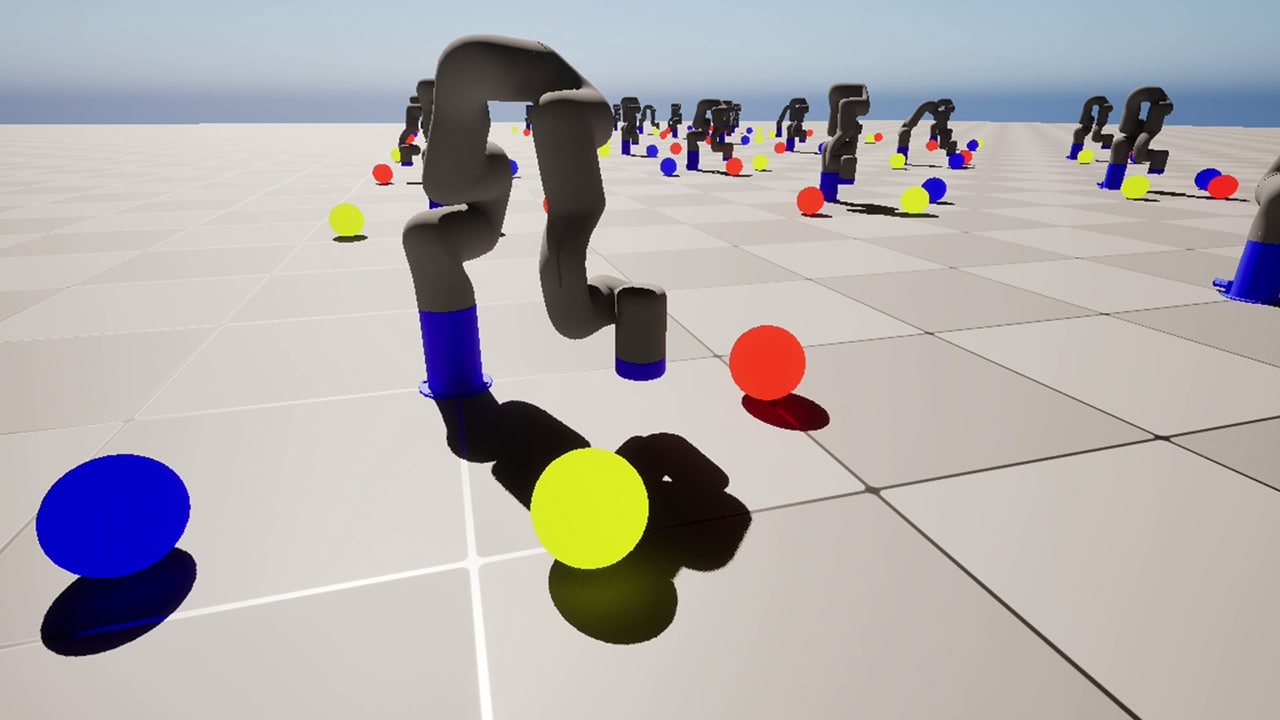
AMD Schola is a library for developing reinforcement learning (RL) agents in Unreal Engine and training with your favorite python-based RL Frameworks.

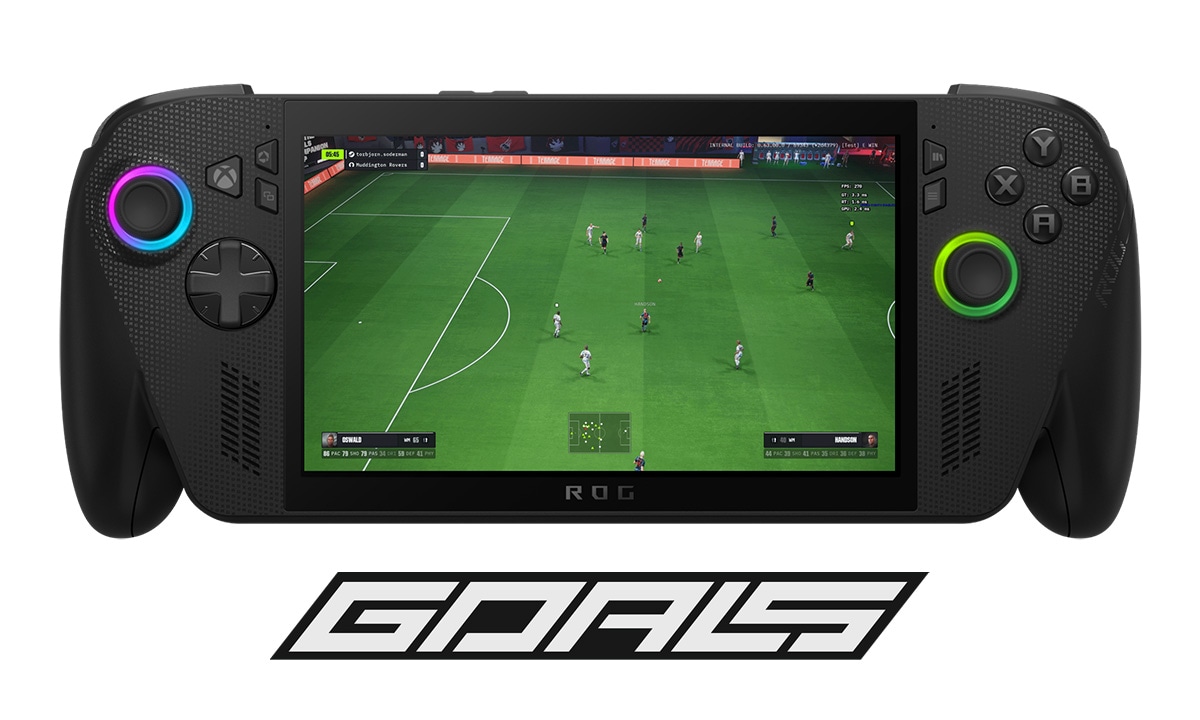
When people think about competitive esports, they typically picture high-refresh-rate monitors, discrete GPUs, and desktop rigs with unconstrained power budgets. The reality of who is actually playing GOALS is more varied and more interesting.
Guest blog by

GOALS is a free-to-play competitive football game, using our custom-built, patent-pending SENTEC simulation engine with Unreal® Engine for the presentation layer, designed for crossplay across PC, console, mobile, and handheld. During our playtests in alpha, hardware telemetry revealed something instructive: a meaningful share of our players were on hardware that many would consider obsolete, graphics cards dating back to 2013, and up to 9% of the player population on devices that fell into this category. Experience from other free-to-play titles suggests that number could climb toward 30% post-launch.
At the same time, players on the opposite end of the spectrum, those with high-end discrete GPUs and modern AMD Ryzen™ Processors for Handheld PC Gaming, were reporting a different problem entirely: GPU fan noise, coil whine, and in some cases, hardware thermal shutdowns. The game was simply running at full throttle when it didn’t need to.
Both problems have the same root cause: a lack of intentional power management. And both were addressed through the same architecture. This article covers how AMD hardware and APIs, specifically the AMD Device Library eXtra (ADLX) SDK and the AMD RDNA™ architecture GPU power model, enabled us to build a power-aware performance system that scales from decade-old integrated graphics to current AMD Ryzen APU handhelds, and everything in between.
A competitive esports game with a well-optimised renderer can generate frame rates far beyond what a monitor can display or a player can perceive. On a 144 Hz display, rendering at 400 FPS wastes significant GPU work while generating substantial heat, fan noise, and coil whine, an audible hum from electrical components vibrating under high current draw.
For players in hot climates, this is not a minor annoyance. PC fans running at maximum RPM in an already warm room can meaningfully degrade the play experience. A player who associates your game with an uncomfortably hot room will eventually stop launching it.
The traditional answer to this is VSync. But VSync has well-known problems in a competitive context: it introduces input latency, and on monitors with very high refresh rates it doesn’t meaningfully cap performance at a comfortable level. A player reporting 153 FPS before enabling VSync dropped to 60 FPS afterward, an unacceptable regression for a player who reasonably expects to sustain 120+ FPS on their hardware.
What we needed was something more surgical: a system that could target a specific thermal and acoustic state, rather than a fixed frame number.
Before getting into the power management system, it helps to understand how GOALS approaches the breadth of PC hardware in the first place.
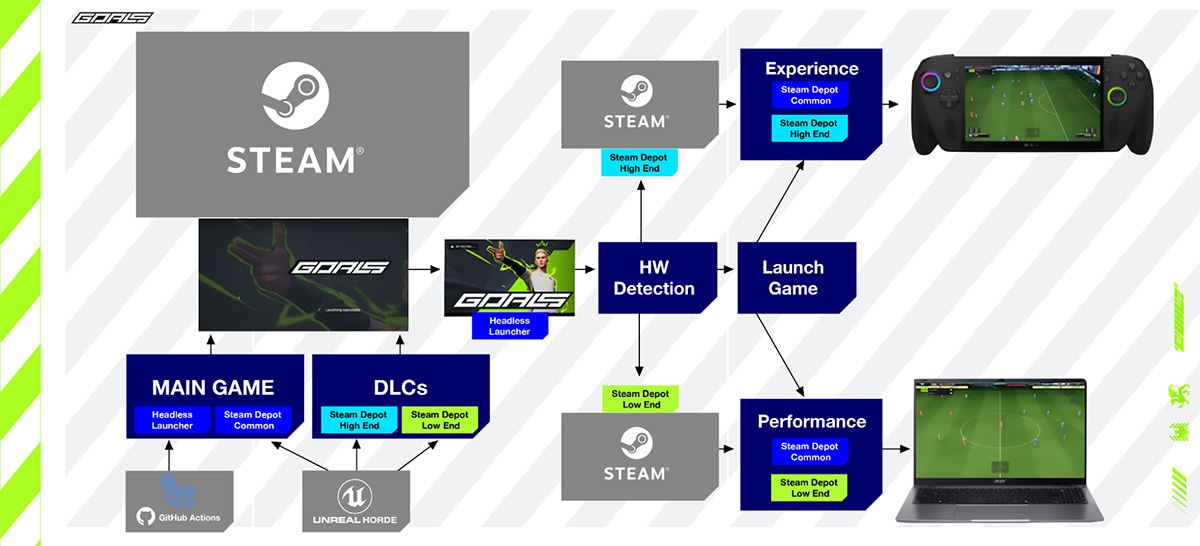
We ship two PC variants.
The Experience build targets mainstream and modern hardware, including all current AMD Ryzen APU handhelds. It runs the full rendering pipeline with deferred shading, full material complexity, and the complete feature set. On WinGDK, this is the only build we ship, Game Pass players always receive the Experience build, with runtime scaling and device profiles handling the adaptation to different handheld hardware.
The Performance build targets legacy integrated GPUs and early-generation low-end hardware. For the most extreme cases at the very bottom of the hardware range, we took a lesson from mobile development and enabled Unreal’s ES3.1 mobile rendering path on desktop. The result was 4–6ms faster frames and the ability to push genuinely “potato” devices to a playable 30+ FPS.
Shipping as a separate binary pays dividends beyond the rendering path switch. Because it is a distinct build, we can include cheaper, lower-memory versions of assets without those compromises touching the Experience build at all, reducing both memory pressure and streaming cost on machines that may have as little as 4GB of RAM. The engineering constraints of supporting very old hardware stay cleanly contained, rather than leaking into the Experience build as a lowest-common-denominator tax.
An important benefit of this separation: optimisations at the low end often propagate upward. Better frame timing, reduced draw call pressure, and tighter CPU usage patterns improve the high-end experience as well.
For AMD Ryzen APU handhelds, the Experience build is the right home. But delivering a good experience on these devices requires understanding what makes them architecturally different from discrete GPU setups.
AMD Ryzen APUs introduce three constraints that directly shape every engineering decision.
A unified power envelope. The CPU and GPU share a total package power limit. A transient CPU spike from physics, animation evaluation, or pathfinding will cause the driver to redistribute power away from the GPU almost immediately. On a discrete GPU machine, a CPU spike is annoying. On an APU handheld, it can cause a visible GPU frequency drop mid-frame.
A shared memory bus. System RAM services both the AMD Zen architecture CPU cores and the RDNA architecture graphics compute units. Overdraw, high material complexity, and excessive draw call pressure compete for the same bandwidth as CPU subsystems. Bandwidth pressure that’s invisible on a discrete setup becomes a genuine bottleneck on APU hardware.
Transient boost frequencies. AMD Ryzen APUs boost aggressively in short bursts, but sustained workloads must be designed for the equilibrium clock rates the device settles into after thermal saturation. For a competitive title where players routinely run multiple matches back-to-back in a single session, sustained behaviour is the only behaviour that matters.
The engineering principle that flows from these constraints: design for steady-state power delivery, not peak benchmark performance.
The core of our power management approach is an Unreal game instance subsystem called UGoalsGPUThrottlingSubsystem. It reads real-time GPU telemetry through hardware vendor APIs and uses it to regulate the frame rate dynamically via Unreal’s SetMaxFPS(), rather than imposing a static cap.
The subsystem is controlled through console variables, making it fully scriptable through Unreal’s scalability system and easily exposed to the player-facing settings menu. Four operating modes are available:
Off — no throttling. The GPU works as hard and fast as possible. High heat and loud fan noise are the expected result on capable hardware.
Fixed FPS (goals.GPUThrottleMethod 1) — sets a specific maximum FPS target via goals.GPUFixedFPSThreshold. A more granular alternative to VSync that avoids VSync’s latency and refresh-rate coupling problems. The most familiar mode for players.
Silent (goals.GPUThrottleMethod 2) — targets both a GPU temperature and a fan level threshold simultaneously, weighted as a composite control signal. The goal is not a specific frame rate, it is the highest sustainable frame rate that keeps the device below both a thermal and an acoustic limit.
Temperature (goals.GPUThrottleMethod 3) — dynamically adjusts the FPS cap to target a specific GPU temperature (goals.GPUTempThreshold, default 70°C). Frame rate floats up when thermal headroom exists and pulls back as the device approaches its ceiling.
The subsystem also manages state transitions between InGame and MainMenu. In MainMenu, the frame rate is hard-capped to LowerFPSValue (30 on low-end hardware, 60 otherwise). Beyond that, the subsystem implements idle detection: after 45 seconds of no player input, detected via FSlateApplication::Get().GetLastUserInteractionTime() the menu drops further to 15 FPS. Any input within a 0.2-second window immediately cancels the idle state and restores the normal menu cap. When the player transitions out of the menu, idle state is also cleared automatically. Both thresholds are configurable via console variables (goals.MenuIdleThresholdSeconds and goals.MenuIdleFPS).
Menus have no competitive sensitivity and no reason to drive the GPU to full load. A player who opens the game, navigates to the settings screen, and then walks away to make coffee should not be running their GPU at 200W in the background.
The most important architectural decision in the AMD ADLX SDK integration is where driver calls happen. Calling GPU telemetry APIs on the game thread every frame is a reliable way to introduce frame time variance — vendor driver code does not make timing guarantees. Our solution is to push all ADLX calls onto a dedicated background thread.
The base class GoalsGPUThrottle inherits from Unreal’s FRunnable and owns a dedicated FRunnableThread. Its Run() loop calls the pure virtual UpdateTelemetry() at a fixed 1-second interval and stores results in TAtomic<float> members:
virtual uint32 Run() override{ while (bRunning) { UpdateTelemetry(); FPlatformProcess::Sleep(1.0f); } return 0;}GoalsAMDThrottle implements UpdateTelemetry() to call ADLX and write the results into the atomics:
void GoalsAMDThrottle::UpdateTelemetry(){ CachedTemperature.Store(GetADLXGPUTemperature(), EMemoryOrder::Relaxed); CachedPowerUsage.Store(GetADLXPowerUsage(), EMemoryOrder::Relaxed); CachedFanSpeed.Store(GetADLXGPUFanRPM(), EMemoryOrder::Relaxed);}The game thread subsystem calls GetCurrentGPUTemperature(), GetPowerUsage(), and GetCurrentGPUFanLevel() which are relaxed atomic loads. No locks, no driver calls, no frame time impact. The worst-case staleness of the telemetry data is one second, which is entirely acceptable for a thermal regulation loop whose own update cadence is measured in seconds.
This pattern, background thread owns driver calls, game thread reads atomics, is the right general approach for any vendor GPU telemetry API integrated into a game loop.
GPU selection at initialisation uses FPlatformMisc::GetPrimaryGPUBrand() to match against the ADLX GPU list by name string, rather than assuming a fixed GPU index. This handles multi-GPU and hybrid graphics configurations correctly.
Temperature capability is the most nuanced part. ADLX exposes two separate readings: standard GPU Temperature (average die temperature) and HotSpot Temperature (peak temperature on the hottest point of the die). HotSpot is more sensitive and more representative of what the thermal system is actually responding to, it can read several degrees higher than the average. Targeting your throttle against the cooler average means you’re running closer to actual thermal limits than you intend. The initialisation code checks support for both and sets flags accordingly:
if (ADLX_SUCCEEDED(GpuMetricsSupport->IsSupportedGPUHotspotTemperature(&Supported)) && Supported)    bGPUHotspotTemperatureSupported = true;
if (ADLX_SUCCEEDED(GpuMetricsSupport->IsSupportedGPUTemperature(&Supported)) && Supported)    bGPUTemperatureSupported = true;
At runtime, GetADLXGPUTemperature() uses HotSpot where available and falls back silently:
if (bGPUHotspotTemperatureSupported) GpuMetrics->GPUHotspotTemperature(&Temp);else GpuMetrics->GPUTemperature(&Temp);Maximum temperature threshold is queried from ADLX at initialisation via GetGPUTemperatureRange() and written directly into the goals.GPUThermalTemperatureMax console variable. This means the pressure scoring system uses a device-accurate ceiling rather than an assumed constant, important for correct normalisation across different RDNA architecture generations with different operating limits.
Fan capability is gated through IsSupportedManualFanTuning. If not supported, bGPUFanRPMReadingSupported remains false and Silent mode degrades gracefully to temperature-only regulation, with no code path changes required in the subsystem.
Power measurement is similarly capability-gated via IsSupportedGPUPower. When enabled, the subsystem accumulates GPU energy consumption in kWh across the session, a per-session energy telemetry signal that can be surfaced to players or collected for internal analysis.
The Temperature mode regulator is where the most interesting engineering sits. It is not a fixed-gain PID, it uses adaptive gain scheduling that changes KP, KI, and KD based on how far the current temperature is from the target.
For readers unfamiliar with PID controllers: a PID (Proportional-Integral-Derivative) controller is a feedback loop with three terms that together determine how aggressively to respond to being off-target.
KP (Proportional) reacts to how far off you are right now. If the GPU is 10°C above target, KP pushes the frame rate down hard. If it’s only 1°C above, KP nudges gently. It is the immediate response.
KI (Integral) reacts to how long you have been off target. If the GPU has been running slightly too hot for a sustained period, the integral term accumulates and adds additional correction, catching cases where KP alone isn’t strong enough to close a persistent gap.
KD (Derivative) reacts to how fast the temperature is changing. If the GPU is heading toward the target quickly, the derivative term eases off the correction to avoid overshooting. It acts as a brake on momentum.
Together the three terms give the controller both fast response to large deviations and fine-grained stability near the target. The practical goal here is a frame rate that settles smoothly around the thermal ceiling without oscillating, because oscillating frame rates are nearly as disruptive to competitive play as unconstrained heat.
When the GPU is more than 4°C below the target (substantial thermal headroom), the controller switches to aggressive recovery gains and a 50% FPS smoothing factor, allowing frame rate to climb quickly back toward the sustainable maximum. If the error exceeds 8°C below target, the smoothed FPS ceiling is reset entirely, the device has cooled significantly and there’s no reason to hold an artificially low cap.
When the GPU is more than 4°C above the target, the controller switches to aggressive reduction gains with the same 50% smoothing factor, pulling frame rate down quickly.
For small errors within ±4°C of target, the controller uses fine-tuning gains to make gentle adjustments and avoid oscillation:
if (Error < -4.0f) // GPU is well under target — increase FPS aggressively{ KP = 0.8f; KI = 0.1f; KD = 0.05f; FPSSmoothfactor = 0.5f;}else if (Error > 4.0f) // GPU is over target — reduce FPS aggressively{ KP = 1.0f; KI = 0.2f; KD = 0.1f; FPSSmoothfactor = 0.5f;}else // Small error — fine adjustments only{ KP = 0.5f; KI = 0.05f; KD = 0.02f;}The integral term uses anti-windup decay (IntegralDecayFactor = 0.95f) to prevent accumulation during sustained deviation, and is clamped to ±5.0. The derivative term uses exponential smoothing (DerivativeSmoothingFactor = 0.1f) to suppress high-frequency noise in the temperature signal from causing erratic FPS adjustments. A ±1.5°C dead zone around the target suppresses unnecessary micro-adjustments when the system is already well-regulated.
All gains are also exposed as console variable scalars (goals.GPUThrottleKPScale, KIScale, KDScale), allowing tuning without recompilation, useful both for development and for future scalability configuration per device profile.
Beyond frame rate regulation, the subsystem maintains a continuous thermal pressure score, a composite metric used to determine when to notify the player that the device is running hot.
The score is computed as a weighted sum of two normalised signals:
LastPressureScore = (LastTempPressure * 0.7f) + (LastFanPressure * 0.3f);LastTempPressure is the current temperature expressed as a fraction of the hardware’s maximum temperature threshold, queried from ADLX at initialisation and stored in goals.GPUThermalTemperatureMax. This gives a device-accurate normalisation rather than a hardcoded constant.
LastFanPressure is the current fan level as a fraction of the highest fan level observed during the session. Critically, the observed maximum uses a slow exponential decay (ObservedMaxFanLevel * 0.995f per update) rather than a hard historical maximum. This prevents a single transient peak early in a session from permanently compressing the pressure range, the ceiling drifts slowly downward toward the actual sustained operating level, keeping the signal responsive over long play sessions.
When the pressure score exceeds the critical threshold (default 0.95) and has remained there for more than 12 seconds continuously, bThermalCritical is set. The 12-second hysteresis is deliberate, it prevents momentary load spikes from triggering the advisory and ensures the notification only appears during genuinely sustained thermal stress.
This flag drives the in-game notification informing players that their hardware is under significant thermal load, giving them the context and agency to act, rather than silently throttling the experience without explanation.
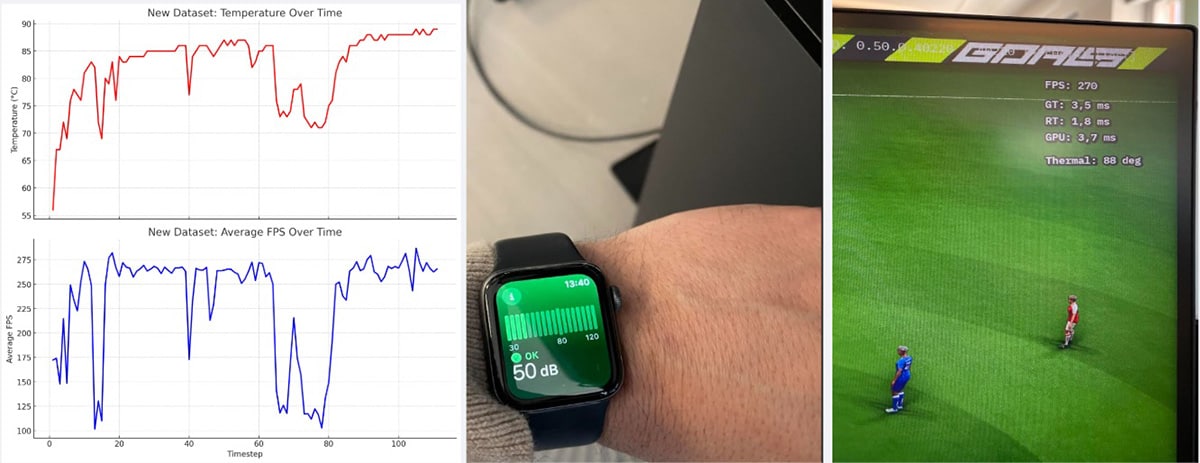
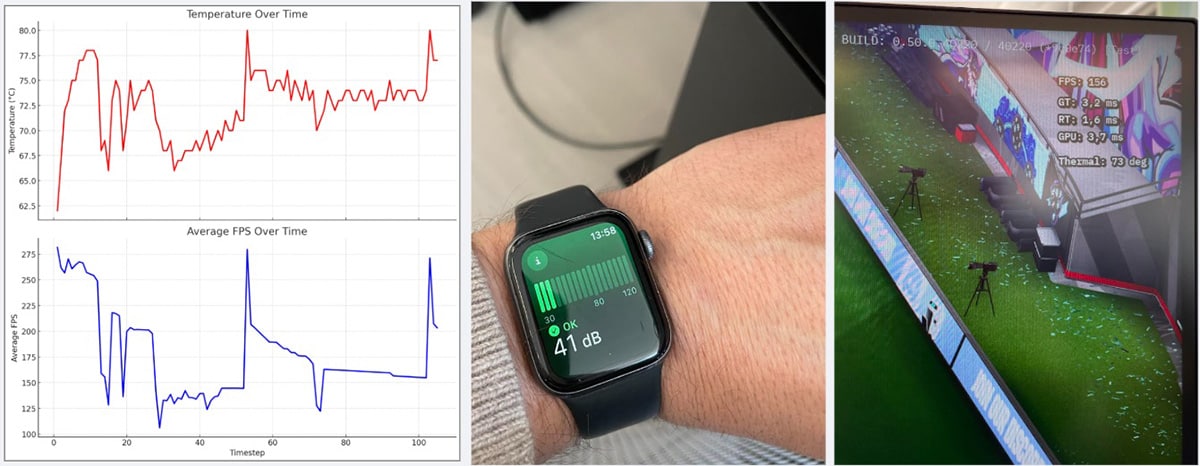
Internal testing compared throttled and non-throttled behaviour over a sustained gameplay session on a high-end desktop PC. The test was run using the same vendor-agnostic subsystem architecture described above, with the AMD ADLX path active on AMD hardware and equivalent telemetry used on other configurations.
| No Throttling | Temperature Mode (70°C target) | |
|---|---|---|
| Avg. GPU Power | ~245W | ~160W |
| Peak GPU Power | 250W+ | 250W+ |
| Fan Noise | 50 dB | 41 dB |
| Avg. FPS | 220+ | 150 |
| Peak FPS | 275+ | 270+ |
The 35% reduction in average power draw is the headline figure, but the acoustic result is arguably more significant for player experience. The difference between 41 dB and 50 dB represents roughly a tenfold reduction in acoustic power, a substantially quieter room, without players being asked to accept a meaningfully degraded competitive experience.
The temperature trace showed initial oscillation around the 70°C target before settling, expected behaviour from any feedback control system calibrating itself against real thermal inertia. After stabilisation, GPU temperature held at approximately 72°C for the duration of the session.
Live telemetry collected from players during testing showed that the majority of players who engaged with throttling settings chose Fixed FPS mode. This is unsurprising: Fixed FPS is a familiar concept with predictable and easily understood behaviour. Temperature and Silent modes require players to understand that frame rate is a consequence of thermal management rather than the target itself, a more abstract concept that the in-game UI didn’t explain well enough at the time.
The important finding, however, is that all throttling modes reduced average power consumption compared to no throttling, regardless of which mode players chose.
| Mode | Users | Power Samples | Avg. GPU Power |
|---|---|---|---|
| No throttling | 18,885 | 24,076,528 | Baseline |
| Fixed FPS | 844 | 1,638,563 | −5% |
| Silent | 119 | 206,813 | −6% |
| Temperature | 144 | 173,587 | −5.2% |
The baseline reduction from player-initiated throttling was meaningful even without optimised UX around the feature. This points to a clear opportunity: rather than leaving throttling off and requiring player discovery of the setting, there is a strong case for enabling Temperature mode by default on hardware capable of sustained high FPS, and surfacing it more prominently in the initial setup flow.
While reducing wattage is the primary engineering goal, we wanted to make the impact legible to the end user. By combining the real-time power telemetry from AMD ADLX with grid carbon intensity data, we’ve built a system that calculates the CO₂ footprint of a play session in real-time.
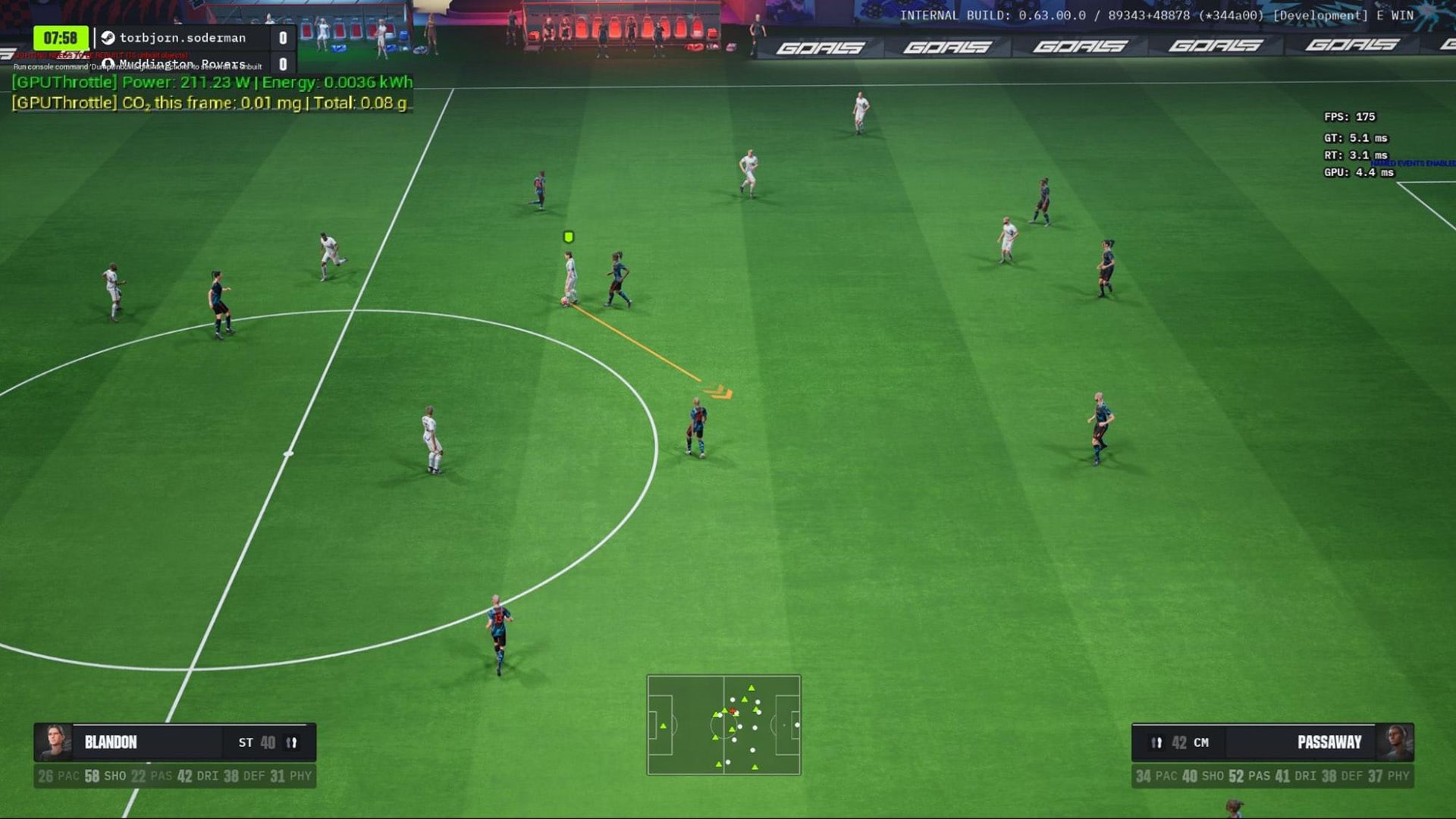
The architecture is deliberately async and lightweight on the client. On GameInstance initialisation, the subsystem fires an OnRequestCarbonIntensity delegate, which triggers a protobuf call to our backend via GoalsServicesSubsystem:
ProtoWrappers::gameclient::v1::FPBGetCarbonIntensityRequestWrapper Request;GoalsServicesSubsystem ->CallAsync<FPBGetCarbonIntensityResponseWrapper>(MoveTemp(Request)) .Then([GPUThrottlingSubsystem](const FPBGetCarbonIntensityResponseWrapper& Response) { GPUThrottlingSubsystem->SetCarbonIntensity( static_cast<float>(Response.GetCarbonIntensity())); });The backend handles geolocation and looks up the current grid carbon intensity (in gCO₂/kWh) from the Electricity Maps API, returning the value to the client via protobuf. The subsystem stores this as LastCarbonIntensity, initialised to -1.f as a “not yet received” sentinel, no CO₂ math runs until a valid value arrives.
Each frame, GPU energy is accumulated using the actual DeltaTime rather than a fixed polling interval, giving a more accurate integral over the session:
float DeltaKWh = (CurrentPowerWatts / 1000.0f) * (DeltaTime / 3600.0f);AccumulatedKWh += DeltaKWh;
if (CarbonIntensityValue > 0.0f){    CO2_ThisFrame = DeltaKWh * CarbonIntensityValue; // grams    SessionCO2Grams += CO2_ThisFrame;}
The result is a running SessionCO2Grams total that reflects the player’s actual local energy mix at the time of play, not a global average. Because grid intensity varies significantly by region and time of day, the backend lookup is what makes the figure meaningful rather than decorative. This turns GPU efficiency from an internal engineering metric into something visible and legible to the player.
The through-line connecting these systems is a single principle: treat frame rate and GPU load as variables to be managed, not targets to be maximised.
On discrete GPUs, maximising GPU load is often fine because the thermal and acoustic consequences are confined to the GPU itself. On AMD Ryzen APUs, where CPU and GPU share a power budget and a memory bus, the consequences of an unmanaged GPU load propagate immediately and visibly into the player experience.
AMD’s hardware, the RDNA architecture power model, the Zen CPU architecture, the AMD ADLX telemetry API, gives developers the tools to manage this precisely. The question is whether you use them.
Part 2 of this article covers how GOALS handles handheld device profiles, layered fallback for unknown hardware, a custom animation budget system with football-aware priority scoring, and battery vs. AC power state adaptation.
GOALS will launch later this spring on PlayStation, Xbox Game Pass, Steam and Epic Games Store. More platforms will follow towards the end of 2026. The GOALS team is a remote-first team spread across Europe, with HQ based in Stockholm, Sweden.
GOALS © GOALS AB. All rights reserved.
Unreal® is a trademark or registered trademark of Epic Games, Inc. in the United States of America and elsewhere.