AMD FSR SDK
AMD FSR™ SDK v2.2 is the launchpad for our ML-based FSR "Redstone" rendering technologies, inc. AMD FSR Upscaling, Frame Generation, Ray Regeneration, and Radiance Caching.

This is part 2 of a two-part article. Part 1 covered the GPUThrottle power management system, AMD ADLX SDK integration, and the PID-based thermal regulator. This part covers how GOALS handles handheld device profiles, layered fallback for unknown hardware, a custom animation budget system with football-aware priority scoring, and battery vs. AC power state adaptation.
Guest blog by

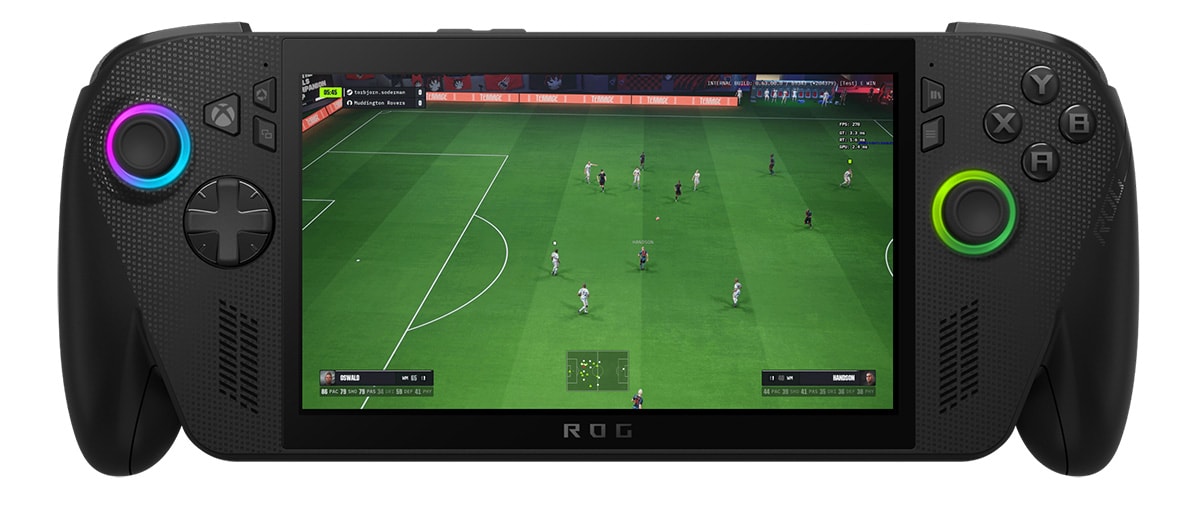
The power management system described in part 1 addresses the high-end desktop problem. For AMD Ryzen™ Processors for Handheld PC Gaming, there is an additional layer: certification.
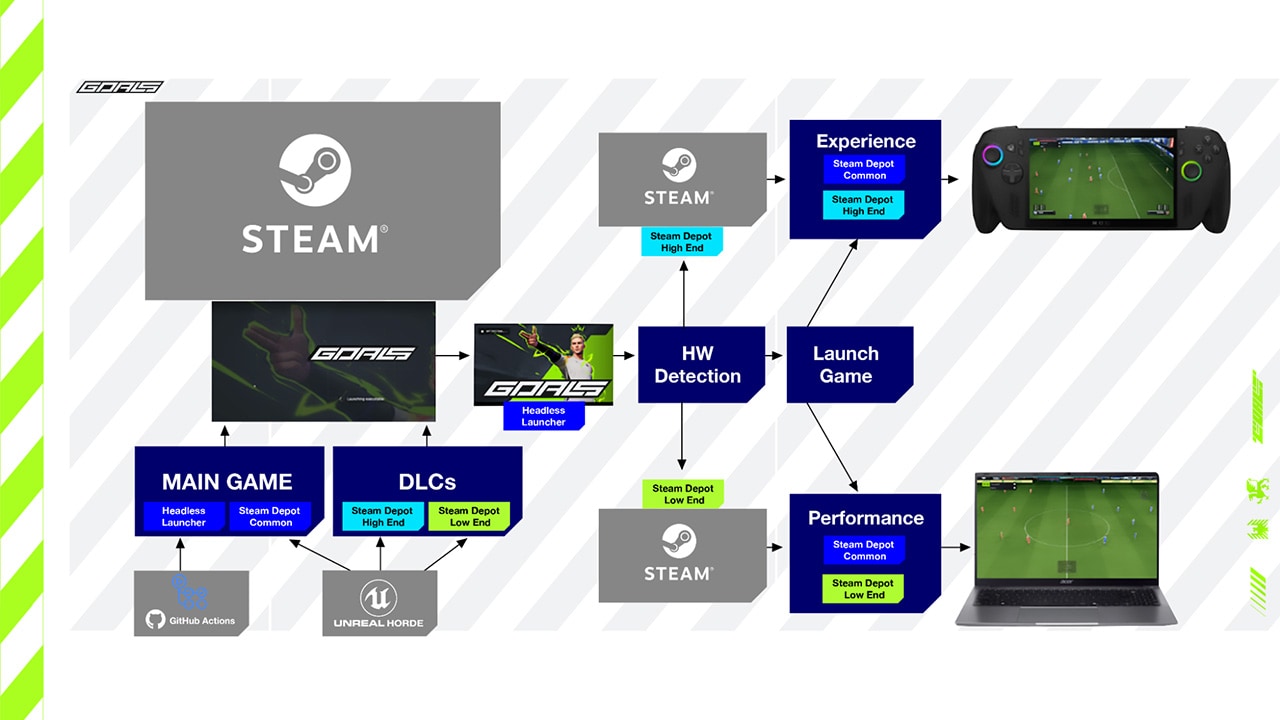
Shipping GOALS on Xbox Game Pass through WinGDK requires that default settings “just work” on supported devices without player intervention. On a traditional PC, you can ask the player to run a benchmark. On a handheld, the device needs to open, start playing, and feel good immediately.
Our answer was to treat known AMD-powered handhelds the way you treat a console: with a bespoke, handcrafted configuration for each device. These profiles define resolution scale and upscaling configuration, anti-aliasing method, AMD Radeon™ Anti-Lag 2 settings, simulation budget defaults, and animation system constraints. They are authored by an engineer who has played the game on the device, profiled it under sustained load, and tuned the settings for its specific thermal and power envelope.
These device profiles are shared between WinGDK and Steam builds, authored once and applied consistently across both distribution paths.
GOALS integrates AMD FSR™ via the Unreal® Engine 5.7 plugin, supporting both FSR Upscaling and FSR Frame Generation. On handheld devices, these are not simply visual quality options — they are core tools for managing the relationship between render workload, thermal budget, and perceived frame rate.
One technical detail matters here: while we use the latest version of the FSR plugin, ML-based upscaling is a feature of AMD RDNA™ 4 architecture. On current handheld devices powered by AMD Ryzen Z-series silicon, the plugin automatically falls back to analytical upscaling (FSR 3.1) and frame generation. The device profiles and CVar values described below reflect that reality.
The baseline for all handheld profiles is FSR Balanced upscaling (goals.PresetRenderingAAModeIndex=1), set in the BaseHandheld profile that every device inherits from. This gives a reasonable internal resolution on small screens while keeping GPU workload within the sustained thermal envelope. Most Ryzen Z-series handhelds default to Medium rendering quality combined with this FSR Balanced setting.
Rather than applying a single AMD FSR setting across all hardware, the device profile system maps upscaling quality directly to the silicon’s compute capability.
AMD Ryzen Z1 and Z2 base chips (GenericRyzenZ1, GenericRyzenZ2) inherit the Balanced baseline and add one further optimisation: a cheaper FSR history format:
+CVars=r.FidelityFX.FSR4.HistoryFormat=1This reduces FSR’s temporal history memory bandwidth by half, a meaningful saving on APU hardware where system RAM is shared between the AMD Zen architecture CPU cores and the RDNA architecture graphics compute units. The Z1 base profile also allows a slightly more aggressive animation update interval (MaxUpdateInterval=3 versus the baseline of 2), trading some animation fidelity for additional CPU headroom.
AMD Ryzen Z1 Extreme and Z2 Extreme chips (GenericRyzenZ1Extreme, GenericRyzenZ2Extreme) step up to FSR Quality mode (goals.PresetRenderingAAModeIndex=2), reflecting the additional compute units available on these SKUs. The Ryzen Z2 Extreme profile also raises overall rendering quality to Medium-High (goals.PresetRenderingQuality=2) and increases the animation budget worker thread ceiling to 55% of available thread time. On these chips, the silicon can sustain the higher internal resolution and rendering complexity without exceeding the thermal envelope.
The Lenovo Legion Go is a good example of why device profiles require genuine per-device engineering rather than blanket silicon mapping. It inherits GenericRyzenZ1Extreme and would therefore default to FSR Quality. However, the Legion Go has a native 1600p display — the highest resolution in the handheld market. Running FSR Quality upscaling on a 1600p screen produces a very high internal render resolution, and players running at or near native resolution would push the GPU well beyond the device’s sustained power budget.
The profile explicitly overrides back to FSR Balanced:
[LegionGo DeviceProfile]BaseProfileName=GenericRyzenZ1Extreme
; We're gonna lower FSR back down to Balanced because this device is 1600p natively which is; potentially a huge problem if ppl are actually running native resolution on their devices.+CVars=goals.PresetRenderingAAModeIndex=1
This is the kind of judgment call that can only come from profiling a specific device: the silicon is capable of Quality upscaling, but the display characteristics mean Balanced is the right default for sustained play.
FSR Frame Generation is available in the current build as a manual player-controlled toggle in the Visual Settings menu. On handheld hardware the thermal logic behind it is worth making explicit.
By reducing the actual render frame rate, the GPU does less work per second and draws less power. FSR Frame Generation then fills the gap, generating interpolated frames to hit the display’s refresh rate without the full render cost of native frames. The result is a display frame rate that feels competitive while the GPU runs cooler and draws less from the shared power budget.
The final piece is AMD Radeon Anti-Lag 2, which remains active even when frame generation is running. It measurably reduces input-to-display latency, keeping the game feeling responsive even when the rendered frame rate is intentionally held below the display refresh rate. For a competitive title where players are acutely sensitive to how their inputs feel, that latency reduction matters.
The device profile system also handles non-AMD handhelds. The MSI Claw Series primarily uses Intel® CPUs, and the BaseClaw profile switches the upscaler accordingly:
[BaseClaw DeviceProfile]; Most Claws use Intel chips, so switch upscale to XeSS Balanced+CVars=goals.PresetRenderingAAMethod=5+CVars=goals.PresetRenderingAAModeIndex=0The one exception is the MSI Claw A8, which ships with an AMD Ryzen Z2 Extreme processor rather than an Intel chip. Its profile inherits GenericRyzenZ2Extreme directly rather than the Claw Intel base profile — the upscaler selection follows the silicon, not the brand.
This handheld-first approach was not theoretical. GOALS recently passed Xbox XPA Certification covering Xbox Series X|S, WinGDK PC, and Handhelds. Passing certification required demonstrating that our AMD FSR configurations delivered visual stability and performance consistency across the full spectrum of Windows-based handheld devices, and the device profile hierarchy described above was central to meeting that bar.
We cannot handcraft profiles for every future handheld. The AMD Ryzen Processors for Laptops and handheld market is expanding, and new devices appear regularly. We therefore implement a deliberate fallback hierarchy.
Known handheld with a bespoke profile receives its handcrafted configuration, plus the APU-specific performance safeguards described below.
Detected handheld without a bespoke profile is identified as a handheld through form factor or device enumeration but lacks a handcrafted profile. It receives conservative APU-oriented defaults and the full suite of runtime performance safeguards. The player gets a safe, stable experience rather than unconstrained PC defaults that may cause thermal oscillation on shared-power hardware.
Undetected device falls back to standard PC Experience build behaviour: Unreal’s hardware benchmark determines an appropriate quality tier and sets defaults accordingly.
This hierarchy means no future AMD handheld receives a completely uncurated experience. They get a handcrafted profile, a conservative APU-aware fallback, or standard PC benchmark behaviour, in that priority order.
For detected handhelds, we enable techniques originally developed for the Performance build, specifically those focused on controlling CPU cost variance.
The key insight: on AMD RDNA architecture-based APUs, reducing CPU cost variance often improves sustained GPU frequency more than reducing average GPU load. The driver responds to spikes, not averages. Smooth, predictable CPU behaviour directly translates to stable GPU clocks.
Rather than using Epic’s AnimationBudgetAllocator plugin directly, we built our own animation budget subsystem, UGoalsAnimationBudgetSubsystem, with football-specific priority logic and tighter integration with our frame time telemetry.
The core mechanism will be familiar to anyone who has used Epic’s system: each registered UGoalsBudgetedSkeletalMeshComponent tracks its own game thread evaluation time, game thread wait time, and worker thread time at cycle-counter precision. The subsystem sorts components by priority each frame and updates them in descending priority order until the frame’s thread budgets are exhausted. Lower-priority components are skipped, with their animation interpolating from the last evaluated pose.
What makes it GOALS-specific is the priority function. Rather than prioritising by screen-space size or camera distance as a generic engine system would, CalculatePriority() uses distance to the ball as its primary signal:
float UGoalsAnimationBudgetSubsystem::CalculatePriority(const ComponentFrameData& FrameData) const{    if (FrameData.Component->GetOwner() == ControlledActor)        return 1.f;  // Local player: always full fidelity    if (!FrameData.Component->IsVisible())        return 0.f;
    const float DistanceToBall = FVector2D::Distance(        FVector2D(FrameData.Component->GetComponentLocation()), BallPosition);    const float DistanceFactor = FMath::Max(1.f - DistanceToBall / BallEffectRange, 0);    const float TimeFactor = FMath::Min(        static_cast<float>(FrameData.FramesSinceUpdate) / CVarAnimationBudgetMaxUpdateInterval, 1.f);    return FMath::Lerp(DistanceFactor, 1.f, TimeFactor);}
The local player’s controlled actor is pinned at priority 1.0, always evaluated at full fidelity. Every other character’s priority is determined by proximity to the ball, not proximity to the camera. In football, what matters most perceptually is what is happening near the ball, not what is near the edge of the screen.
The TimeFactor term is an anti-starvation mechanism: a character who hasn’t been updated for several frames gradually climbs back toward priority 1.0 regardless of ball proximity. This prevents characters from being permanently frozen at the edge of the pitch simply because play has moved away from them.
The budget itself is dynamically derived from actual frame telemetry. UpdateFrameTimesMs() receives real game thread, render thread, RHI thread, and GPU frame times each frame. When the game thread is the bottleneck, the animation budget tightens, reducing by however much game thread time exceeds the render/RHI/GPU ceiling, down to a configurable minimum proportion of frame time. When the game thread has headroom, the budget relaxes gradually. Animation quality automatically scales with how much CPU the rest of the frame is consuming, rather than operating against a fixed cap.
On hardware with two or fewer logical cores, the subsystem detects this at initialisation and disables parallel animation evaluation entirely by setting a.ParallelAnimEvaluation, a.ParallelAnimUpdate, and a.ParallelAnimInterpolation to zero. Spawning worker threads that immediately contend for the same two cores would cost more than the parallelism saves.
For crowd and background characters, those rarely near the ball and never the controlled actor, we have a second system: UGoalsSimpleSkeletalMeshComponent.
Rather than evaluating skeletal animation at runtime, this component records the full animation to a compressed transform array at initialisation time, sampling at a configurable FPS and storing per-frame bone transforms as FCompressedTransform. Once recorded, playback is a direct array lookup with no animation graph evaluation, no blend tree, and no skeletal solve:
const int32 FrameIndex = FMath::Min( FMath::RoundToInt(AnimationPosition * SampledFPS), AnimationFrameCount - 1);TArray<FTransform>& CurrentTransforms = GetEditableComponentSpaceTransforms();CurrentTransforms.Reset();for (int32 BoneIndex = FrameIndex * BoneCount; BoneIndex < (FrameIndex + 1) * BoneCount; ++BoneIndex){ CurrentTransforms.Add(AnimationTransforms[BoneIndex].Decompress());}The recording itself is spread across frames and budgeted through the same subsystem. CanRecordSimpleAnimation() limits how much recording work happens per frame, preventing the startup cost from spiking frame time.
The result is that background characters cost essentially nothing per frame on the CPU. On an APU handheld where every saved millisecond of game thread work translates directly into more stable GPU clocks, this is a meaningful contribution to sustained performance.
One of the most practically important differences between a handheld and a console is that the player may be running on battery or connected to AC power, and the device firmware adjusts the APU’s available TDP accordingly. An AMD Ryzen APU at 10–15W on battery is a fundamentally different performance target than the same silicon at 25–30W on AC.
In the current shipping build, AMD FSR Frame Generation is available as a manual player-controlled toggle in the Visual Settings menu. Players have full agency to enable or disable it regardless of hardware or power state. The handheld device profiles described above establish the right defaults at launch, but the system does not yet respond dynamically to live power state changes.
The next step is to close that gap. We have prototype code in development that detects battery versus AC state at runtime and adjusts scalability targets accordingly, without requiring player intervention. The direction in battery mode is clear: shift toward power-optimised defaults, lower resolution scale targets and more conservative frame targets. The right AC mode defaults are less settled — the expanded thermal headroom exists in principle, but what that should mean in practice for upscaling quality and frame generation requires real-world validation across actual handheld hardware before we’d be comfortable shipping specific defaults.
Both states share the same underlying philosophy: match pipeline demand to the power the APU can actually sustain at equilibrium. Battery mode is not a fallback — it is a different equilibrium target. This dynamic adaptation is not yet present in the current GOALS Beta, but remains a target for the full launch later this spring.
Looking across both parts of this article, a coherent design pattern emerges.
High-end desktops get GPUThrottle: AMD ADLX-powered thermal and acoustic regulation that finds and holds the highest sustainable frame rate within a comfortable operating envelope. Players get competitive frame rates without the noise and heat of an unconstrained GPU.
Known AMD Ryzen-powered handhelds get console-style bespoke profiles: handcrafted, empirically validated, and shared across both WinGDK and Steam distribution paths.
Unknown handhelds get conservative adaptive behaviour: APU-aware safeguards, CPU spike mitigation, and battery state awareness even without a device-specific profile.
All APU hardware benefits from CPU variance reduction: the custom animation budget system and football-aware priority scoring that stabilise GPU clocks by smoothing the CPU load presented to the shared power budget.
ADLX closes the loop across all of it: real-time telemetry that lets runtime decisions respond to what the hardware is actually doing, rather than what a static profile predicted it would do.
The through-line connecting these systems, from high-end desktop thermal management to handheld device profiles to battery-aware scalability, is a single principle: treat frame rate and GPU load as variables to be managed, not targets to be maximised.
On discrete GPUs, maximising GPU load is often fine because the thermal and acoustic consequences are confined to the GPU itself. On AMD Ryzen APUs, where CPU and GPU share a power budget and a memory bus, the consequences of an unmanaged GPU load propagate immediately and visibly into the player experience.
AMD’s hardware, the RDNA architecture power model, the Zen CPU architecture, the AMD ADLX telemetry API, gives developers the tools to manage this precisely. The question is whether you use them.
The player in a hot climate with their GPU fan at maximum RPM, or the player on a handheld watching the battery drain twice as fast as it should: these are solvable problems. The hardware APIs exist. The data is available at runtime. Using them is an engineering choice.
GOALS will launch later this spring on PlayStation, Xbox Game Pass, Steam and Epic Games Store. More platforms will follow towards the end of 2026. The GOALS team is a remote-first team spread across Europe, with HQ based in Stockholm, Sweden.
GOALS © GOALS AB. All rights reserved.
Unreal® is a trademark or registered trademark of Epic Games, Inc. in the United States of America and elsewhere.