FSR™ SDK Structure
The AMD FSR™ SDK is comprised of several main components, organised to make sure you have a good experience exploring and learning about the different techniques implemented by the SDK.
The core components which would ultimately ship in your application are separated for convenient integration in your project’s source code.
AMD FSR™ SDK
Includes
The SDK contains everything needed to ship all of our FSR™ effects in your application:
- Host side includes for all of our effect components, which represent the pre-built easy to use library for easier effect integration.
- A limited collection of HLSL shaders, which represent some of the pre-built library GPU code executed as part of the binary.
Libraries and DLLs
A collection of pre-built runtime libraries to automate the usage of the FSR™ SDK and make integration as simple as possible.
Docs
A collection of detailed markdown documents.
Samples
The FSR™ SDK comes complete with numerous examples which demonstrate use of the effects implemented by the SDK.
The FSR™ SDK features a collection of sample applications in the Samples sub-folder which are dependent on the FSR™ SDK headers and DLLs. Each sample application demonstrates how a technique (or techniques) should be integrated into your application. The samples present lots of options to allow you to evaluate and explore the technique before undertaking an integration.
Dependencies
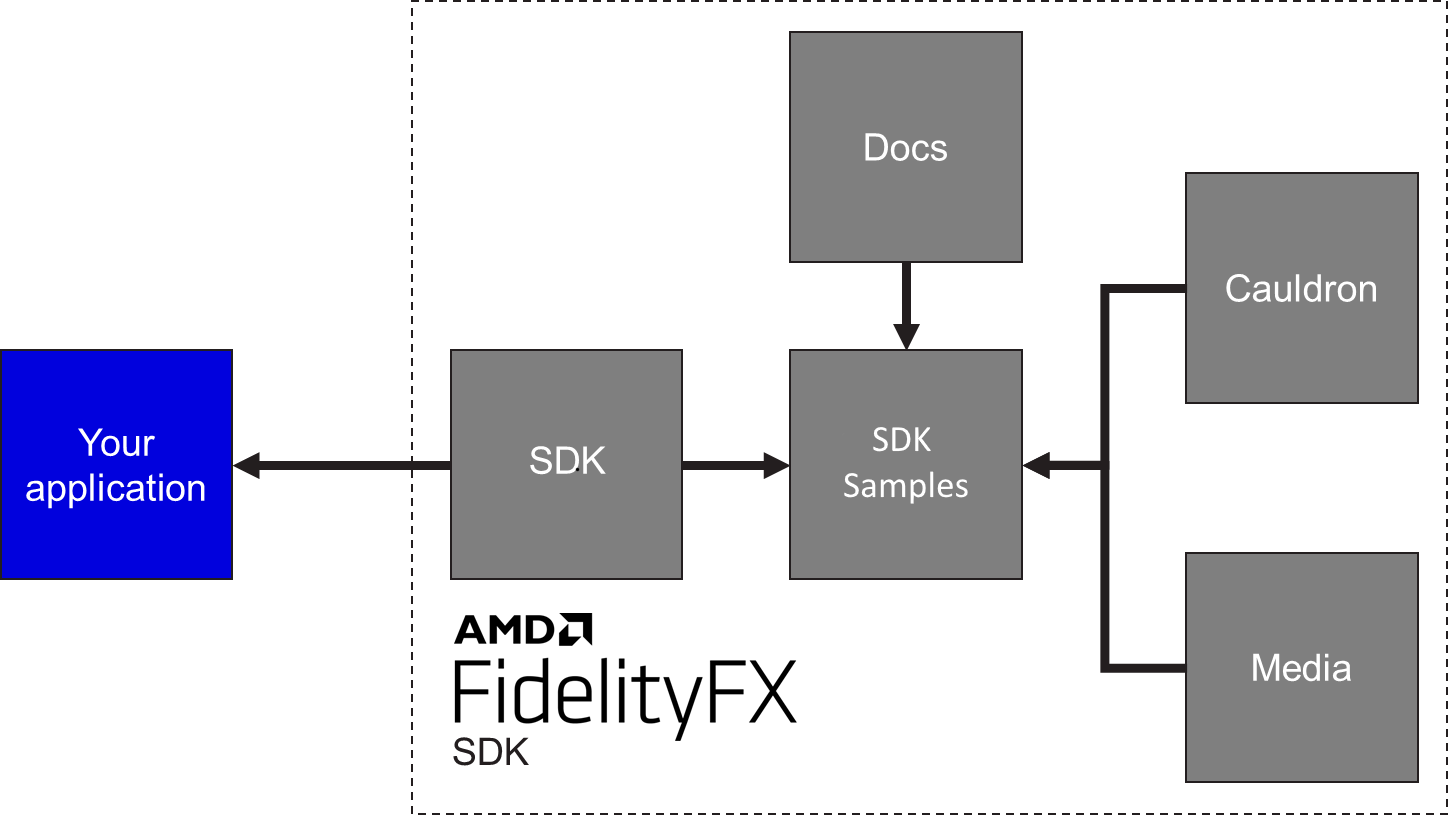
The FSR™ SDK samples are dependent upon our backing Cauldron Framework and various common render modules.
The ./Kits/Cauldron2 location is where out Cauldron framework can be found as well as a number of render modules for commonly used rendering features (rendermodules).
The architecture of the AMD FSR SDK implies a set of dependencies between the components. The image below shows which components depend on which other components, and which you might ultimately depend upon in your application.
Media
Media delivery for the AMD FSR™ SDK is handled via remote download into the Media/cauldronmedia subfolder.
Simply run the UpdateMedia.bat file in the root directory to fetch the latest version of the FSR™ SDK content.
When fetching content for updated code packages from github, please first run ClearMediaCache.bat to ensure fetching of the latest content.