AMD FSR™ Ray Regeneration 1.2.1
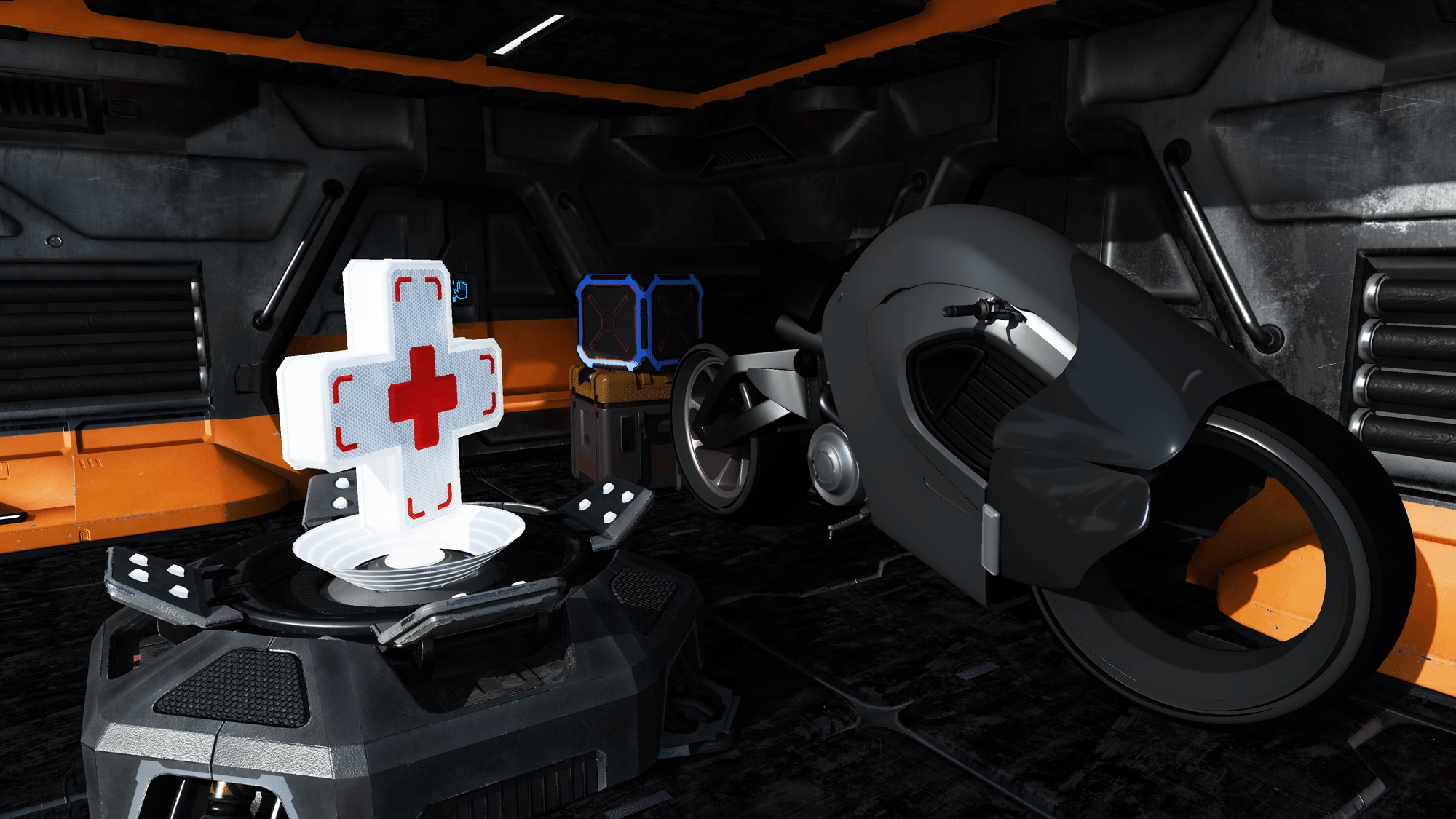
Figure 1: Sample output from AMD FSR™ Ray Regeneration.
AMD FSR™ Ray Regeneration is a machine learning-based denoiser for ray-traced workloads. It improves visual quality by reducing noise in rendered frames while preserving detail.
Table of contents
- 1. Introduction
- 2. Getting started
- 2.1. Setting up your project
- 2.2. Setting up logging
- 2.3. Querying support
- 2.4. Creating the context
- 2.5. Dispatching
- 2.5.1. Checkerboard reconstruction
- 2.5.2.
ffxDispatchDescDenoiser - 2.5.3.
FfxApiDispatchDenoiserFlags - 2.5.4.
FfxApiDenoiserSignal - 2.5.5.
ffxDispatchDescDenoiserAmbientOcclusion - 2.5.6.
ffxDispatchDescDenoiserDirectDiffuse - 2.5.7.
ffxDispatchDescDenoiserDirectSpecular - 2.5.8.
ffxDispatchDescDenoiserDominantLight - 2.5.9.
ffxDispatchDescDenoiserIndirectDiffuse - 2.5.10.
ffxDispatchDescDenoiserIndirectSpecular - 2.5.11.
ffxDispatchDescDenoiserSpecularOcclusion
- 2.6. Configuring settings
- 2.7. Cleaning up
- 3. Performance
- 3.1. Timings
- 3.2. Memory requirements
- 3.2.1. Denoising direct diffuse, direct specular, indirect diffuse and indirect specular signals
- 3.2.2. Denoising indirect diffuse and indirect specular signals
- 3.2.3. Denoising indirect specular signal
- 3.2.4. Denoising ambient occlusion or dominant light visibility or specular occlusion signal
- 3.2.5.
ffxQueryDescDenoiserGetGPUMemoryUsage
- 4. Debugging
- 5. Best practices
- 6. Requirements
- 7. Version history
- 8. See also
1. Introduction
Since the advent of hardware-accelerated ray tracing, real-time game and rendering engines have increasingly adopted ray tracing techniques. From realistic reflections to finely detailed shadows, ray tracing has significantly elevated visual fidelity in modern games. As GPU ray tracing capabilities continue to improve, developers are pushing the boundaries of global illumination and exploring real-time path tracing. However, raw ray-traced outputs are inherently noisy, making effective denoising essential for producing clean, high-quality images.
Denoising transforms noisy ray- or path-traced outputs into coherent, visually accurate images, often leveraging both spatial and temporal information. AMD FSR™ Ray Regeneration performs this task with a key advantage: it uses machine learning to dynamically determine optimal filter weights, delivering superior results compared to purely analytical methods.
1.1. Decoupled denoising vs. joint denoising
AMD FSR™ Ray Regeneration performs denoising independently of upscaling, making it a decoupled denoiser. In contrast, denoising and upscaling can also be combined into a single, joint operation. Both approaches are valid, but decoupling denoising into its own dispatch call simplifies adding additional rendered content afterward.
Although upscaling is not strictly required for denoising, rendering expensive ray-traced effects, especially path tracing, at native resolution can be very demanding on hardware. With significant advancements in upscaling technology, incorporating upscaling into the rendering pipeline is strongly recommended. Additionally, the temporal anti-aliasing provided by upscalers such as AMD FSR™ 4 adds an extra layer of smoothing when used alongside AMD FSR™ Ray Regeneration. For optimal visual results, AMD FSR™ Ray Regeneration should be paired with AMD FSR™ 4.
1.2. Signals
To maximize compatibility and efficiency when denoising your game’s specific workloads, AMD FSR™ Ray Regeneration provides multiple input/output signals:
| Signal flags | Input/output signals: |
|---|---|
FFX_DENOISER_SIGNAL_AMBIENT_OCCLUSION | Ambient occlusion (in [0, 1]/[0, 1]) |
FFX_DENOISER_SIGNAL_DIRECT_DIFFUSE | Direct diffuse |
FFX_DENOISER_SIGNAL_DIRECT_SPECULAR | Direct specular |
FFX_DENOISER_SIGNAL_DOMINANT_LIGHT_VISIBILITY | Dominant light visibility (in [0, FP16_MAX]/[0, 1]) |
FFX_DENOISER_SIGNAL_INDIRECT_DIFFUSE | Indirect diffuse |
FFX_DENOISER_SIGNAL_INDIRECT_SPECULAR | Indirect specular |
FFX_DENOISER_SIGNAL_SPECULAR_OCCLUSION | Specular occlusion (in [0, 1]/[0, 1]) |
The selected signals are specified via the signalFlags member of the ffxCreateContextDescDenoiser context creation description.
2. Getting started
2.1. Setting up your project
AMD FSR™ Ray Regeneration is part of the AMD FSR™ SDK. Before getting started, make sure to read the Getting Started with the AMD FSR™ API guide. Once familiar with the API, follow these steps to prepare your project for AMD FSR™ Ray Regeneration:
- Add the AMD FSR™ API include headers to your project’s include directories.
- Add the AMD FSR™ Ray Regeneration include headers to your project’s include directories.
- Link your project against
amd_fidelityfx_loader_dx12.lib, located in FidelityFX/signedbin. - Copy
amd_fidelityfx_loader_dx12.dllandamd_fidelityfx_denoiser_dx12.dllfrom FidelityFX/signedbin into your project’s executable directory.
2.2. Setting up logging
By default, all messages (FFX_API_CONFIGURE_GLOBALDEBUG_LEVEL_VERBOSE) are output as debug strings.
Logging can be explicitly set up before (or after) context creation for the denoiser effect by passing a ffxConfigureDescGlobalDebug configure description to ffxConfigure.
// Example: configuring the logging callback for the denoiser effect.ffx::ConfigureDescGlobalDebug configureDesc = {};configureDesc.effectId  = FFX_API_EFFECT_ID_DENOISER;// If set to nullptr, messages will be output as debug strings.configureDesc.fpMessage = [](uint32_t type, const wchar_t* message){    switch (type)    {
    case FFX_API_MESSAGE_TYPE_ERROR:    {        LogError(message);        break;    }    case FFX_API_MESSAGE_TYPE_WARNING:    {        LogWarning(message);        break;    }    default:    {      break;    }
    }};configureDesc.debugLevel = FFX_API_CONFIGURE_GLOBALDEBUG_LEVEL_VERBOSE;
ffx::ReturnCode result = ffx::Configure(configureDesc);assert(result == ffx::ReturnCode::Ok);2.3. Querying support
Before context creation, you can query supported versions by passing a ffxQueryDescGetVersions query description to ffxQuery.
If the query returns no contexts, support for AMD FSR™ Ray Regeneration is not available.
// Example: querying all supported AMD FSR™ Ray Regeneration versions.uint64_t supportedVersionCount = 0;ffx::QueryDescGetVersions queryDesc = {};queryDesc.createDescType = FFX_API_EFFECT_ID_DENOISER;queryDesc.device         = GetDevice()->GetImpl()->DX12Device();queryDesc.outputCount    = &supportedVersionCount;ffx::ReturnCode result = ffx::Query(queryDesc);assert(result == ffx::ReturnCode::Ok);
m_DenoiserVersionIds.resize(supportedVersionCount);m_DenoiserVersionStrings.resize(supportedVersionCount);
queryDesc.versionIds   = m_DenoiserVersionIds.data();queryDesc.versionNames = m_DenoiserVersionStrings.data();result = ffx::Query(queryDesc);assert(result == ffx::ReturnCode::Ok);
m_DenoiserAvailable = not versionIds.empty();
2.4. Creating the context
To start using AMD FSR™ Ray Regeneration, you need to create a denoiser context by passing a ffxCreateContextDescDenoiser context creation description along with a backend description to ffxCreateContext.
The parameters you provide determine the internal resource allocations and pipeline state compilations.
Creating contexts in time-critical paths is not recommended due to their initialization cost.
If the hardware does not support AMD FSR™ Ray Regeneration, ffxCreateContext will return an error and the context pointer will remain unset.
// Example: creating a denoiser context with the desired signal flags.ffx::CreateBackendDX12Desc backendDesc = {};backendDesc.device = GetDevice()->GetImpl()->DX12Device();
ffx::CreateContextDescDenoiser createDesc = {};createDesc.version       = FFX_DENOISER_VERSION;createDesc.maxRenderSize = { resInfo.UpscaleWidth, resInfo.UpscaleHeight };// SignalscreateDesc.signalFlags   = FFX_DENOISER_SIGNAL_NONE;if (m_EnableDirectDiffuse){    // Flag indicating that direct diffuse needs to be denoised.    denoiserContextDesc.signalFlags |= FFX_DENOISER_SIGNAL_DIRECT_DIFFUSE;}if (m_EnableDirectSpecular){    // Flag indicating that direct specular needs to be denoised.    denoiserContextDesc.signalFlags |= FFX_DENOISER_SIGNAL_DIRECT_SPECULAR;}if (m_EnableIndirectDiffuse){    // Flag indicating that indirect diffuse needs to be denoised.    denoiserContextDesc.signalFlags |= FFX_DENOISER_SIGNAL_INDIRECT_DIFFUSE;}if (m_EnableIndirectSpecular){    // Flag indicating that indirect specular needs to be denoised.    denoiserContextDesc.signalFlags |= FFX_DENOISER_SIGNAL_INDIRECT_SPECULAR;}if (m_EnableDominantLightVisibility){    // Flag indicating that dominant light visibility needs to be denoised.    denoiserContextDesc.signalFlags |= FFX_DENOISER_SIGNAL_DOMINANT_LIGHT_VISIBILITY;}if (m_EnableAmbientOcclusion){    // Flag indicating that ambient occlusion needs to be denoised.    denoiserContextDesc.signalFlags |= FFX_DENOISER_SIGNAL_AMBIENT_OCCLUSION;}if (m_EnableSpecularOcclusion){    // Flag indicating that specular occlusion needs to be denoised.    denoiserContextDesc.signalFlags |= FFX_DENOISER_SIGNAL_SPECULAR_OCCLUSION;}// Checkerboard reconstruction (optional, must be a subset of signalFlags)createDesc.checkerboardSignalFlags = FFX_DENOISER_SIGNAL_NONE;// FlagsdenoiserContextDesc.flags = {};if (m_EnableDebugging){    // Flag indicating that debug features may be enabled. Memory usage may increase.    denoiserContextDesc.flags |= FFX_DENOISER_ENABLE_DEBUGGING;}if (m_EnableValidation){    // Flag indicating that exhaustive validation should be enabled. Performance may decrease.    denoiserContextDesc.flags |= FFX_DENOISER_ENABLE_VALIDATION;}
// Create the denoiser contextffx::ReturnCode result = ffx::CreateContext(m_pDenoiserContext, nullptr, createDesc, backendDesc);assert(result == ffx::ReturnCode::Ok);
2.4.1. ffxCreateContextDescDenoiser
| Parameter | Description |
|---|---|
version | The version of the API the application was built against. Must be set to FFX_DENOISER_VERSION. |
maxRenderSize | Maximum size that rendering will be performed at. |
signalFlags | Signal flags corresponding to a combination of values from FfxApiDenoiserSignalFlags. |
checkerboardSignalFlags | Signal flags corresponding to a combination of values from FfxApiDenoiserSignalFlags for signals that use checkerboard reconstruction. Must be a subset of signalFlags. |
flags | Create flags corresponding to zero or a combination of values from FfxApiCreateContextDenoiserFlags. |
2.4.2. FfxApiCreateContextDenoiserFlags
| Flag | Description |
|---|---|
FFX_DENOISER_ENABLE_DEBUGGING | Flag indicating that debug features may be enabled. Memory usage may increase. |
FFX_DENOISER_ENABLE_VALIDATION | Flag indicating that exhaustive validation should be enabled. Performance may decrease. |
For use cases that require a specific version, you can override the implicit default version by passing a ffxOverrideVersion description to ffxCreateContext too.
// Example: creating a denoiser context pinned to a specific version.ffx::CreateContextDescOverrideVersion versionOverride = {};versionOverride.versionId = m_DenoiserVersionIds[m_SelectedDenoiserVersion];
// Create the denoiser contextffx::ReturnCode result = ffx::CreateContext(m_pDenoiserContext, nullptr, createDesc, backendDesc, versionOverride);assert(result == ffx::ReturnCode::Ok);2.5. Dispatching
Denoising is performed on the GPU by passing the below dispatch descriptions to ffxDispatch.
Dispatch descriptions can be passed if and only if the corresponding dispatch conditions are met by the context.
Furthermore, the majority of dispatch descriptions are non-optional and must be passed if and only if the corresponding dispatch conditions are met by the context.
| Dispatch Description | Dispatch Condition | Optional |
|---|---|---|
ffxDispatchDescDenoiser | / | No |
ffxDispatchDescDenoiserAmbientOcclusion | FFX_DENOISER_SIGNAL_AMBIENT_OCCLUSION must be set | No |
ffxDispatchDescDenoiserDebugView | FFX_DENOISER_ENABLE_DEBUGGING must be set | Yes |
ffxDispatchDescDenoiserDirectDiffuse | FFX_DENOISER_SIGNAL_DIRECT_DIFFUSE must be set | No |
ffxDispatchDescDenoiserDirectSpecular | FFX_DENOISER_SIGNAL_DIRECT_SPECULAR must be set | No |
ffxDispatchDescDenoiserDominantLight | FFX_DENOISER_SIGNAL_DOMINANT_LIGHT_VISIBILITY must be set | No |
ffxDispatchDescDenoiserIndirectDiffuse | FFX_DENOISER_SIGNAL_INDIRECT_DIFFUSE must be set | No |
ffxDispatchDescDenoiserIndirectSpecular | FFX_DENOISER_SIGNAL_INDIRECT_SPECULAR must be set | No |
ffxDispatchDescDenoiserSpecularOcclusion | FFX_DENOISER_SIGNAL_SPECULAR_OCCLUSION must be set | No |
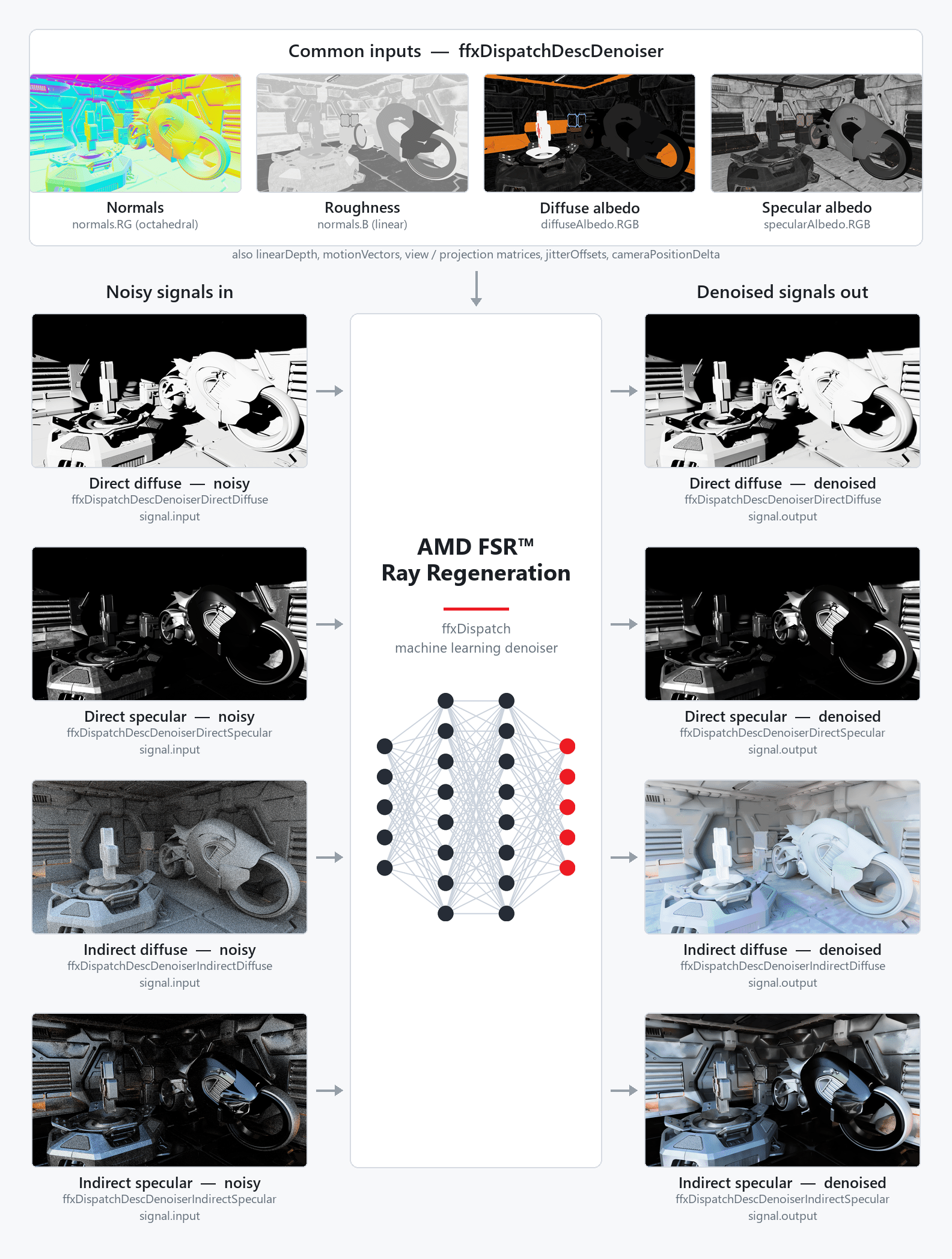
Figure 2: Inputs and outputs of an example AMD FSR™ Ray Regeneration dispatch for denoising direct diffuse, direct specular, indirect diffuse and indirect specular signals. The common input resources of ffxDispatchDescDenoiser are shown above, and the noisy input and denoised output signal resource of each dispatch description on either side.
AMD FSR™ Ray Regeneration uses a linked-list pattern to pass multiple dispatch descriptions to a single ffxDispatch call.
Each description header contains a pNext pointer that chains the next description in sequence.
The ffxDispatchDescDenoiser description is always the head of the chain; all signal and debug-view descriptions are linked after it.
All descriptions passed to a single ffxDispatch call must remain alive (i.e., not go out of scope) for the duration of that call.
// Example: dispatching all active signals using manual pNext chaining.// Needs to persist in the ::ffxDispatch scope.ffx::DispatchDescDenoiser dispatchDesc = {};// ... assign description members ...
ffxDispatchDescHeader* prevHeader = &dispatchDesc.header;const auto link = [&prevHeader](auto& desc){    ffxDispatchDescHeader* const nextHeader = &desc.header;    prevHeader->pNext = nextHeader;    prevHeader = nextHeader;};
// Need to persist in the ::ffxDispatch scope.ffx::DispatchDescDenoiserAmbientOcclusion dispatchDescAmbientOcclusion = {};if (m_EnableAmbientOcclusion){    // ... assign description members ...
    link(dispatchDescAmbientOcclusion);}
// Need to persist in the ::ffxDispatch scope.ffx::DispatchDescDenoiserDirectDiffuse dispatchDescDirectDiffuse = {};if (m_EnableDirectDiffuse){    // ... assign description members ...
    link(dispatchDescDirectDiffuse);}
// Need to persist in the ::ffxDispatch scope.ffx::DispatchDescDenoiserDirectSpecular dispatchDescDirectSpecular = {};if (m_EnableDirectSpecular){    // ... assign description members ...
    link(dispatchDescDirectSpecular);}
// Need to persist in the ::ffxDispatch scope.ffx::DispatchDescDenoiserDominantLight dispatchDescDominantLight = {};if (m_EnableDominantLightVisibility){    // ... assign description members ...
    link(dispatchDescDominantLight);}
// Need to persist in the ::ffxDispatch scope.ffx::DispatchDescDenoiserIndirectDiffuse dispatchDescIndirectDiffuse = {};if (m_EnableIndirectDiffuse){    // ... assign description members ...
    link(dispatchDescIndirectDiffuse);}
// Need to persist in the ::ffxDispatch scope.ffx::DispatchDescDenoiserIndirectSpecular dispatchDescIndirectSpecular = {};if (m_EnableIndirectSpecular){    // ... assign description members ...
    link(dispatchDescIndirectSpecular);}
// Need to persist in the ::ffxDispatch scope.ffx::DispatchDescDenoiserSpecularOcclusion dispatchDescSpecularOcclusion = {};if (m_EnableSpecularOcclusion){    // ... assign description members ...
    link(dispatchDescSpecularOcclusion);}
// Need to persist in the ::ffxDispatch scope.ffx::DispatchDescDenoiserDebugView dispatchDescDebugView = {};if (m_EnableDebugging && m_ShowDebugView){    // ... assign description members ...
    link(dispatchDescDebugView);}
// ffx::Dispatch cannot be used because it will reset pNext.ffxReturnCode_t result = ::ffxDispatch(&m_pDenoiserContext, &dispatchDesc.header);assert(result == FFX_API_RETURN_OK);
Alternatively, the templated ffx_api.hpp allows linking multiple inputs together as variable arguments.
// Example: dispatching indirect diffuse and specular signals using the variadic ffx::Dispatch helper.// Denoise indirect diffuse and specular
ffx::DispatchDescDenoiser dispatchDesc = {};// ... assign description members ...
ffx::DispatchDescDenoiserIndirectDiffuse dispatchDescIndirectDiffuse = {};// ... assign description members ...
ffx::DispatchDescDenoiserIndirectSpecular dispatchDescIndirectSpecular = {};// ... assign description members ...
ffx::ReturnCode result = ffx::Dispatch(m_pDenoiserContext, dispatchDesc, DispatchDescDenoiserIndirectDiffuse, DispatchDescDenoiserIndirectSpecular);assert(result == ffx::ReturnCode::Ok);
2.5.1. Checkerboard reconstruction
To reduce ray tracing cost, signals can be rendered at half horizontal resolution by tracing alternate pixels each frame in a checkerboard pattern. AMD FSR™ Ray Regeneration can reconstruct a full-resolution signal from these half-resolution inputs using depth- and normal-aware bilateral filtering.
To enable checkerboard reconstruction for a signal, include its flag in both signalFlags and checkerboardSignalFlags at context creation.
checkerboardSignalFlags must always be a subset of signalFlags.
In the checkerboard pattern, only half the pixels are traced per frame, alternating as follows:
// Checkerboard pattern: 0 = inactive (not traced), 1 = active (traced). x=0 x=1 x=2 x=3y=0: 0 1 0 1y=1: 1 0 1 0y=2: 0 1 0 1Where 0 indicates an inactive pixel (not traced this frame) and 1 indicates an active pixel (traced this frame).
The origin of the pattern alternates each frame via checkerboardOrigin in the per-signal FfxApiDenoiserSignal:
checkerboardOrigin = 0: pixel(0,0)is active (traced).checkerboardOrigin = 1: pixel(1,0)is active (traced).
The typical usage is checkerboardOrigin = frameIndex & 1.
Active pixels must be packed into a half-width texture (width = renderSize.width / 2) before being passed as the input of the signal.
AMD FSR™ Ray Regeneration will unpack them and reconstruct the inactive pixels internally.
2.5.2. ffxDispatchDescDenoiser
| Parameter | Description |
|---|---|
commandList | A pointer to the command list. DX12: pointer to ID3D12GraphicsCommandList. |
linearDepth | The signed linear depth. Channels: R: Signed linear depth values for the current frame. CurrentLinearDepth |
motionVectors | The motion vectors. Channels: RG: 2D motion vectors. PreviousUV - CurrentUVB: Signed linear depth delta. PreviousLinearDepth - CurrentLinearDepth |
normals | The normals, roughness and material type. Channels: RG: Octahedrally encoded normals B: Linear Roughness A: Material Type - See docs for more info. |
specularAlbedo | The specular albedo. Channels: RGB: Specular albedo. The denoiser expects a software encoding chosen by the application: sqrt(SpecularAlbedo) by default, or the raw SpecularAlbedo (identity function) when FFX_DENOISER_DISPATCH_NON_ENCODED_ALBEDO is provided. This software encoding is a convention between the application and the denoiser and is orthogonal to the resource format: if a hardware sRGB format is used, the sampled value is already sRGB-decoded to linear by the hardware, and the software encoding above is then applied on top of that linear value.The default sqrt encoding is a perceptual transfer function: it allocates more precision to darker values, matching human perception and reducing banding when the albedo is stored in a low-bit-depth format. For this reason, apply only one transfer function, not both: either use a hardware sRGB format together with FFX_DENOISER_DISPATCH_NON_ENCODED_ALBEDO (so the software step is the identity function), or store into a linear format and use the default software sqrt encoding. Combining a hardware sRGB format with the software sqrt encoding applies two perceptual transfer functions, which defeats the purpose: the precision redistribution is applied twice and warps the values.Can be zero-initialized if and only if FFX_DENOISER_SIGNAL_DIRECT_SPECULAR, FFX_DENOISER_SIGNAL_INDIRECT_SPECULAR, and FFX_DENOISER_SIGNAL_DOMINANT_LIGHT_VISIBILITY are not set in the context creation signal flags. |
diffuseAlbedo | The diffuse albedo. Channels: RGB: Diffuse albedo (e.g., BaseColor * (1 - Metalness)). The denoiser expects a software encoding chosen by the application: sqrt(DiffuseAlbedo) by default, or the raw DiffuseAlbedo (identity function) when FFX_DENOISER_DISPATCH_NON_ENCODED_ALBEDO is provided. This software encoding is a convention between the application and the denoiser and is orthogonal to the resource format: if a hardware sRGB format is used, the sampled value is already sRGB-decoded to linear by the hardware, and the software encoding above is then applied on top of that linear value.The default sqrt encoding is a perceptual transfer function: it allocates more precision to darker values, matching human perception and reducing banding when the albedo is stored in a low-bit-depth format. For this reason, apply only one transfer function, not both: either use a hardware sRGB format together with FFX_DENOISER_DISPATCH_NON_ENCODED_ALBEDO (so the software step is the identity function), or store into a linear format and use the default software sqrt encoding. Combining a hardware sRGB format with the software sqrt encoding applies two perceptual transfer functions, which defeats the purpose: the precision redistribution is applied twice and warps the values.Can be zero-initialized if and only if FFX_DENOISER_SIGNAL_DIRECT_DIFFUSE, FFX_DENOISER_SIGNAL_INDIRECT_DIFFUSE, and FFX_DENOISER_SIGNAL_DOMINANT_LIGHT_VISIBILITY are not set in the context creation signal flags. |
motionVectorScale | The motion vector scale factor. Channels: RG: The scale factor for transforming the 2D motion vectors into UV space For 2D motion vectors computed as PreviousUV - CurrentUV, use { .x = +1.0f, .y = +1.0f }.For 2D motion vectors computed as PreviousNDC - CurrentNDC, use { .x = +0.5f, .y = -0.5f }.B: The scale factor for transforming the signed linear depth delta For linear depth deltas computed as PreviousLinearDepth - CurrentLinearDepth, use { .z = +1.0f }. |
jitterOffsets | The subpixel jitter offset applied to the camera projection. (Expressed in screen pixels) |
cameraPositionDelta | The position delta of the camera since last frame. PreviousPosition - CurrentPosition (Expressed in world space) |
view | The world-to-view transformation matrix for the current frame. Matrix convention: Storage: row-major (rows stored contiguously in memory) Multiplication: row vectors v' = vMCompatibility: Column-major with column vectors (e.g., OpenGL®, Cauldron): direct copy ( memcpy) - no transpose neededColumn-major with row vectors: requires transpose Row-major with row vectors (e.g., DirectXMath): direct copy ( memcpy)Row-major with column vectors: requires transpose Memory Layout Example (translation by (Tx, Ty, Tz)): [m00 m01 m02 m03] [1 0 0 0][m10 m11 m12 m13] = [0 1 0 0][m20 m21 m22 m23] [0 0 1 0][m30 m31 m32 m33] [Tx Ty Tz 1] |
projection | The (unjittered) view-to-projection transformation matrix for the current frame. Matrix convention: Storage: row-major (rows stored contiguously in memory) Multiplication: row vectors v' = vMCompatibility: Column-major with column vectors (e.g., OpenGL®, Cauldron): direct copy ( memcpy) - no transpose neededColumn-major with row vectors: requires transpose Row-major with row vectors (e.g., DirectXMath): direct copy ( memcpy)Row-major with column vectors: requires transpose |
linearDepthBounds | The absolute linear depth bounds considered for denoising. Passthrough is enabled for signal texels where the corresponding absolute linear depth values are outside [linearDepthBounds.min,linearDepthBounds.max]. |
renderSize | The resolution that was used for rendering the input resources. |
frameIndex | The index of the current frame. Must be previousFrameIndex + 1 for normal operation.Any other value (jump or reset) is interpreted as a scene discontinuity and implicitly triggers FFX_DENOISER_DISPATCH_RESET, discarding temporal history. For intentional discontinuities such as camera cuts, set FFX_DENOISER_DISPATCH_RESET explicitly instead. |
flags | Dispatch flags corresponding to zero or a combination of values from FfxApiDispatchDenoiserFlags. |
Depth values and depth deltas are computed using signed linear depth.
- Signed means the depth value is dependent on whether the camera is facing forward or backward in view space.
- Linear means the depth is expressed in view space (z component), rather than NDC space.
2.5.3. FfxApiDispatchDenoiserFlags
| Flag | Description |
|---|---|
FFX_DENOISER_DISPATCH_RESET | Flag indicating that the history accumulation needs to be reset. |
FFX_DENOISER_DISPATCH_NON_ENCODED_ALBEDO | Flag controlling the software encode/decode transfer function applied to the (diffuse and specular) albedo textures. This is a software convention agreed between the application and the denoiser; it is independent of any hardware sRGB texture format. When set: the application is expected to encode the albedo in software with the identity function; the denoiser decodes with the identity function. When clear: the application is expected to encode the albedo in software with the sqrt function; the denoiser decodes with the square function. |
2.5.4. FfxApiDenoiserSignal
Each per-signal dispatch description holds a signal member of type FfxApiDenoiserSignal, which carries the input resource, the output resource, and the checkerboard origin for that signal.
| Parameter | Description |
|---|---|
input | Input signal to be denoised. |
output | Resulting denoised signal. |
checkerboardOrigin | The X-coordinate of the first traced pixel at Y=0 in a checkerboard pattern. In a checkerboard pattern, only half the pixels are traced per frame, alternating as follows: x=0 x=1 x=2 x=3y=0: 0 1 0 1y=1: 1 0 1 0y=2: 0 1 0 10: pixel (0, 0) was traced.1: pixel (1, 0) was traced.checkerboardOrigin = frameIndex & 1Must be zero-initialized if this signal is not set in checkerboardSignalFlags.Only meaningful if this signal is set in checkerboardSignalFlags. |
2.5.5. ffxDispatchDescDenoiserAmbientOcclusion
| Parameter | Description |
|---|---|
signal | Channels: R: input: Ambient occlusion (in [0,1] where 0 is fully occluded and 1 is fully exposed) to denoiseoutput: Denoised ambient occlusion (in [0,1] where 0 is fully occluded and 1 is fully exposed) (or input if passthrough) |
2.5.6. ffxDispatchDescDenoiserDirectDiffuse
| Parameter | Description |
|---|---|
signal | Channels: RGB: input: Direct diffuse radiance to denoiseoutput: Denoised direct diffuse radiance (or input if passthrough)A: input: Undefinedoutput: Preserved (or input if passthrough) |
2.5.7. ffxDispatchDescDenoiserDirectSpecular
| Parameter | Description |
|---|---|
signal | Channels: RGB: input: Direct specular radiance to denoiseoutput: Denoised direct specular radiance (or input if passthrough)A: input: Undefinedoutput: Preserved (or input if passthrough) |
2.5.8. ffxDispatchDescDenoiserDominantLight
| Parameter | Description |
|---|---|
signal | Channels: R: input: Dominant light visibility (ray hit distance [0,FP16_MAX] where FP16_MAX is fully exposed) to denoiseoutput: Denoised dominant light visibility (in [0,1] where 0 is fully occluded and 1 is fully exposed) (or input ray hit distance converted to visibility if passthrough) |
direction | Dominant light direction. (from light source to target) |
emission | Dominant light emission. (i.e. LightColor * LightIntensity) |
angularRadius | Dominant light angular radius, i.e. the half-angle of the cone the light subtends at the shaded point. (Expressed in radians) Controls the width of the penumbra and must match the angular radius used when sampling the light to generate the noisy visibility signal. |
// Example: sampling the dominant light within its angular cone to generate the noisy// visibility signal. The same angularRadius is passed to ffxDispatchDescDenoiserDominantLight.const float  cosHalfAngle = cos(angularRadius);const float3 sampleDir    = UniformSampleCone(rngState, lightDirection, cosHalfAngle);
// Trace the hit-distance ray toward the sampled direction.// The result is the noisy visibility encoded as ray hit distance in [0, FP16_MAX],// where FP16_MAX denotes an unshadowed (fully exposed) sample.Ray ray;ray.origin    = surfacePosition + surfaceNormal * rayEpsilon;ray.direction = sampleDir;const float hitDistance = TraceHitDistanceRay(rtas, ray);
2.5.9. ffxDispatchDescDenoiserIndirectDiffuse
| Parameter | Description |
|---|---|
signal | Channels: RGB: input: Indirect diffuse radiance to denoiseoutput: Denoised indirect diffuse radiance (or input if passthrough)A: input: Indirect diffuse ray hit distanceoutput: Preserved (or input if passthrough) |
2.5.10. ffxDispatchDescDenoiserIndirectSpecular
| Parameter | Description |
|---|---|
signal | Channels: RGB: input: Indirect specular radiance to denoiseoutput: Denoised indirect specular radiance (or input if passthrough)A: input: Indirect specular ray hit distanceoutput: Preserved (or input if passthrough) |
2.5.11. ffxDispatchDescDenoiserSpecularOcclusion
| Parameter | Description |
|---|---|
signal | Channels: R: input: Specular occlusion (in [0,1], where 0 is fully occluded and 1 is fully exposed) to denoiseoutput: Denoised specular occlusion (in [0,1], where 0 is fully occluded and 1 is fully exposed) (or input if passthrough) |
2.6. Configuring settings
To achieve the best results with AMD FSR™ Ray Regeneration, some settings may need to be adjusted.
The default values are already set to sensible presets and are not simply zeros.
A recommended best practice when modifying settings is to first query the current defaults by passing a ffxQueryDescDenoiserGetDefaultKeyValue to ffxQuery.
This ensures that you start from a valid baseline.
Example code for querying the default value of the stability bias setting:
// Example: querying the default value of FFX_API_CONFIGURE_DENOISER_KEY_STABILITY_BIAS.float stabilityBias;
ffx::QueryDescDenoiserGetDefaultKeyValue queryDesc = {};queryDesc.key   = FFX_API_CONFIGURE_DENOISER_KEY_STABILITY_BIAS;queryDesc.count = 1u;queryDesc.data  = &stabilityBias;
ffx::ReturnCode result = ffx::Query(m_pDenoiserContext, queryDesc);assert(result == ffx::ReturnCode::Ok);
New denoiser settings can be committed at any time before calling ffxDispatch and do not need to be updated every frame.
To apply the settings, pass a ffxConfigureDescDenoiserKeyValue to ffxConfigure.
Example code for configuring the stability bias setting with a custom value:
// Example: applying a custom value for FFX_API_CONFIGURE_DENOISER_KEY_STABILITY_BIAS.float stabilityBias = ...;
ffx::ConfigureDescDenoiserKeyValue configureDesc = {};configureDesc.key   = FFX_API_CONFIGURE_DENOISER_KEY_STABILITY_BIAS;configureDesc.count = 1u;configureDesc.data  = &stabilityBias;
ffx::ReturnCode result = ffx::Configure(m_pDenoiserContext, configureDesc);assert(result == ffx::ReturnCode::Ok);
2.6.1. ffxConfigureDescDenoiserKeyValue
| Parameter | Description |
|---|---|
key | Configuration key corresponding to an entry of FfxApiConfigureDenoiserKey. |
count | The number of elements to configure. |
data | Pointer to an array with the configuration values for the elements to configure. |
2.6.2. ffxQueryDescDenoiserGetDefaultKeyValue
| Parameter | Description |
|---|---|
key | Configuration key corresponding to an entry of FfxApiConfigureDenoiserKey. |
count | The number of elements to query. |
data | Pointer to an array for storing the queried elements. |
2.6.3. FfxApiConfigureDenoiserKey
| Key | Description |
|---|---|
FFX_API_CONFIGURE_DENOISER_KEY_CROSS_BILATERAL_NORMAL_STRENGTH | Override the strength of the cross bilateral normal term. Format: A single float. |
FFX_API_CONFIGURE_DENOISER_KEY_STABILITY_BIAS | Override the bias of the temporal accumulation to be more stable but less responsive. Format: A single float. |
FFX_API_CONFIGURE_DENOISER_KEY_MAX_RADIANCE | Override the maximum radiance value. Format: A single float. |
FFX_API_CONFIGURE_DENOISER_KEY_RADIANCE_CLIP_STD_K | Override the standard deviation K value used for radiance clipping. Format: A single float. |
FFX_API_CONFIGURE_DENOISER_KEY_GAUSSIAN_KERNEL_RELAXATION | Override the Gaussian kernel relaxation factor. Format: A single float. |
FFX_API_CONFIGURE_DENOISER_KEY_DISOCCLUSION_THRESHOLD | Override the disocclusion threshold used for depth comparisons during temporal reprojection. Format: A single float. |
FFX_API_CONFIGURE_DENOISER_KEY_DEBUG_VIEW_LINEAR_DEPTH_BOUNDS | Override the absolute linear depth bounds used for normalizing the absolute linear depth debug view. Format: A single FfxApiFloatBounds. |
2.7. Cleaning up
The application is responsible for cleaning up any created denoiser context.
This is done by calling ffxDestroyContext with the context to be destroyed.
3. Performance
AMD FSR™ Ray Regeneration performance may vary depending on your target hardware and configuration.
3.1. Timings
The tables below summarize the timings of AMD FSR™ Ray Regeneration under various operating conditions.
3.1.1. Denoising direct diffuse, direct specular, indirect diffuse and indirect specular signals
| Target Render Resolution | Average [ms] |
|---|---|
| 960x540 | 0.99 |
| 1920x1080 | 3.74 |
| 2560x1440 | 7.15 |
3.1.2. Denoising indirect diffuse and indirect specular signals
| Target Render Resolution | Average [ms] |
|---|---|
| 960x540 | 0.81 |
| 1920x1080 | 3.08 |
| 2560x1440 | 6.01 |
3.1.3. Denoising indirect specular signal
| Target Render Resolution | Average [ms] |
|---|---|
| 960x540 | 0.71 |
| 1920x1080 | 2.57 |
| 2560x1440 | 5.27 |
3.1.4. Denoising dominant light visibility signal
| Target Render Resolution | Average [ms] |
|---|---|
| 960x540 | 0.13 |
| 1920x1080 | 0.36 |
| 2560x1440 | 0.57 |
Performance figures are accurate at the time of writing for an AMD Radeon™ RX 9070 XT and are subject to change.
3.2. Memory requirements
AMD FSR™ Ray Regeneration requires additional GPU local memory for use by the GPU. When using the API, this memory is allocated during context creation via the series of callbacks that make up the backend interface. This memory is used to store intermediate surfaces computed by the algorithm, as well as surfaces that persist across multiple frames of the application.
The tables below summarize the memory usage of AMD FSR™ Ray Regeneration under various operating conditions.
3.2.1. Denoising direct diffuse, direct specular, indirect diffuse and indirect specular signals
| Render Resolution | Total Working Set [MB] | Persistent Working Set [MB] | Aliasable Working Set [MB] |
|---|---|---|---|
| 960x540 | 117 | 62 | 55 |
| 1920x1080 | 377 | 178 | 199 |
| 2560x1440 | 634 | 306 | 328 |
3.2.2. Denoising indirect diffuse and indirect specular signals
| Render Resolution | Total Working Set [MB] | Persistent Working Set [MB] | Aliasable Working Set [MB] |
|---|---|---|---|
| 960x540 | 99 | 44 | 55 |
| 1920x1080 | 313 | 114 | 199 |
| 2560x1440 | 519 | 191 | 328 |
3.2.3. Denoising indirect specular signal
| Render Resolution | Total Working Set [MB] | Persistent Working Set [MB] | Aliasable Working Set [MB] |
|---|---|---|---|
| 960x540 | 90 | 35 | 55 |
| 1920x1080 | 282 | 83 | 199 |
| 2560x1440 | 462 | 134 | 328 |
3.2.4. Denoising ambient occlusion or dominant light visibility or specular occlusion signal
| Render Resolution | Total Working Set [MB] | Persistent Working Set [MB] | Aliasable Working Set [MB] |
|---|---|---|---|
| 960x540 | 32 | 27 | 5 |
| 1920x1080 | 72 | 55 | 17 |
| 2560x1440 | 118 | 88 | 30 |
Memory figures are accurate at the time of writing for an AMD Radeon™ RX 9070 XT and are subject to change.
3.2.5. ffxQueryDescDenoiserGetGPUMemoryUsage
| Parameter | Description |
|---|---|
device | A pointer to the device. For DX12: pointer to ID3D12Device. |
maxRenderSize | Maximum size that rendering will be performed at. |
signalFlags | Signal flags corresponding to a combination of values from FfxApiDenoiserSignalFlags. |
checkerboardSignalFlags | Signal flags corresponding to a combination of values from FfxApiDenoiserSignalFlags for signals that use checkerboard reconstruction.Must be a subset of signalFlags. |
flags | Create flags corresponding to zero or a combination of values from FfxApiCreateContextDenoiserFlags. |
gpuMemoryUsage | A pointer to a FfxApiEffectMemoryUsage structure that will hold the GPU memory usage. |
The expected memory usage can be queried before context creation by passing a ffxQueryDescDenoiserGetGPUMemoryUsage to ffxQuery:
// Example: querying the expected GPU memory usage before context creation.FfxApiEffectMemoryUsage memoryUsage = {};ffx::QueryDescDenoiserGetGPUMemoryUsage queryDesc = {};queryDesc.device                  = GetDevice()->GetImpl()->DX12Device();queryDesc.maxRenderSize           = denoiserContextDesc.maxRenderSize;queryDesc.signalFlags             = denoiserContextDesc.signalFlags;queryDesc.checkerboardSignalFlags = denoiserContextDesc.checkerboardSignalFlags;queryDesc.flags                   = denoiserContextDesc.flags;queryDesc.gpuMemoryUsage          = &memoryUsage;
ffx::ReturnCode result = ffx::Query(queryDesc, versionOverride);assert(result == ffx::ReturnCode::Ok);
LOG(L"Denoiser GPU Memory Usage totalUsageInBytes %.3f MB aliasableUsageInBytes %.3f MB",    memoryUsage.totalUsageInBytes     / 1048576.f,    memoryUsage.aliasableUsageInBytes / 1048576.f);
The actual memory usage can be queried after context creation by passing a ffxQueryDescDenoiserGetGPUMemoryUsage to ffxQuery:
// Example: querying the actual GPU memory usage after context creation.FfxApiEffectMemoryUsage memoryUsage = {};ffx::QueryDescDenoiserGetGPUMemoryUsage queryDesc = {};queryDesc.device                  = GetDevice()->GetImpl()->DX12Device();queryDesc.maxRenderSize           = denoiserContextDesc.maxRenderSize;queryDesc.signalFlags             = denoiserContextDesc.signalFlags;queryDesc.checkerboardSignalFlags = denoiserContextDesc.checkerboardSignalFlags;queryDesc.flags                   = denoiserContextDesc.flags;queryDesc.gpuMemoryUsage          = &memoryUsage;
ffx::ReturnCode result = ffx::Query(m_pDenoiserContext, queryDesc);assert(result == ffx::ReturnCode::Ok);
LOG(L"Denoiser GPU Memory Usage totalUsageInBytes %.3f MB aliasableUsageInBytes %.3f MB",    memoryUsage.totalUsageInBytes     / 1048576.f,    memoryUsage.aliasableUsageInBytes / 1048576.f);
4. Debugging
4.1. Debug view
When the AMD FSR™ Ray Regeneration context is created with FFX_DENOISER_ENABLE_DEBUGGING, integrations can pass an optional ffxDispatchDescDenoiserDebugView dispatch description to ffxDispatch to output relevant debug information into an app-provided render target.
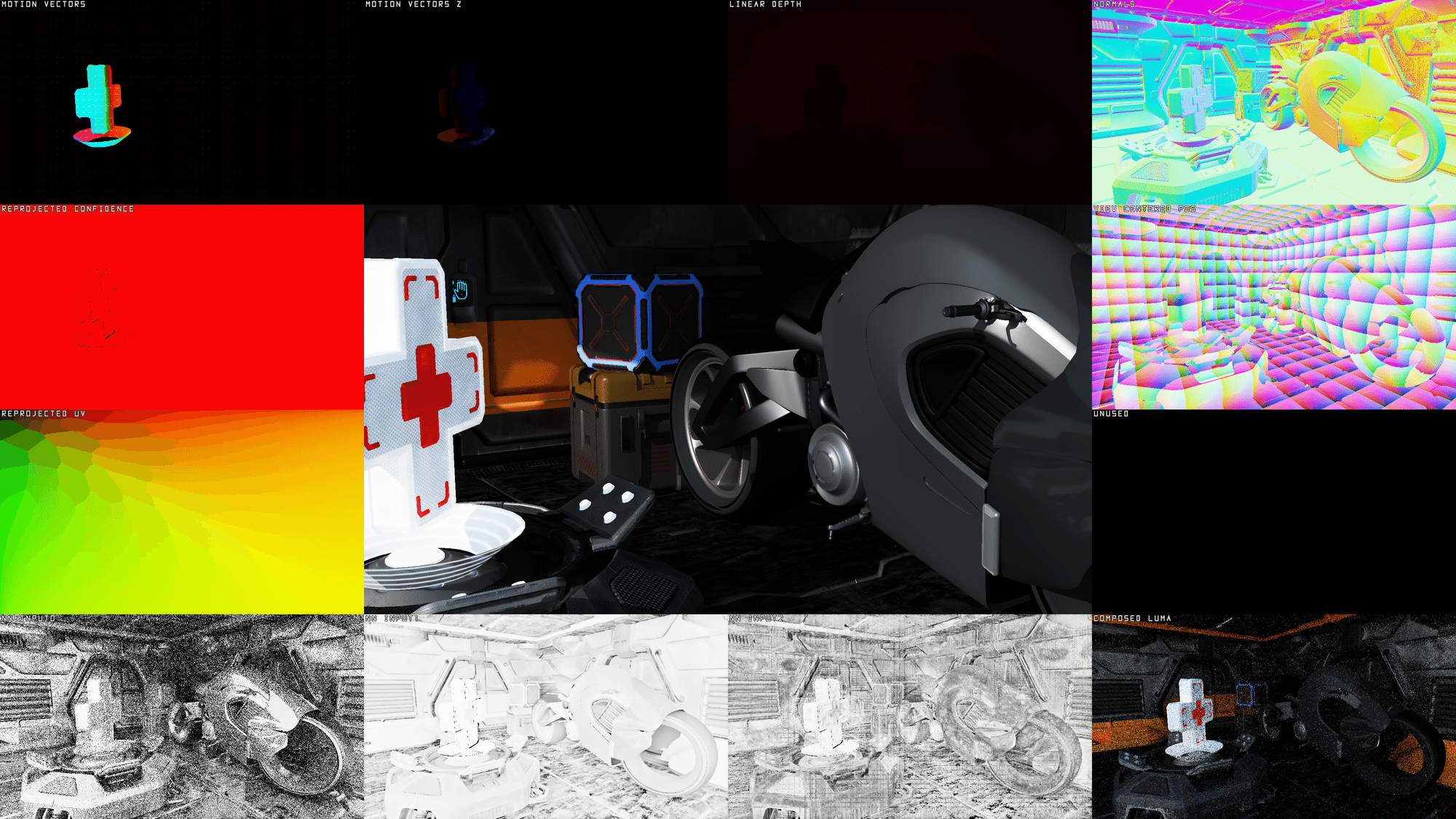
Figure 3: AMD FSR™ Ray Regeneration debug view in overview mode.
| Data | Description |
|---|---|
Motion Vectors | Pixel screen motion, the XY-components of the motionVectors input. |
Motion Vectors Z | Pixel z motion (i.e. signed linear depth delta), the Z-component of the motionVectors input.Blue for negative deltas, Red for positive deltas. |
Linear Depth | Absolute value of the linearDepth input.Clamped to the bounds corresponding to FFX_API_CONFIGURE_DENOISER_KEY_DEBUG_VIEW_LINEAR_DEPTH_BOUNDS. |
Normals | Decoded normals of the normals input. |
Reprojected Confidence | Indicates the per pixel confidence of a history sample. Black means the sample will not contribute in the accumulation. |
Reprojected UV | UV that will be used to sample history information. |
View Centered Pos | Reconstructed position centered around the camera. This information is useful to validate that input camera parameters are correct. |
Unused | Unused viewport, displayed as a black texture. |
NN Input0 | First input channel to the neural network. |
NN Input1 | Second input channel to the neural network. |
NN Input2 | Third input channel to the neural network. |
Composed Luma | Luminance of the composited input signals. |
Passing a ffxDispatchDescDenoiserDebugView dispatch description to ffxDispatch automatically enables the debug pass internally.
Output information is written to an app-provided render target and it is therefore up to the app itself to implement how to composite the output information to the screen.
AMD FSR™ Ray Regeneration expects the output target to be in a 4-component format as all four data components are used.
In the output target the RGB channels contain the color information to display and the A channel indicates which pixels have been written to.
The mode parameter toggles between an overview mode or fullscreen mode of a single data viewport.
The viewportIndex controls which viewport to display if FFX_API_DENOISER_DEBUG_VIEW_MODE_FULLSCREEN_VIEWPORT is selected as the active mode.
The viewportIndex is clamped between 0 and FFX_API_DENOISER_DEBUG_VIEW_MAX_VIEWPORTS - 1.
// Example: populating the debug view dispatch description.ffx::DispatchDescDenoiserDebugView dispatchDenoiserDebugView = {};dispatchDenoiserDebugView.output = SDKWrapper::ffxGetResourceApi(m_pDebugView->GetResource(), FFX_API_RESOURCE_STATE_UNORDERED_ACCESS);dispatchDenoiserDebugView.outputSize = { m_pDebugView->GetDesc().Width, m_pDebugView->GetDesc().Height };dispatchDenoiserDebugView.mode = m_DebugViewMode;dispatchDenoiserDebugView.viewportIndex = (uint32_t)m_DebugViewport;4.1.1. ffxDispatchDescDenoiserDebugView
| Parameter | Description |
|---|---|
output | The target output resource for debug visualization. Channels: RGB: Color information to display. A: Indicates which pixels have been written to. |
outputSize | The resolution of the debug visualization. |
mode | The debug view mode corresponding to an entry of FfxApiDenoiserDebugViewMode. |
viewportIndex | The index of the viewport to visualize when FFX_API_DENOISER_DEBUG_VIEW_MODE_FULLSCREEN_VIEWPORT mode is active.Clamped between 0 and FFX_API_DENOISER_DEBUG_VIEW_MAX_VIEWPORTS - 1. |
5. Best practices
5.1. Generating noisy signals
AMD FSR™ Ray Regeneration expects one or more low-sample radiance and/or occlusion input signals for denoising, depending on the selected signals at context creation. High-quality inputs are essential to achieve the best results, as the algorithm is not designed to “correct” artifacts present in the input data. Below are some guidelines for generating high-quality noisy inputs.
5.1.1. Radiance inputs and albedo modulation
AMD FSR™ Ray Regeneration expects the first-bounce albedo modulation to be absent from the radiance signals.
The first-bounce albedo is instead passed separately via the diffuseAlbedo and specularAlbedo members of ffxDispatchDescDenoiser.
After denoising, the application is responsible for multiplying the denoised output by the first-bounce albedo before compositing.
The expected albedo modulation state per signal is:
| Signal | First-bounce albedo | Subsequent-bounce albedo |
|---|---|---|
| Direct diffuse | Not applied — passed separately via diffuseAlbedo | N/A |
| Direct specular | Not applied — passed separately via specularAlbedo | N/A |
| Indirect diffuse | Not applied — passed separately via diffuseAlbedo | Applied |
| Indirect specular | Not applied — passed separately via specularAlbedo | Applied |
In practice this means your ray tracer should output the first-bounce lighting contribution directly, without multiplying by the surface albedo. Subsequent bounces accumulate full radiance (albedo included) as usual. After the denoiser dispatch, multiply the denoised output by the albedo to produce the final composited result.
// Example: re-modulating the denoised output in the composition pass.const float3 diffuseAlbedo  = Square(g_DiffuseAlbedo[pixel]);   // decode sqrt-encoded albedoconst float3 specularAlbedo = Square(g_SpecularAlbedo[pixel]);
const float3 diffuse  = (directDiffuse  + indirectDiffuse)  * diffuseAlbedo;const float3 specular = (directSpecular + indirectSpecular) * specularAlbedo;g_Output[pixel] = float4(diffuse + specular, 0.0f);
5.1.2. Stochastic sampling
In most physically-based path tracers, stochastic sampling is used to simulate realistic lighting behaviors such as shadows, reflections, and indirect lighting. Stochastic sampling introduces randomness into ray directions so that, over many samples, the result converges to a noise-free signal. At low sample counts, this randomness produces perceivable noise in the rendered image. This noise is exactly what AMD FSR™ Ray Regeneration targets for denoising. Understanding and managing the quality of this noise is critical for achieving optimal denoising results.
| Noisy Input | Denoised Output |
|---|---|
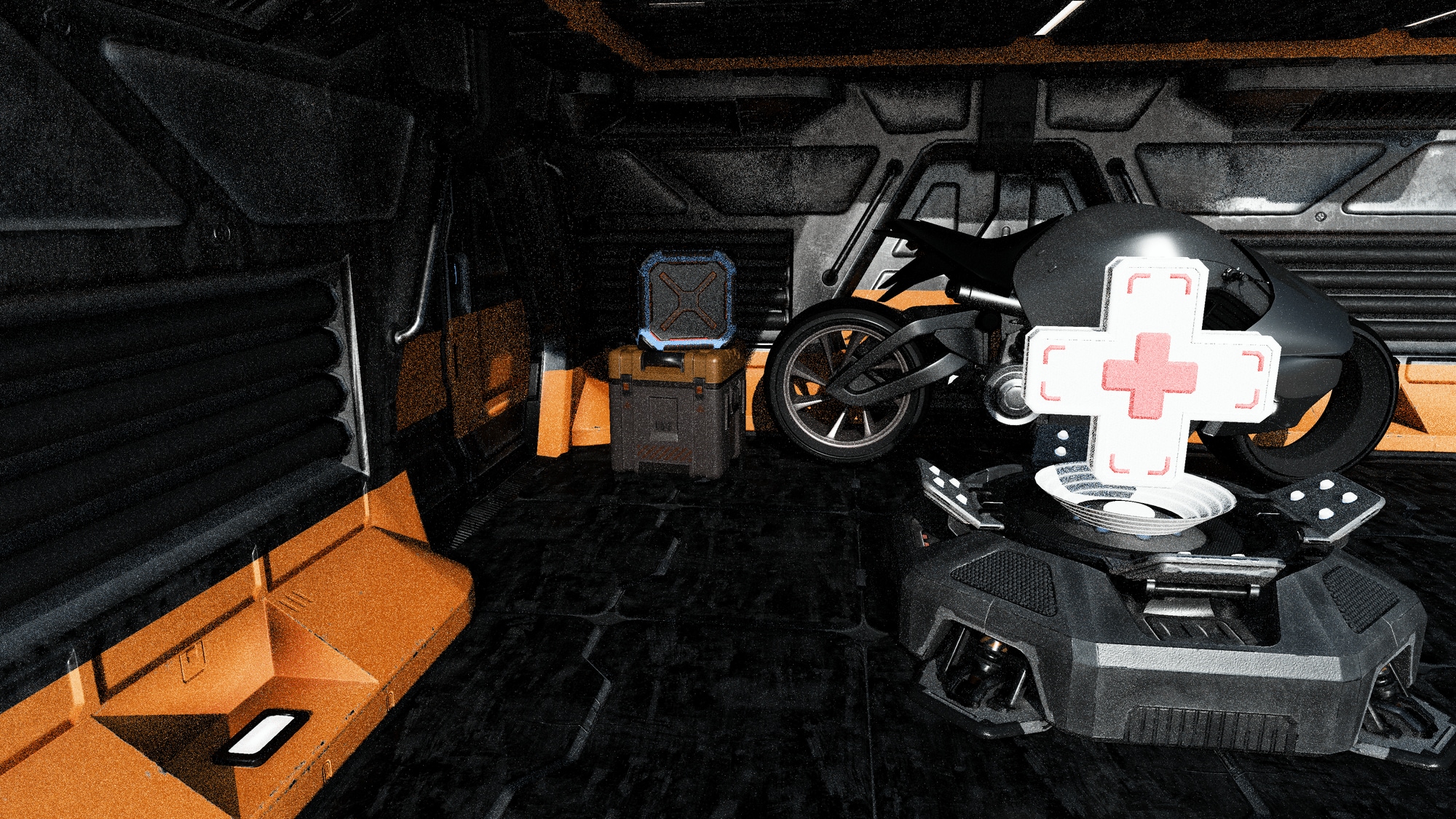 | 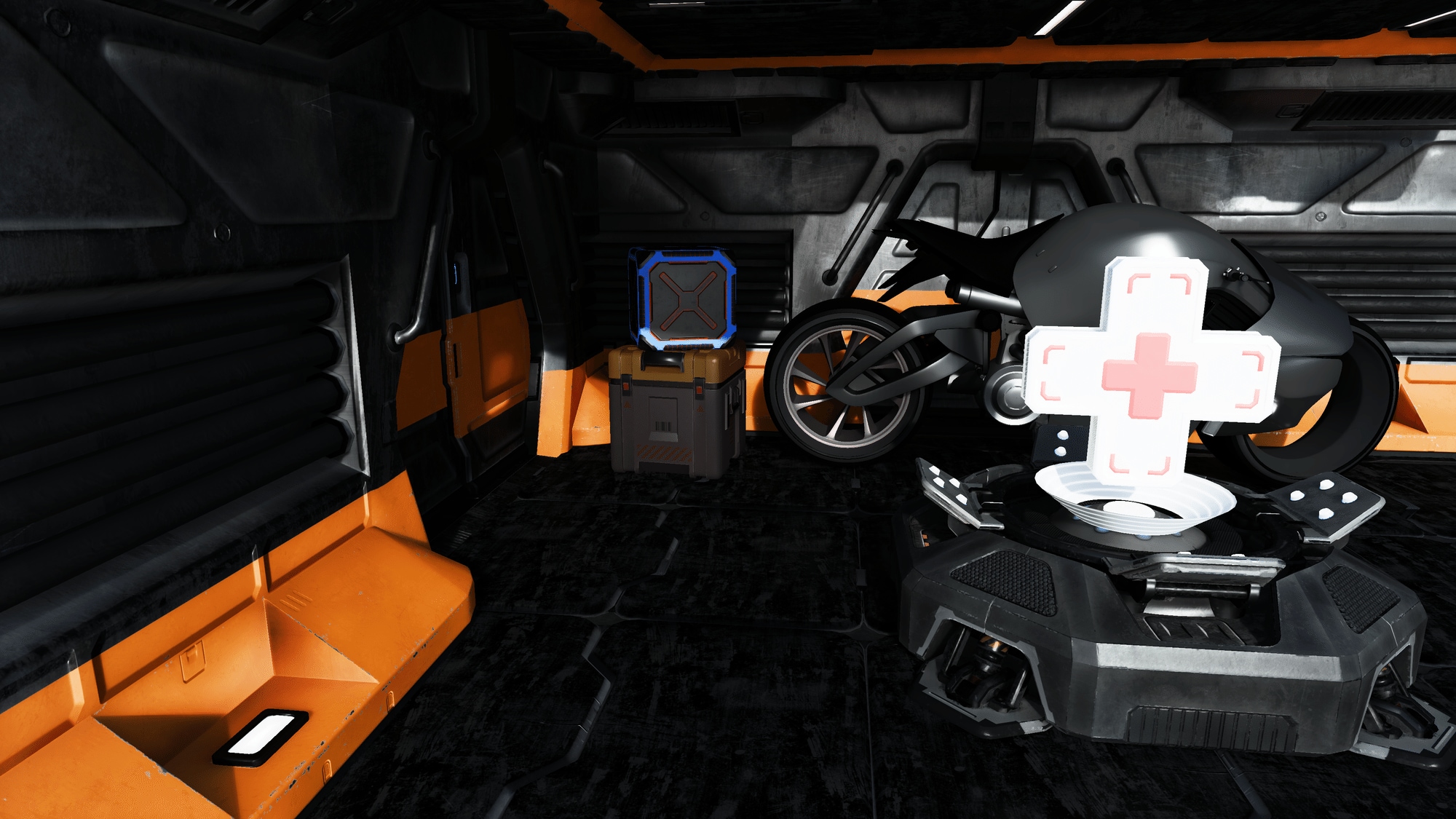 |
Figure 4: left: Noisy ray-traced input to AMD FSR™ Ray Regeneration. right: Corresponding denoised output from AMD FSR™ Ray Regeneration.
5.1.3. Noise
We recommend using white noise and high-quality hash functions with minimal correlations when driving stochastic sampling.
Examples of suitable hash functions include xxhash32 and lowbias32.
A good practice is to ensure that your ray-traced image converges to a noise-free result when using many samples without denoising. If it does not, verify whether your chosen noise or hash function is introducing unwanted correlations or other artifacts that are difficult to denoise.
While blue noise often performs well in many scenarios, it can introduce correlation artifacts if its period is not sufficiently large. For this reason, white noise is generally preferred for AMD FSR™ Ray Regeneration inputs.
Noise reduction techniques such as ReSTIR can help reduce noise in the input signals. However, these techniques often introduce cross-sample dependencies that AMD FSR™ Ray Regeneration is not designed to handle. In such cases, it is important to disrupt correlation patterns using strategies like permutation sampling or randomization of temporal reuse.
5.1.4. Usage of radiance caching
Tracing paths recursively quickly becomes too expensive for real-time rendering. To manage this cost, many real-time path tracers apply radiance caching after only a few recursive bounces. Radiance caching provides a precomputed store of radiance that can be sampled by direction, enabling early ray termination and significantly reducing computational overhead.
Using a radiance cache generally results in a more complete signal, since additional lighting contributions, too expensive to compute per frame, are incorporated through cached samples. This is naturally beneficial for AMD FSR™ Ray Regeneration, as more complete inputs typically yield more complete and stable outputs.
However, the caching process often trades accuracy for performance, which may introduce artifacts into the final image. Watch out for low-frequency noise or temporal inconsistencies, as these issues can be amplified by the denoiser if not mitigated.
See AMD GI-1.0 for examples and guidance on radiance caching.
5.1.5. Tweakable denoiser settings
Even with high-quality inputs and the recommended best practices applied, some artifacts may still remain.
AMD FSR™ Ray Regeneration exposes a number of tweakable settings, defined in FfxApiConfigureDenoiserKey, that allow fine-grained control over denoiser behavior.
These parameters can help balance stability, sharpness, and noise reduction to best suit your application.
It is recommended to start from the default settings queried from the API and then adjust selectively according to what works best for your application. For the full list of available keys and guidance on retrieving and applying these settings, see 2.6. Configuring settings.
5.2. Providing motion vectors
5.2.1. Space
A key part of any temporal algorithm is the provision of motion vectors.
AMD FSR™ Ray Regeneration accepts motion vectors in a 2.5D format:
- The
XYcomponents represent screen-space pixel motion, encoding the movement from a pixel in the current frame to the same pixel in the previous frame. - The
Zcomponent represents the signed linear view-spacezdelta.
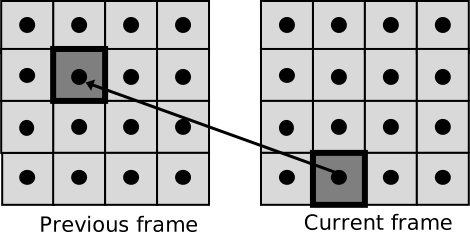
Figure 5: A 2D motion vector from a pixel in the current frame to the corresponding pixel in the previous frame.
If your application computes motion vectors in a space other than UV space (for example, NDC space), you can use the motionVectorScale member of the ffxDispatchDescDenoiser dispatch description to scale them appropriately for AMD FSR™ Ray Regeneration.
Example HLSL and C++ code illustrating NDC-space motion vector scaling:
// GPU: Example of NDC motion vector computation
float3 motionVector;
// 2D motion expressed in NDC spacemotionVector.xy = (previousPosition.xy / previousPosition.w) - (currentPosition.xy / currentPosition.w) - cancelJitter;
// Assuming camera looks along the +Z axis in view space: pView.z = pProjection.w// Signed linear depth deltamotionVector.z = previousPosition.w - currentPosition.w;
// CPU: Matching AMD FSR™ Ray Regeneration motionVectorScale configuration to convert motion vectors from NDC to UV spacedispatchDesc.motionVectorScale.x = +0.5f;dispatchDesc.motionVectorScale.y = -0.5f;
dispatchDesc.motionVectorScale.z = +1.0f;5.2.2. Coverage
AMD FSR™ Ray Regeneration achieves higher-quality denoising when more objects provide valid motion vectors. It is therefore recommended that all opaque, alpha-tested, and alpha-blended objects write motion vectors for every pixel they cover. Additionally, if vertex shader effects are applied, such as scrolling UVs or procedural vertex animations, these transformations should also be incorporated into the motion vector computation to ensure optimal results.
5.3. Encoding normals
Each 3D normal vector represents a direction on the unit sphere. To store normals efficiently, we can project the unit sphere onto a 2D plane and remap each normal vector as a 2D UV coordinate. This process is called octahedral encoding. The normals passed to AMD FSR™ Ray Regeneration are required to be stored using octahedral encoding.
Below are examples of how to encode and decode normals using this method.
5.3.1. Octahedral encoding of normals:
// Example: encoding a unit normal vector into a 2D octahedral UV.float2 NormalToOctahedronUv(float3 N){ N.xy /= abs(N.x) + abs(N.y) + abs(N.z); float2 k = sign(N.xy); if (N.z < 0.0) { N.xy = (1.0 - abs(N.yx)) * k; } return N.xy * 0.5 + 0.5;}5.3.2. Octahedral decoding of normals:
// Example: decoding a 2D octahedral UV back into a unit normal vector.float3 OctahedronUvToNormal(float2 UV){ UV = UV * 2.0f - 1.0f; float3 N = float3(UV, 1.0f - abs(UV.x) - abs(UV.y)); float t = saturate(-N.z); float2 s = sign(N.xy); N.xy -= s * t; return normalize(N);}5.4. Encoding material type
The alpha channel of the normals member of the ffxDispatchDescDenoiser dispatch description is used to encode the material type.
The material type is a lightweight way to distinguish different surface materials from one another.
AMD FSR™ Ray Regeneration will reject mixing between two pixels if their material IDs do not match.
This prevents cross-material blending and is an effective solution for avoiding ghosting artifacts in complex material setups.
AMD FSR™ Ray Regeneration supports four material type values (0–3).
Material type 0 is reserved as the default material, leaving three additional values available for custom use.
Upon encoding the material type into the normals member of the ffxDispatchDescDenoiser dispatch description, the stored value should be a normalized fraction relative to the maximum number of supported materials.
// Example: encoding the material type into the alpha channel of the normals resource.// ... ray tracing pass ...
uint materialType = hit.materialType;float materialTypeFrac = materialType / 3.0;
outNormalsResource[pixel] = float4(normalOctahedralUv, roughness, materialTypeFrac);5.5. Generating specular albedo
Specular albedo can be generated using various methods. In most physically-based rendering pipelines, similar computations are already performed as part of the lighting computations. These computations can be reused to generate a standalone specular albedo feature map.
Below are two commonly used methods for generating specular albedo in real-time rendering applications.
5.5.1. Example: BRDF lookup table
A BRDF LUT is generated offline and stored in a floating-point texture. At runtime, this LUT is sampled to look up approximate BRDF characteristics, commonly used in the split-sum approximation for image-based lighting.

Figure 6: A typical GGX BRDF look-up table.
The following HLSL code snippet illustrates how to sample the BRDF LUT and use the resulting scale and bias to generate specular albedo:
// Example: generating specular albedo from a pre-baked GGX BRDF look-up table.// ... ray tracing pass ...
float NoV = dot(normal, view);float2 brdf = BrdfLUT.SampleLevel(LinearSampler, float2(NoV, hit.materialRoughness), 0);
const float3 MinReflectance = float3(0.04, 0.04, 0.04);float3 F0 = lerp(MinReflectance, hit.materialAlbedo.rgb, hit.materialMetallic);float3 specularAlbedo = F0 * brdf.x + brdf.y;
// ...
5.5.2. Example: BRDF Approximation
The following HLSL code snippets illustrate how to approximate the BRDF contribution at runtime without the need for an offline baked LUT:
// [Ray Tracing Gems, Chapter 32]float3 ApproximateBRDF(float3 F0, float alpha, float NoV){    NoV = abs(NoV);    float4 x = float4(1.0, NoV, NoV*NoV, NoV*NoV*NoV);    float4 y = float4(1.0, alpha, alpha*alpha, alpha*alpha*alpha);
    float2x2 M1 = float2x2(0.99044, -1.28514,                           1.29678, -0.755907);
    float3x3 M2 = float3x3(1.0,      2.92338, 59.4188,                           20.3225, -27.0302, 222.592,                           121.563,  626.13,  316.627);
    float2x2 M3 = float2x2(0.0365463, 3.32707,                           9.0632,   -9.04756);
    float3x3 M4 = float3x3(1.0,      3.59685, -1.36772,                           9.04401, -16.3174,  9.22949,                           5.56589,  19.7886, -20.2123);
    float bias = dot(mul(M1, x.xy), y.xy) * rcp(dot(mul(M2, x.xyw), y.xyw));    float scale = dot(mul(M3, x.xy), y.xy) * rcp(dot(mul(M4, x.xzw), y.xyw));
    // Hack for specular reflectance of 0    bias *= saturate(F0.g * 50);    return mad(F0, max(0, scale), max(0, bias));}
// ... ray tracing pass ...
const float3 MinReflectance = float3(0.04, 0.04, 0.04);float3 F0 = lerp(MinReflectance, hit.materialAlbedo.rgb, hit.materialMetallic);
float alpha = hit.materialRoughness * hit.materialRoughness;float NoV = dot(normal, view);
float3 specularAlbedo = ApproximateBRDF(F0, alpha, NoV);
// ...
6. Requirements
- AMD FSR™ Ray Regeneration requires an AMD Radeon™ RX 9000 Series GPU or later.
- DirectX® 12 + Shader Model 6.6
- Windows® 11
7. Version history
For more details, refer to the changelog.