AMD FSR™ Frame Generation (Swapchain)
This SDK includes two versions of AMD FSR™ Frame Generation (Swapchain). They share the same integration model and API, and the AMD FSR™ API selects between them automatically:
| Version | Product name | Additional hardware requirement |
|---|---|---|
| 4.0.0 | AMD FSR™ Frame Generation (Swapchain) | AMD Radeon™ RX 9000 Series (AMD RDNA™ 4 architecture) or later |
| 3.1.7 | AMD FidelityFX™ Super Resolution Frame Generation (Swapchain) | None |
Table of contents
Introduction
The AMD FSR™ Frame Generation (Swapchain) provides an easy way to handle dispatching the workloads required for frame interpolation and pacing presentation. On DirectX® 12 it implements the IDXGISwapChain4 interface. On Vulkan® it replaces the application’s VkSwapchainKHR and returns replacement function pointers for swapchain creation, image acquire, and present.
Though this implementation may not work for all engines or applications, it was designed to provide an easy way to integrate AMD FSR™ Frame Generation in a way that it is (almost) transparent to the underlying application.
Description
AMD FSR™ Frame Generation (Swapchain) can be used as a replacement of the API’s swapchain and from the application point of view behavior should be similar.
When AMD FSR™ Frame Generation is disabled, the main difference will be that present is slightly more expensive (one extra surface copy) compared to using the API swapchain directly.
In this case, the AMD FSR™ Frame Generation (Swapchain) still supports handling the UI composition, so applications don’t have to handle their UI differently when disabling AMD FSR™ Frame Generation.
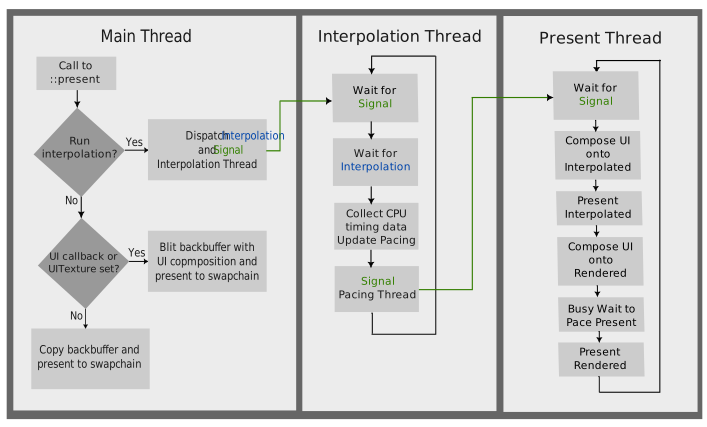
Internally the AMD FSR™ Frame Generation (Swapchain) will create 2 additional CPU threads:
- The first thread is used to not stall the application while waiting for interpolation to finish on the GPU. After that the thread will get the current CPU time and compute pacing information.
- The second thread dispatches the GPU workloads for UI composition (calling the callback function if needed) and pacing the presents.
Integration
The AMD FSR™ Frame Generation (Swapchain) should be integrated using the AMD FSR™ API, this document describes the API constructs specific to the AMD FSR™ Frame Generation (Swapchain).
AMD FSR™ Frame Generation (Swapchain) for DirectX 12 implements the IDXGISwapChain4 interface, so once created it behaves just like a normal swapchain.
On Vulkan®, after context creation call ffxQuery with ffxQueryDescSwapchainReplacementFunctionsVK. pOutGetSwapchainImagesKHR, pOutAcquireNextImageKHR, pOutQueuePresentKHR, and pOutSetHdrMetadataEXT replace vkGetSwapchainImagesKHR, vkAcquireNextImageKHR, vkQueuePresentKHR, and vkSetHdrMetadataEXT. pOutCreateSwapchainFFXAPI and pOutDestroySwapchainFFXAPI replace vkCreateSwapchainKHR and vkDestroySwapchainKHR, but each takes an additional void* pContext argument. pOutGetLastPresentCountFFXAPI reports how many presents have occurred since the swapchain was created.
New APIs
As of AMD FSR™ SDK 2.1 it is necessary to create and fill in a version structure and link it in the header.pNext field of whichever context-creation structure is used. This is used to ensure compatibility between different versions of the API.
- DirectX® 12:
ffxCreateContextDescFrameGenerationSwapChainVersionDX12. SetversiontoFFX_FRAMEGENERATION_SWAPCHAIN_DX12_VERSION. - Vulkan®:
ffxCreateContextDescFrameGenerationSwapChainVersionVK. SetversiontoFFX_FRAMEGENERATION_SWAPCHAIN_VK_VERSION.
Context creation
On DirectX® 12, creation can be performed in several ways:
- Create and fill in a
ffxCreateContextDescFrameGenerationSwapChainWrapDX12structure then callffxCreateContext. This will wrap & replace an existing swapchain. - Create and fill in a
ffxCreateContextDescFrameGenerationSwapChainNewDX12structure then callffxCreateContext. This will create a new swapchain from the givendxgiFactory. - Create and fill in a
ffxCreateContextDescFrameGenerationSwapChainForHwndDX12structure then callffxCreateContext. This will create a new swapchain from the providedhwnd,desc,fullscreenDescanddxgiFactory. DX12 only allows one swapchain to exist at a time for each hwnd, therefore the swapchain context has to be destroyed before a new swapchain is created for the hwnd.
On Vulkan® there is a single creation structure, ffxCreateContextDescFrameGenerationSwapChainVK. Fill in the device, the VkSwapchainCreateInfoKHR, and the game, async-compute, present, and image-acquire queues, then call ffxCreateContext with the version structure chained. swapchain is the VkSwapchainKHR to replace. It is destroyed during context creation and, on return, contains the frame-generation swapchain. It may be VK_NULL_HANDLE. If createInfo.oldSwapchain is not VK_NULL_HANDLE, it must be the same handle. Each VkQueueInfoFFXAPI supplies the queue, its family index, and an optional vkQueueSubmit callback used when that queue can be submitted concurrently.
Optionally chain ffxCreateContextDescFrameGenerationSwapChainModeVK when UI composition must run on the present queue (composeOnPresentQueue = true) or on the game queue (composeOnPresentQueue = false).
ffx::CreateContextDescFrameGenerationSwapChainVersionVK versionDesc{};versionDesc.version = FFX_FRAMEGENERATION_SWAPCHAIN_VK_VERSION;
ffx::CreateContextDescFrameGenerationSwapChainVK createSwapChainDesc{};createSwapChainDesc.physicalDevice = physicalDevice;createSwapChainDesc.device = device;createSwapChainDesc.swapchain = ¤tSwapchain;createSwapChainDesc.createInfo = swapchainCreateInfo;createSwapChainDesc.allocator = nullptr;
createSwapChainDesc.gameQueue.queue = graphicsQueue;createSwapChainDesc.gameQueue.familyIndex = graphicsQueueFamily;createSwapChainDesc.gameQueue.submitFunc = nullptr;
createSwapChainDesc.asyncComputeQueue.queue = asyncComputeQueue;createSwapChainDesc.asyncComputeQueue.familyIndex = asyncComputeQueueFamily;createSwapChainDesc.asyncComputeQueue.submitFunc = nullptr;
createSwapChainDesc.presentQueue.queue = presentQueue;createSwapChainDesc.presentQueue.familyIndex = presentQueueFamily;createSwapChainDesc.presentQueue.submitFunc = nullptr;
createSwapChainDesc.imageAcquireQueue.queue = imageAcquireQueue;createSwapChainDesc.imageAcquireQueue.familyIndex = imageAcquireQueueFamily;createSwapChainDesc.imageAcquireQueue.submitFunc = nullptr;
ffx::Context swapChainContext = nullptr;ffx::ReturnCode retCode = ffx::CreateContext(swapChainContext, nullptr, createSwapChainDesc, versionDesc);
ffx::QueryDescSwapchainReplacementFunctionsVK replacementFunctions{};retCode = ffx::Query(swapChainContext, replacementFunctions);// pOutGetSwapchainImagesKHR, pOutAcquireNextImageKHR, pOutQueuePresentKHR, and// pOutSetHdrMetadataEXT match the Vulkan entry points. pOutCreateSwapchainFFXAPI// and pOutDestroySwapchainFFXAPI take an additional void* pContext argument.// createSwapChainDesc.swapchain now holds the frame-generation swapchain.Recording and dispatching the frame interpolation workload
The AMD FSR™ Frame Generation (Swapchain) has been designed to be independent of the AMD FidelityFX™ Frame Interpolation interface. To achieve this, it does not interact directly with those interfaces. The frame interpolation workload can be provided to the AMD FSR™ Frame Generation (Swapchain) in 2 ways:
- Provide a callback function
frameGenerationCallbackin theffxConfigureDescFrameGeneration. This function will get called from the AMD FSR™ Frame Generation (Swapchain) during present on the game thread (IDXGISwapChain::Presenton DirectX® 12,vkQueuePresentKHRon Vulkan®), if frame interpolation is enabled to record the command buffer containing the frame interpolation workload. - Query a command buffer from the AMD FSR™ Frame Generation (Swapchain) and record the frame interpolation workload into it. On DirectX® 12 use
ffxQueryDescFrameGenerationSwapChainInterpolationCommandListDX12, which returns anID3D12GraphicsCommandList. On Vulkan® useffxQueryDescFrameGenerationSwapChainInterpolationCommandListVK, which returns aVkCommandBuffer. The destination image isffxQueryDescFrameGenerationSwapChainInterpolationTextureDX12orffxQueryDescFrameGenerationSwapChainInterpolationTextureVK. In this case the command buffer will be executed when present is called.
The command list can either be executed on the same command queue present is being called on, or on an asynchronous compute queue:
- Synchronous execution is more resilient to issues if an application calls upscale but then decides not to call present on a frame.
- Asynchronous execution may result in higher performance depending on the hardware and what workloads are running alongside the frame interpolation workload.
Either way, UI composition and present will be executed on a second graphics queue in order to not restrict UI composition to compute and allow the driver to schedule the present calls during preparation of the next frame.
Note: to ensure presents can execute at the time intended by the AMD FSR™ Frame Generation frame pacing logic, avoid micro stuttering and assure good VRR response by the display, it is recommended to ensure the frame consists of multiple command list submissions.
UI Composition
When using AMD FSR™ Frame Generation, it is highly advisable to treat the UI with special care, since distortion due to game motion vectors that would hardly be noticeable in 3D scenes will significantly impact readability of any UI text and result in very noticeable artifacts, especially on any straight, hard edges of the UI.
To combat any artifacts and keep the UI nice and readable, there are 3 ways to handle UI composition in the AMD FSR™ Frame Generation (Swapchain):
-
Register a callback function, which will render the UI on top of the back buffer. This function will get called for every back buffer presented (interpolated and real) so it allows the application to render UI animations at display rate or apply effects like film grain differently for each frame sent to the monitor. However this approach obviously has some impact on performance as the UI will have to be rendered twice, so care should be taken to only record small workloads in the UI callback.
-
Render the UI to a separate surface, so it can be alpha-blended to the final back buffer. This way the UI can be applied to the interpolated and real back buffers without any distortion.
-
Provide a surface containing the HUD-less scene to the AMD FSR™ Frame Generation (Swapchain) in addition to the final back buffer. In this case the frame interpolation shader will detect UI areas in the frame and suppress distortion in those areas.
Memory Usage
Figures are given to the nearest MB, taken on Radeon RX 9070 XTX using DirectX 12, and are subject to change.
| Output resolution | UI Mode | Memory usage(MB) |
|---|---|---|
| 3840x2160 | Separate UI surface + FFX_FRAMEGENERATION_UI_COMPOSITION_FLAG_ENABLE_INTERNAL_UI_DOUBLE_BUFFERING | 191 |
| 3840x2160 | All other modes | 159 |
| 2560x1440 | Separate UI surface + FFX_FRAMEGENERATION_UI_COMPOSITION_FLAG_ENABLE_INTERNAL_UI_DOUBLE_BUFFERING | 90 |
| 2560x1440 | All other modes | 75 |
| 1920x1080 | Separate UI surface + FFX_FRAMEGENERATION_UI_COMPOSITION_FLAG_ENABLE_INTERNAL_UI_DOUBLE_BUFFERING | 51 |
| 1920x1080 | All other modes | 42 |
An application can get the amount of GPU local memory required by AMD FSR™ Frame Generation (Swapchain) context after context creation by calling ffxQuery with the valid context and ffxQueryFrameGenerationSwapChainGetGPUMemoryUsageDX12 on DirectX® 12, or ffxQueryFrameGenerationSwapChainGetGPUMemoryUsageVK on Vulkan®.
An application can get GPU local memory required by default AMD FSR™ Frame Generation (Swapchain) version before context creation by calling ffxQuery with NULL context and filling out ffxQueryFrameGenerationSwapChainGetGPUMemoryUsageDX12V2 on DirectX® 12, or ffxQueryFrameGenerationSwapChainGetGPUMemoryUsageVKV2 on Vulkan®. The DirectX® 12 structure takes an ID3D12Device in device. The Vulkan® structure takes a VkDevice and a VkPhysicalDevice directly. To get the memory requirement info for a different AMD FSR™ Frame Generation (Swapchain) version, additionally link ffxOverrideVersion.
See code examples of how to call Query.
Waitable Object
This section applies to DirectX® 12. GetFrameLatencyWaitableObject is a method of IDXGISwapChain2 and has no Vulkan® equivalent in this API. On Vulkan®, keep the CPU from running ahead with the application’s own frame limiter. pOutGetLastPresentCountFFXAPI on ffxQueryDescSwapchainReplacementFunctionsVK reports the number of presents since swapchain creation.
It is advisable that the game uses GetFrameLatencyWaitableObject to get a waitable object, then use that object to prevent the CPU from running too far ahead of the GPU. This is especially important when VSync is on with a low refresh rate monitor, as the GPU render rate can fall far below the CPU submission rate. Alternatively, the app can use a frame limiter set to half monitor refresh rate.
Important: The application must close the returned handle using CloseHandle() after destroying the AMD FSR™ Frame Generation (Swapchain) context (via ffxDestroyContext). The handle remains valid when frame generation is toggled on/off via configuration without destroying the swapchain context. Each call to GetFrameLatencyWaitableObject() returns a new independent handle (via DuplicateHandle internally) that must be closed separately by the application.
// Get waitable handle once (each call returns a new handle)HANDLE waitableHandle = fgSwapchain->GetFrameLatencyWaitableObject();
// Use for frame pacingWaitForSingleObject(waitableHandle, INFINITE);
// On shutdown: destroy context first, then close handleffx::DestroyContext(swapChainContext);CloseHandle(waitableHandle);
Frame pacing and presentation
The AMD FSR™ Frame Generation (Swapchain) handles frame pacing automatically. Since Windows is not a real-time operating system and variable refresh rate displays are sensitive to timing imprecisions, the AMD FSR™ Frame Generation (Swapchain) has been designed to use a busy wait loop in order to achieve the best possible timing behavior.
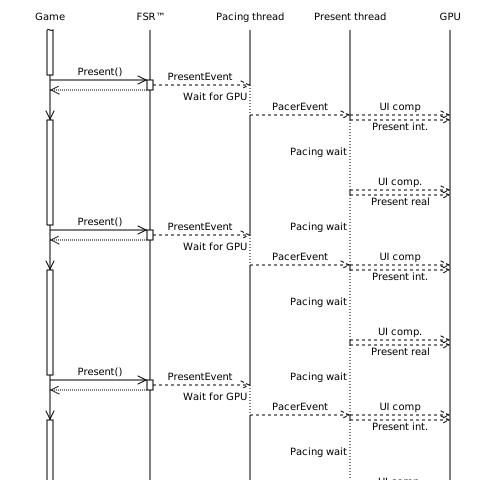
With AMD FSR™ Frame Generation enabled, frames can take wildly different amounts of time to render. The workload for interpolated frames can be much smaller than for application rendered frames (“real” frames). It is therefore important to properly pace presentation of frames to ensure a smooth experience. The goal is to display each frame for an equal amount of time.
Presentation and pacing are done using two additional CPU threads separate from the main render loop. A high-priority pacing thread keeps track of average frame time, including UI composition time, and calculates the target presentation time delta. It also waits for GPU work to finish to avoid long GPU-side waits after the CPU-side presentation call.
To prevent any frame time spikes from impacting pacing too much, the moving average of several frames is used to estimate the frame time.
A present thread dispatches UI composition work for the generated frame, waits until the calculated present time delta has passed since the last presentation, then presents the generated frame. It repeats this for the real frame.
The application should ensure that the rendered frame rate is slightly below half the desired output frame rate. When VSync is enabled, the render performance will be implicitly limited to half the monitor’s maximum refresh rate.
It is recommended to use normal priority for any GPU queues created by the application to allow interpolation work to be scheduled with higher priority. In addition, developers should take care that command lists running concurrently with interpolation and composition are short (in terms of execution time) to allow presentation to be scheduled at a precise time.
Driver-Assisted Frame Pacing
Starting with AMD FSR™ Frame Generation (Swapchain) 4.0.0, the final presentation timing can be delegated to the AMD display driver instead of being paced by the swapchain itself, as described above. Because the driver schedules the present closer to the display pipeline, it is not subject to the timing imprecision of a user-mode busy wait loop, which results in smoother frame delivery and lower CPU overhead.
Games that have integrated the AMD FSR™ SDK 2.1 or later, or AMD FidelityFX™ Super Resolution Frame Generation (Swapchain) 3.1.6 or later, can receive AMD FSR™ Frame Generation (Swapchain) 4.0.0 through an automatic driver override in AMD Software: Adrenalin Edition™ 26.10.1 or later.
Whether the swapchain comes from a direct AMD FSR™ SDK integration or from the driver override, Driver-Assisted Frame Pacing requires frame generation to be dispatched by that swapchain during presentation. Integrations that dispatch frame generation manually and present through their own swapchain do not use it, for example if the AMD FSR™ Unreal® Engine plugin has OverrideSwapChainDX12 set to false.
Driver-Assisted Frame Pacing is then selected automatically when the driver reports support for it and the following requirements are met. No further application changes are required to opt in, and whenever it is unavailable the swapchain transparently falls back to its own pacing.
| Requirement | Detail |
|---|---|
| GPU | AMD Radeon™ RX 9000 Series or later (AMD RDNA™ 4 architecture or later) |
| Driver | AMD Software: Adrenalin Edition™ driver version 26.10.1 or later |
| Frame generation swapchain | AMD FSR™ Frame Generation (Swapchain) 4.0.0 or later |
| Fullscreen mode | Exclusive fullscreen, or borderless fullscreen covering the display area |
| VSync | Disabled |
| VRR | Presenting within the variable refresh rate window of the display |
These requirements are subject to change with future driver updates and reflect the current validated configuration.
The presentation requirements are evaluated continuously while the application runs, not only at context creation. Switching to windowed presentation, enabling VSync, or presenting outside the VRR window causes the swapchain to fall back to its own pacing, and returning to a qualifying configuration re-enables Driver-Assisted Frame Pacing.
Both DirectX® 12 and Vulkan® are supported, and Driver-Assisted Frame Pacing is optimized for Windows® 11 with Hardware-accelerated GPU scheduling enabled.
Frame type reporting
On DirectX® 12, AMD FSR™ Frame Generation (Swapchain) 4.0.0 reports the type of each presented frame, so that performance measurement tools built on Intel® PresentMon can distinguish generated frames from application rendered frames.
This reporting is set up automatically when the swapchain context is created and requires no application involvement. There is no API to enable, disable or configure it.
Note that current Intel® PresentMon releases report the generated frame type as Unknown. Generated and application rendered frames are still reported as distinct frame types, so the two can be told apart.
Expected behavior
To further illustrate the pacing method and rationale behind it, the following sections will lay out expected behavior in different scenarios. We differentiate based on the post-interpolation frame rate as well as whether the display uses a fixed or variable refresh rate.
Fixed refresh rate
VSync enabled
Here, tearing is disabled and every frame is displayed for at least one sync interval. Presentation is synchronized to the display’s vertical blanking period (“vsync”). This may result in uneven display timings and may increase input latency (by up to one refresh period).
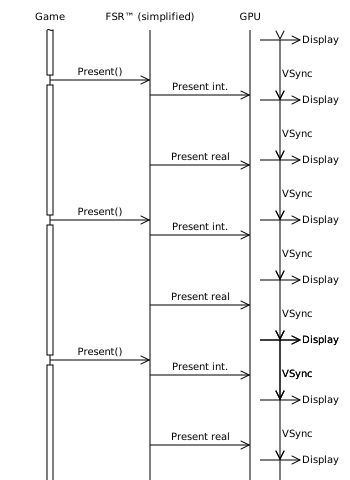
In the diagram, the first real frame is presented slightly after the vertical blanking interval, leading to the prior interpolated frame being shown for two refresh intervals and increased latency compared to immediate display.
VSync disabled
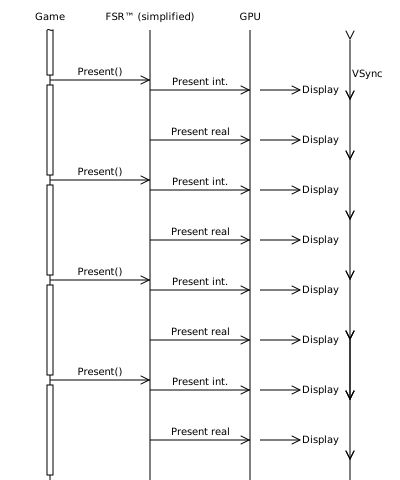
In this case, tearing is likely to occur. Presentation is not synchronized with the display. The benefit of this is reduced input latency compared to lower frame rates.
Variable refresh rate
This section applies to display and GPU combinations with support for variable refresh rate (VRR) technologies, such as AMD FreeSync, NVIDIA G-SYNC® and VESA AdaptiveSync.
The timing between display refreshes is dictated by the variable refresh rate window. The delta time between two refreshes can be any time inside the window. As an example, if the VRR window is 64-120Hz, then the delta time must be between 8.33 and 15.625 milliseconds. If the delta is outside this window, tearing will likely occur.
If no new present happens inside the window, the prior frame is displayed again.
Interpolated frame rate inside VRR window
The variable refresh window usually does not extend above the reported native refresh rate of the display, so tearing will be disabled in this case.
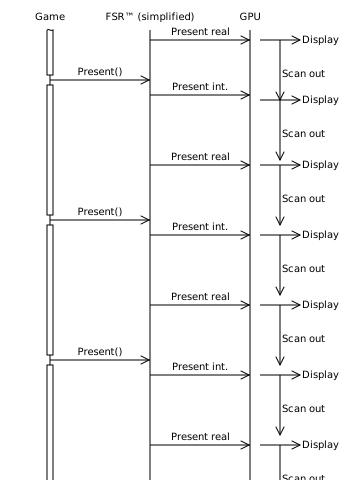
Interpolated frame rate outside VRR window
If the frame rate is below the lower bound of the VRR window, the expected behavior is the same as if the frame rate is below the refresh rate of a fixed refresh rate display (see above).
If the frame rate is above the upper bound of the VRR window, the expected behavior is the same as if the frame rate is above the refresh rate of a fixed refresh rate display (see above).
Implementation Recommendations
This section covers questions about implementation details regarding pacing, expected behavior and recommendations learned from working with various developers integrating AMD FSR™ Frame Generation.
Backbuffer Count
Without AMD FSR™ Frame Generation, usually applications use double buffering when VSync is disabled or triple buffering with VSync enabled:
- One backbuffer that gets currently displayed
- If VSync is enabled: one backbuffer that has finished rendering and waits for the next vertical refresh so it can get displayed
- One backbuffer that the application is preparing.
A higher backbuffer count usually is not used as it will not provide any benefits, but will result in unnecessarily high input latency.
The AMD FSR™ Frame Generation (Swapchain) implements a swapchain with the amount of backbuffers specified by the application, plus a real swapchain, which supports triple buffering. From the application side it is sufficient to always specify double buffering.
Regardless if VSync is enabled or disabled, the present call will kick off the interpolation task with the current backbuffer. Once interpolation has finished, the UI composition will copy the backbuffer to the real swapchain, so the application facing backbuffer can be re-used.
To minimize input latency, the present call of the AMD FSR™ Frame Generation (Swapchain) will wait for the previous frame’s interpolation and UI composition to be finished.
The present waiting on the previous UI composition should not have a negative effect in CPU limited cases. In GPU limited applications this will reduce input latency.
As a result, the previous backbuffer will always be available for rendering the next frame once the present call returns, so the application can preserve some GPU memory by creating the swapchain with no more than 2 backbuffers, even with VSync enabled.
Minimum Framerate
AMD FidelityFX™ Super Resolution Frame Generation 3.1.6 has been designed for an input framerate of at least 60 FPS.
AMD FSR™ Frame Generation 4.0.2 has been designed for an input framerate of at least 30 FPS.
If the frame rate of the application drops below 60FPS (FSR-SRFG 3.1.6) or 30FPS (FSR-FG 4.0.2) generated frames may result in visual artifacts severe enough to negatively impact the user experience. The exact framerate where artifacts become noticeable will depend on application, scene and movement of objects and camera.
AMD FidelityFX™ Super Resolution Frame Generation (Swapchain) 3.1.7 has been designed to give optimal results with an input framerate of 60 FPS or higher. The implementation will function with framerates of at least 30 FPS, but frame-pacing may not be optimal.
Low framerates typically come with high input latency, so depending on the application, it may be preferable to recoup some performance by disabling AMD FSR™ Frame Generation by setting the ffx::ConfigureDescFrameGeneration::frameGenerationEnabled to false if the frame rate consistently drops below that threshold.
This can help performance in both CPU and GPU limited scenarios, since interpolation happens on the GPU and disabling AMD FSR™ Frame Generation will also disable the busy wait loops in the pacing logic and free up CPU resources.
It is recommended to re-compute the average frametime for a couple of seconds after enabling or disabling AMD FSR™ Frame Generation and compute the performance difference from disabling AMD FSR™ Frame Generation. Reverting the decision to enable/disable AMD FSR™ Frame Generation should only be done if the framerate changes more than what can be attributed to the performance difference from disabling it.
VSync and Variable Refresh Rate
Windowed mode
VRR and tearing are only available in fullscreen mode.
In windowed mode the operating system is responsible for composition and presentation of the final frame.
Even with VSync disabled, it is not expected to result in tearing artifacts, however not all frames generated will get displayed, so it is possible multiple generated frames will get displayed back to back.
Additionally, generating more frames than can get presented is a waste of resources, so it is recommended to cap the frame rate to half the monitor refresh rate.
This can also be achieved by using Frame Rate Target Control in Adrenalin Control Center, so it does not necessarily have to be implemented as an application side feature.
If low input latency is the primary goal, it is safe to disable VSync in windowed mode and benefit from uncapped framerate without tearing.
VSync enabled
Enabling VSync will prevent tearing artifacts and results in best display quality, however the refresh rate constraints of the monitor can have undesired results:
-
Ideally the application runs at slightly above half the monitor’s refresh rate, or within half the VRR window supported by the monitor. In this case enabling VSync will result in optimal pacing with every frame getting displayed for one refresh period.
-
If VSync is enabled and the application runs at less than half the monitor refresh rate (or minimum VRR rate if VRR is supported) this will result in some frames getting displayed for 2 refreshes. As a consequence frames will get displayed for an uneven time resulting in micro-stuttering.
-
If the application could run significantly faster than half the monitor refresh rate, AMD FSR™ Frame Generation will slow down the application to half refresh rate, so every interpolated and real frame gets displayed for one refresh. In this case disabling AMD FSR™ Frame Generation or VSync can result in less input latency.
VSync disabled
Running with VSync disabled has lowest impact on performance and input latency but can result in noticeable tearing artifacts. Tearing artifacts may appear even with VRR enabled and the application presenting within the VRR window.
To combine the best of both worlds, VSync enabled or disabled, it is possible to dynamically toggle VSync state based on the current frame rate, but doing so will result in VRR getting reset. Additionally pacing will need a couple of frames to adjust to the new setting, which will also affect framerate. As a result, the decision to enable/disable VSync should only be revised once every few seconds based on a long average.
Shutdown
Prior to destroying the proxy swapchain, the application needs to first destroy the frame generation context. See Shutdown.
Then call ffxDestroyContext on the proxy swap chain context.
On DirectX® 12, optionally save the swapchain description needed to recreate the DXGI swapchain, then release the final COM reference to trigger the proxy swap chain destructor.
if (m_FrameGenContext){    // Frame generation must have been disabled via ffx::Configure(...) beforehand.    ffx::DestroyContext(m_FrameGenContext);    m_FrameGenContext = nullptr;}
if (m_SwapChainContext != nullptr){    // This doesn't call proxy swapchain destructor. There is still a swapchain ref held by cauldron    ffx::DestroyContext(m_SwapChainContext);    m_SwapChainContext = nullptr;}
cauldron::SwapChain* pSwapchain  = cauldron::GetSwapChain();IDXGISwapChain4*     pSwapChain4 = pSwapchain->GetImpl()->DX12SwapChain();
pSwapChain4->AddRef();// Hold strong ref while clearing engine pointer.
// Engine no longer owns COM pointer; safe to recreate after Release().cauldron::GetSwapChain()->GetImpl()->SetDXGISwapChain(nullptr);
// Capture data required to recreate a normal DXGI swap chain BEFORE releasing COM object.HWND windowHandle = pSwapchain->GetImpl()->DX12SwapChainDesc().OutputWindow;DXGI_SWAP_CHAIN_DESC1 desc1 = pSwapchain->GetImpl()->DX12SwapChainDesc1();DXGI_SWAP_CHAIN_FULLSCREEN_DESC  fsDesc = pSwapchain->GetImpl()->DX12SwapChainFullScreenDesc();
// Release final reference – triggers proxy swap chain destructor when refCount reaches 0.ULONG refCount = pDxgiSwap->Release();CauldronAssert(ASSERT_ERROR, refCount == 0, L"SwapChain not fully released. RefCount=%u (expected 0).", refCount);
// Recreate normal DXGI swap chain using hwnd, desc1, fsDesc.
Vulkan® does not use COM references, however it is still necessary to clear the engine’s VkSwapchainKHR API copy to avoid any memory leaks in shared context handles. Destroy the proxy context, and clear the installed replacement functions before creating a new VkSwapchainKHR from the VkSwapchainCreateInfoKHR used at context creation. Note Dispatch ffxDispatchDescFrameGenerationSwapChainWaitForPresentsVK before this sequence when presents from the current context may still be in flight.
if (m_SwapChainContext != nullptr){   ffx::DestroyContext(m_SwapChainContext);   m_SwapChainContext = nullptr;
   cauldron::SwapChainInternal* pSwapchain = cauldron::GetSwapChain()->GetImpl();   if (pSwapchain->IsFrameInterpolation())   {      VkSwapchainKHR fiSwapchain = pSwapchain->VKSwapChain();      pSwapchain->SetVKSwapChain(VK_NULL_HANDLE);      cauldron::GetDevice()->GetImpl()->DestroySwapchainKHR(fiSwapchain, nullptr, true);   }}
void cauldron::DeviceInternal::DestroySwapchainKHR(VkSwapchainKHR swapchain, const VkAllocationCallbacks* pAllocator, bool isFrameInterpolation) const{    if (isFrameInterpolation)    {    // The pContext (4th) parameter is legacy from older API and is unused in the current implementation.        // The swapchain context should be destroyed before this function is called.        m_SwapchainReplacementFunctions.pOutDestroySwapchainFFXAPI(m_Device, swapchain, pAllocator, nullptr);        return;    }
    vkDestroySwapchainKHR(m_Device, swapchain, pAllocator);}
Additional Information
List of resources created by the AMD FSR™ Frame Generation (Swapchain):
- Two CPU worker threads. One of those will be partially spinning between present of the interpolated frame and the real frame to precisely time the presents
- One asynchronous compute queue - only used when
FFX_FRAMEGENERATION_ENABLE_ASYNC_WORKLOAD_SUPPORTis set on FSR3 context creation andallowAsyncWorkloadsis true in theffxConfigureDescFrameGeneration. - One asynchronous present queue. This queue will be used to execute UI composition workloads and present
- A set of command lists, allocators and fences on DirectX® 12, or command buffers, command pools and semaphores on Vulkan®, for the interpolation and UI composition workloads
- The GPU resources required to blit the back buffer to the swapchain and compose the UI (if no callback is used)
- The swapchain attached to the actual game window
The AMD FSR™ Frame Generation (Swapchain) has been designed to minimize dynamic allocations during runtime:
- System memory usage of the class is constant during the lifetime of the swapchain, no STL is being used
- DirectX® 12 resources, and Vulkan® images and command pools, are created on first use and kept alive for reuse
Limitations
FSR requires a GPU with typed UAV load and R16G16B16A16_UNORM support. On Vulkan® the equivalent requirement is storage-image load support for VK_FORMAT_R16G16B16A16_UNORM.
AMD FSR™ Frame Generation (Swapchain) 4.0.0 additionally requires an AMD Radeon™ RX 9000 Series GPU (AMD RDNA™ 4 architecture) or later, on both DirectX® 12 and Vulkan®. On other hardware the AMD FSR™ API falls back to AMD FSR™ Frame Generation (Swapchain) 3.1.7, which has no such requirement.
Frame type reporting is only available on DirectX® 12.
Version history
| Version | Date |
|---|---|
| 4.0.0 | 2026-10-28 |
| 3.1.7 | 2026-06-24 |
| 3.1.6 | 2025-12-10 |
| 3.1.5 | 2025-08-20 |
| 1.1.3 | 2025-05-08 |
| 1.1.2 | 2024-06-05 |
| 1.1.1 | 2023-11-28 |
Refer to changelog for more detail on versions.