AMD Radeon™ Raytracing Analyzer
AMD Radeon™ Raytracing Analyzer (RRA) is a tool which allows you to investigate the performance of your raytracing applications and highlight potential bottlenecks.

On October 28, Microsoft® released two new DirectX® 12 Agility SDKs: Agility SDK 1.620 retail and Agility SDK 1.722-preview, and AMD released two drivers the same day to support both SDKs: AMD Software: Agility SDK Retail Edition 26.20.12.02 and AMD Software: Agility SDK Developer Preview Edition 26.20.12.01. Agility SDK 1.620 brings DirectX Dump Files, Extended PIX Markers and Partial Graphics Programs to retail, making those features available for developers to use in production games.
Agility SDK 1.722-preview adds new DirectX Raytracing (DXR) features, which Microsoft calls DXR’s “most significant update since its debut in 2018”. Learn more about both releases in Microsoft’s blog.
“The latest DirectX Agility SDK release helps developers tackle some of the hardest problems in game development, from updating complex raytraced scenes to managing glitch-free shader compilation and diagnosing GPU crashes. AMD’s day-one retail support for Advanced Shader Delivery and DirectX Dump Files is a direct result of many years of close partnership across Microsoft and AMD, giving developers practical tools to reduce compilation delays and investigate crashes on Radeon GPUs. And with support for the preview of Clustered Geometry and Partitioned TLAS, developers can also start to explore some of the more forward-looking technology we have been working on together, which offers more efficient ways to build detailed, dynamic raytraced worlds.”
— Shawn Hargreaves, 3D Platform Team Dev Manager, Microsoft
Here’s a quick summary, followed by more detail on each feature and which driver and GPU you need.
At a glance
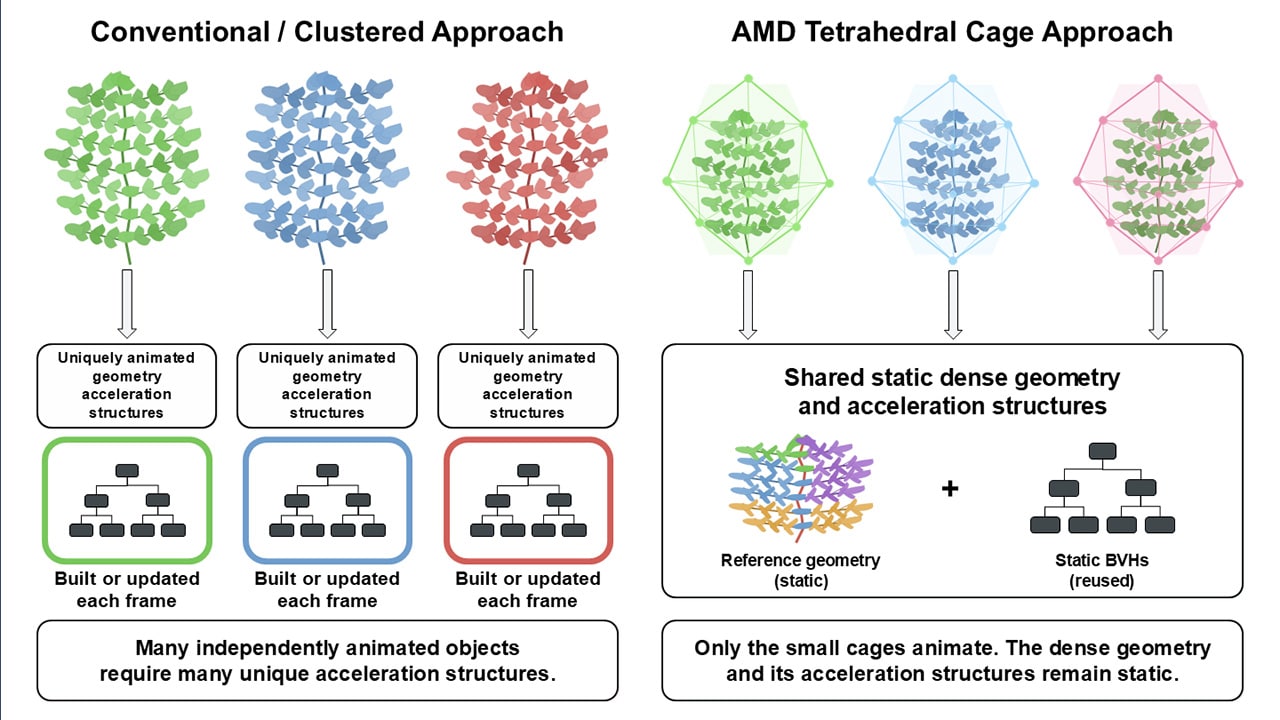
Ray tracing detailed, dynamic scenes means building and updating a lot of acceleration structure data. Animation, streaming and generated geometry can repeatedly incur the cost of building large bottom-level acceleration structures (BLAS), while updating a top-level acceleration structure (TLAS) can be costly for large worlds even if only a few instances changed. The Microsoft® DXR updates in Agility SDK 1.722-preview tackle both, with a unified, GPU-driven API:
With these features, it can become practical to ray trace the same full-detail geometry used for rasterization, rather than simplified proxies, so ray-traced shadows and reflections match the visible scene. The new DXR blog from Microsoft covers each feature in depth.
AMD Radeon™ RX 9000 Series and AMD Radeon AI PRO R9700 and R9600 Series GPUs, built on the AMD RDNA™ 4 architecture, support these features today with AMD Software: Agility SDK Developer Preview Edition 26.20.12.01. AMD collaborated with Microsoft on the design of DXR 1.1, and we’re pleased to support the next step for DXR from day one.
Our AMD Radeon Raytracing Analyzer (RRA) supports Clustered Geometry and Partitioned TLAS too, starting with RRA 1.11.1, released on October 6, so you can inspect acceleration structures built with these features.
The quickest way to get a feel for these features is the D3D12RaytracingClusteredGeometry sample. It’s a cluster sandbox for experimenting with build modes, allocation strategies, vertex formats and precision, workload size, and primary rays per pixel. You can switch between building BLAS from triangles and assembling Cluster BLAS for the same scene, with allocation sizes and GPU build timings shown in an overlay. Try it on your AMD Radeon RX 9000 Series or AMD Radeon AI PRO R9700 or R9600 Series GPU.
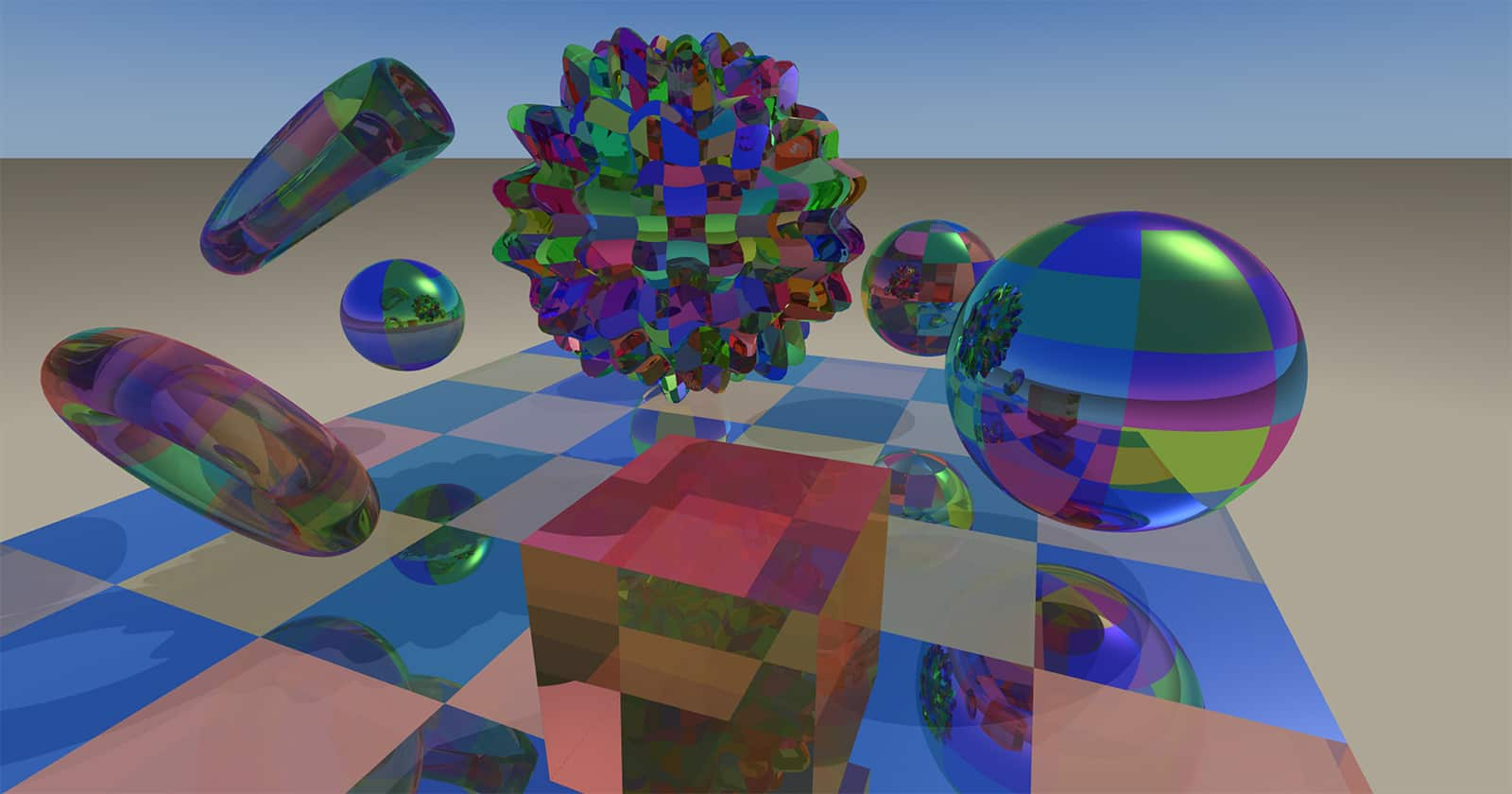 The D3D12RaytracingClusteredGeometry sample running on an AMD Radeon™ RX 9070 GPU.
Microsoft ran the sample on an AMD Radeon™ RX 9070 GPU and published the results in its DXR blog, comparing traditional BLAS rebuilds with Clustered Geometry in the same scene:
Microsoft test results on an AMD Radeon RX 9070 GPU*
| Metric | Traditional BLAS rebuild | Clustered Geometry |
|---|---|---|
| Frame rate | 1.2 FPS | 79 FPS |
| Per-frame GPU acceleration structure preparation/build | 788 ms | 3.11 ms |
| Total acceleration structure memory, including TLAS | 7,519 MiB | 774 MiB |
* Source: Microsoft blog “[PREVIEW] Raytracing: Clustered Geometry, Partitioned TLAS, Indirect Acceleration Structure Builds”. See endnotes for details.
Microsoft is clear that this is a single configuration in a test playground, and that games shouldn’t assume improvements of this magnitude. Results vary by scene, settings and GPU.
The sample also includes automated, command-line benchmarking that compares Clustered Geometry with traditional BLAS rebuild and refit across scene sizes, build settings, allocation modes, and vertex formats and precision. It records GPU build, update and rendering times and memory usage, and generates offline reports, so you can test the scenarios that matter to your engine on your own AMD Radeon RX 9000 Series or AMD Radeon AI PRO R9700 or R9600 Series GPU. See the headless and scripted runs section of the readme for instructions.
To try the new DXR features, you need:
D3D12ExperimentalShaderModels and D3D12RaytracingPreview experimental features enabled.Check for support with the ClustersAndPTLASSupported cap in the D3D12_FEATURE_D3D12_OPTIONS_RAYTRACING2 feature query. PIX also has preview support for the new features.
Learn more in the DXR blog and the Clustered Geometry and Partitioned TLAS specification. This is a preview, so Microsoft welcomes feedback on the DirectX® Discord server.
Microsoft® Advanced Shader Delivery (ASD) delivers precompiled shaders so games can avoid compiling them on the player’s PC. On October 21, Microsoft announced that ASD is broadly available across the Windows® ecosystem, delivering shaders when a title is downloaded to reduce loading times and shader stutter in game. ASD is available through the Microsoft Store and the XBOX PC app today, with support on other leading PC game stores coming soon.
AMD has worked with Microsoft on ASD since its first launch on the ASUS ROG XBOX Ally handhelds in October 2025. The May 2026 public preview expanded ASD to Windows 11 PCs with discrete GPUs and gaming laptop integrated GPUs from AMD, and in June, we expanded support for ASD to our entire AMD RDNA™ architecture-based GPU line.
The ASD documentation covers the full workflow. At a high level, developers:
ASD is also getting easier to adopt for more developers. Unreal® Engine 5.8.4 adds SODB integration, and Epic’s Unreal Engine 5.8.4 hotfix post lists two new ASD items: support for generating SODBs via the ASDTool for compute shaders and bundled PSOs from a cooked game, and developer workflow ASD testing tools for local compilation and registration. See Epic’s documentation for how to generate an SODB.
For local compilation and testing for AMD GPUs, use our AMD Direct3D 12 State Object Compiler plugin. It compiles an SODB into a PSDB without needing an AMD GPU, and comes as a NuGet package. We release a new compiler build for each AMD Software: Adrenalin Edition™ driver release and always keep the compiler page updated with the files developers need, including for AMD Software: Adrenalin Edition 26.10.2, released on October 30. Compiler builds follow our Adrenalin Edition releases, not the Agility SDK developer drivers covered in this blog.
Agility SDK 1.620 also brings Partial Graphics Programs to retail. They allow compiled program parts to be reused across pipeline variants, which can decrease download size and compile time. Both new drivers support Partial Graphics Programs on AMD Radeon™ RX 7000 and 9000 Series and AMD Radeon AI PRO R9700 and R9600 Series GPUs, and we’ve supported them in our preview drivers since the first preview in May. Learn more in the Partial Graphics Programs blog from Microsoft.
DirectX® Dump Files are now ready for retail games with Agility SDK 1.620 and PIX 2610.28. When a GPU crash or hang occurs, DirectX captures a dump file before Windows® resets the GPU. You can then open it in PIX on any PC. You don’t need the GPU or driver that crashed, and Developer Mode isn’t required.
Both new AMD drivers support DirectX Dump Files on AMD Radeon™ RX 7000 and 9000 Series and AMD Radeon AI PRO R9700 and R9600 Series GPUs, with the MEDIUM_OVERHEAD and HIGH_OVERHEAD options. These options are recommended for development and QA builds, and for chasing a rare retail crash on a few players’ PCs. The AMD PIX plugin is included in PIX 2610.28, and dump files from AMD GPUs include your PIX markers. We’ve supported DirectX Dump Files in our preview drivers since the public preview in June.
To generate dump files, the PC that crashes needs Windows 11, version 24H2 or 25H2. Learn more in the DirectX Dump Files blog from Microsoft and the step-by-step guides on Microsoft Learn.
Extended PIX Markers are also retail in Agility SDK 1.620. As we covered in our June Radeon™ Developer Tool Suite blog, Extended PIX Markers let the PIX events and markers in your code appear in AMD Radeon GPU Profiler (RGP) 2.7 and later, and in the crash analysis output of AMD Radeon GPU Detective (RGD) 1.6.3 and later.
To use them, you need Agility SDK 1.620 or later and either AMD Software: Agility SDK Retail Edition 26.20.12.02 or AMD Software: Agility SDK Developer Preview Edition 26.20.12.01.
The setup from our June blog still applies: call ID3D12DeviceTools2::SetUserDefinedAnnotationMode with D3D12_USER_DEFINED_ANNOTATION_MODE_DRIVER_RETAIL during device setup. No AMD-specific headers or code changes are required beyond that. The standard PIXBeginEvent, PIXEndEvent, and PIXSetMarker functions work as-is, and any RGB colors you supply via PIX_COLOR(r, g, b) will be honored in the RGP UI.
Extended PIX Markers are Windows only. The previous approach, using a modified PIX header, still works.
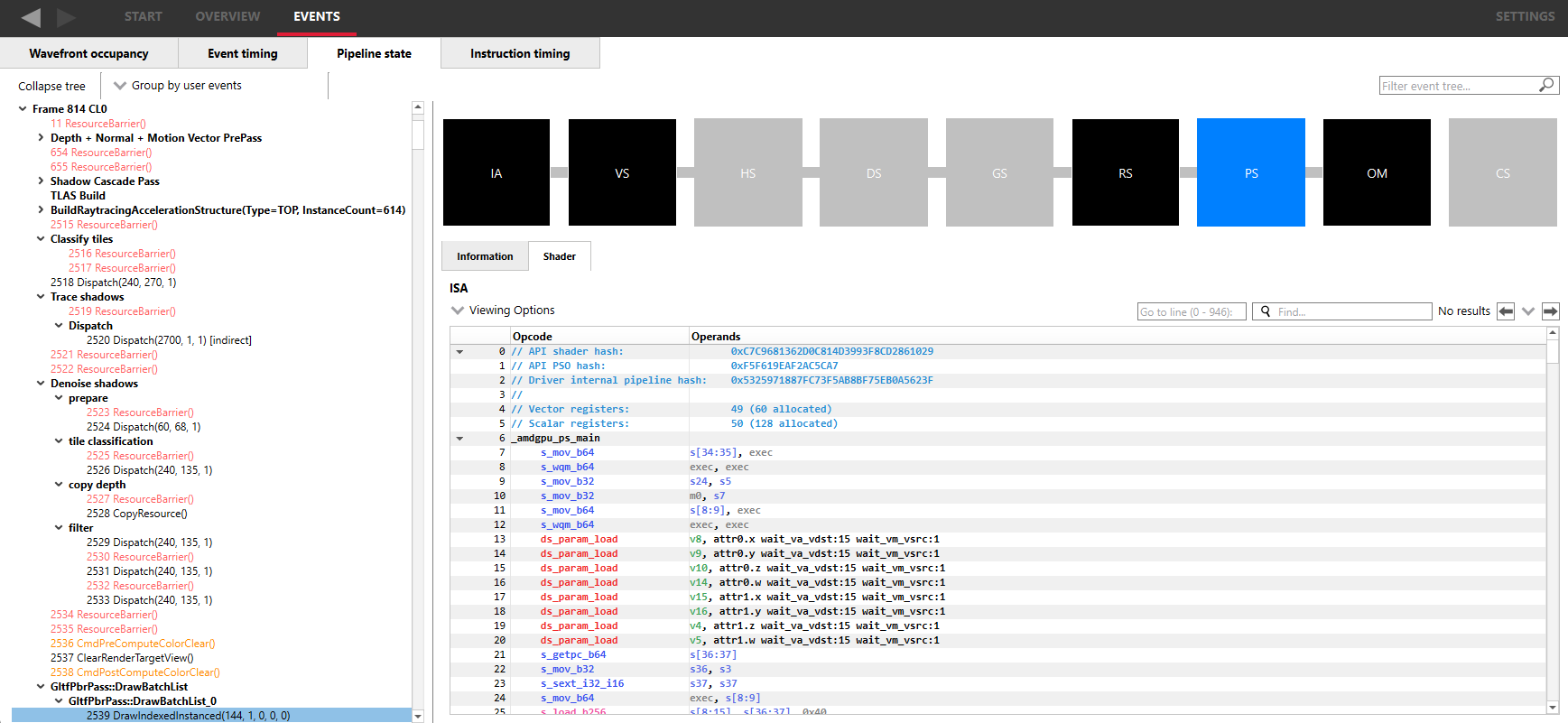
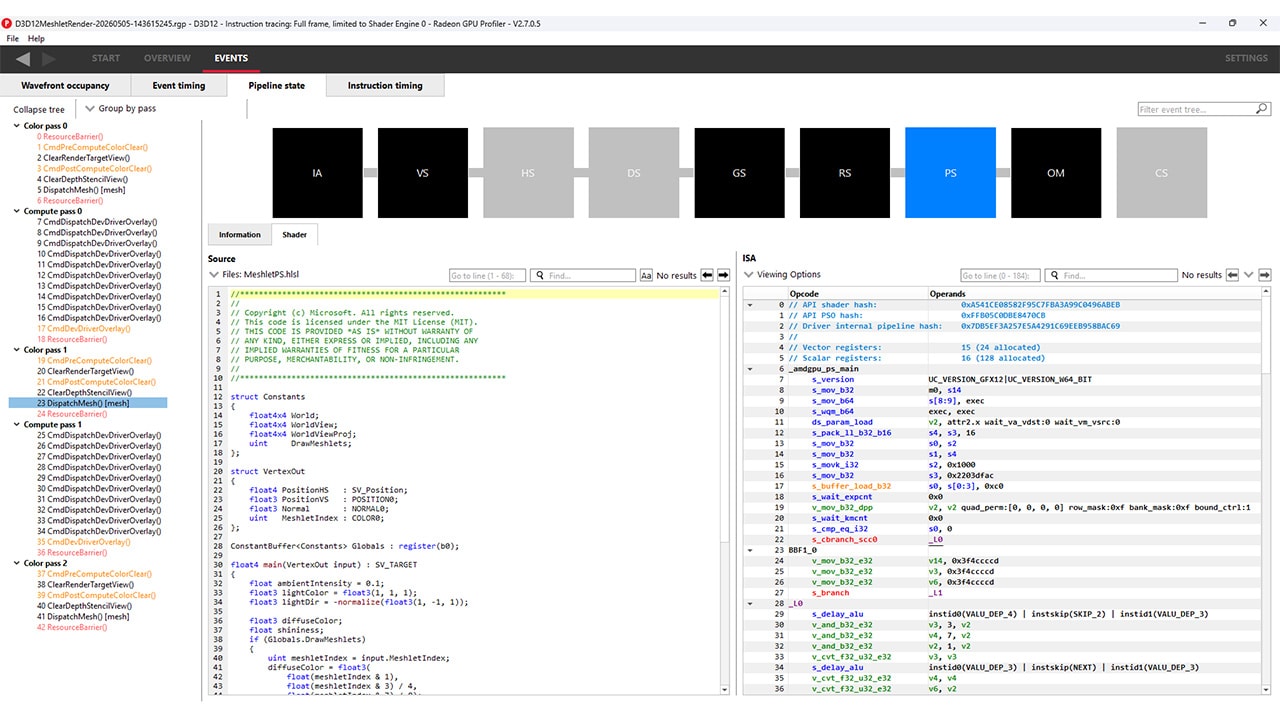
The event tree in AMD Radeon™ GPU Profiler (RGP), with events grouped by user markers, next to the Pipeline state view for the selected draw.
The features in these releases come with day-one support in PIX 2610.28. Shader Explorer is now available in main PIX releases, with offline and live shader analysis on supported AMD hardware. Learn more in the PIX 2610.28 blog.
Agility SDK 1.620 also includes these retail features. Both new AMD drivers support them on AMD Radeon™ RX 7000 and 9000 Series and AMD Radeon AI PRO R9700 and R9600 Series GPUs, unless noted:
CopyBufferRegions, ClearTextureSubresources and FillBuffers, so they may execute concurrently, using Enhanced Barriers for any dependencies.ID3D12Resource3::GetCastableFormatsCount and GetCastableFormats expose the list of castable formats recorded when a resource was created.ID3D12VideoEncoder1::ResolveEncoderOutputMetadataCPU resolves encoder output metadata synchronously on the CPU.Features from Agility SDK 1.619, such as Shader Model 6.9, remain supported in both new drivers. Learn more about everything in Agility SDK 1.620 in the Agility SDK 1.620 and 1.722-preview blog from Microsoft.
AMD Software: Agility SDK Developer Preview Edition 26.20.12.01 also supports these preview features on AMD Radeon™ RX 7000 and 9000 Series and AMD Radeon AI PRO R9700 and R9600 Series GPUs, unless noted:
TriangleObjectPositions and ClusterID.Microsoft® has said that Shader Model 6.10 will move to retail in Agility SDK 1.621, coming in early December. Learn more in the blogs on Shader Model 6.10, Agility SDK 1.721-preview and D3D12 Linear Algebra.
Agility SDK 1.620 also adds DirectX® Compute Graph Compiler (DxCGC) runtime interfaces, for compiling MLIR programs into executable programs within D3D12 state objects. On AMD GPUs, these are supported by the existing AMD Software: DirectX Compute Graph Compiler (DxCGC) Developer Preview Edition 26.10.07.11 driver, which is separate from the two Agility SDK drivers. It supports AMD Radeon™ RX 9070 and 9060 Series and AMD Radeon AI PRO R9700, R9700S and R9600D GPUs on Windows® 11. See its release notes for details.
Choose a driver based on the features you need:
These drivers support:
Some features have further requirements. For example, generating DirectX® Dump Files needs Windows 11, version 24H2 or 25H2.
The table below shows which AMD GPUs support each feature, and which driver you need.
| Agility SDK feature | AMD GPU support | AMD driver |
|---|---|---|
| Agility SDK 1.620 | ||
| DirectX Dump Files (HIGH_OVERHEAD and MEDIUM_OVERHEAD) | AMD Radeon™ RX 7000 and 9000 Series, AMD Radeon AI PRO R9700 and R9600 Series | Agility SDK Retail Edition or Agility SDK Developer Preview Edition |
| Extended PIX Markers | AMD Radeon™ RX 7000 and 9000 Series, AMD Radeon AI PRO R9700 and R9600 Series | Agility SDK Retail Edition or Agility SDK Developer Preview Edition |
| Partial Graphics Programs | AMD Radeon™ RX 7000 and 9000 Series, AMD Radeon AI PRO R9700 and R9600 Series | Agility SDK Retail Edition or Agility SDK Developer Preview Edition |
| Batched Asynchronous Command List APIs | AMD Radeon™ RX 7000 and 9000 Series, AMD Radeon AI PRO R9700 and R9600 Series | Agility SDK Retail Edition or Agility SDK Developer Preview Edition |
| GUID Texture Layout (basic and VPBLT) | AMD Radeon™ RX 7000 and 9000 Series, AMD Radeon AI PRO R9700 and R9600 Series (Limitation: see AMD driver release notes) | Agility SDK Retail Edition or Agility SDK Developer Preview Edition |
| Castable Format Query | AMD Radeon™ RX 7000 and 9000 Series, AMD Radeon AI PRO R9700 and R9600 Series | Agility SDK Retail Edition or Agility SDK Developer Preview Edition |
| Fence Barriers (Tier 1) | AMD Radeon™ RX 7000 and 9000 Series, AMD Radeon AI PRO R9700 and R9600 Series | Agility SDK Retail Edition or Agility SDK Developer Preview Edition |
| Video Encode CPU Metadata Resolution | AMD Radeon™ RX 7000 and 9000 Series, AMD Radeon AI PRO R9700 and R9600 Series | Agility SDK Retail Edition or Agility SDK Developer Preview Edition |
| VPblit 3DLUT | AMD Radeon™ RX 9000 Series, AMD Radeon AI PRO R9700 and R9600 Series | Agility SDK Retail Edition or Agility SDK Developer Preview Edition |
| DirectX Compute Graph Compiler (DxCGC) | AMD Radeon™ RX 9070 and 9060 Series, AMD Radeon AI PRO R9700, R9700S and R9600D | DirectX Compute Graph Compiler (DxCGC) Developer Preview Edition |
| Agility SDK 1.722-preview | ||
| Clustered Geometry (1.722-preview) | AMD Radeon™ RX 9000 Series, AMD Radeon AI PRO R9700 and R9600 Series | Agility SDK Developer Preview Edition |
| Partitioned TLAS (1.722-preview) | AMD Radeon™ RX 9000 Series, AMD Radeon AI PRO R9700 and R9600 Series | Agility SDK Developer Preview Edition |
| Indirect acceleration structure builds (1.722-preview) | AMD Radeon™ RX 9000 Series, AMD Radeon AI PRO R9700 and R9600 Series | Agility SDK Developer Preview Edition |
| GPU Timeline CopyDescriptors (1.722-preview) | AMD Radeon™ RX 7000 and 9000 Series, AMD Radeon AI PRO R9700 and R9600 Series | Agility SDK Developer Preview Edition |
| UAVs of Depth (1.722-preview) | AMD Radeon™ RX 7000 and 9000 Series, AMD Radeon AI PRO R9700 and R9600 Series | Agility SDK Developer Preview Edition |
| Shader Model 6.10 Group Wave Index (1.722-preview) | AMD Radeon™ RX 7000 and 9000 Series, AMD Radeon AI PRO R9700 and R9600 Series | Agility SDK Developer Preview Edition |
| Shader Model 6.10 Variable Group Shared Memory (1.722-preview) | AMD Radeon™ RX 7000 and 9000 Series, AMD Radeon AI PRO R9700 and R9600 Series (Limitation: default size only) | Agility SDK Developer Preview Edition |
| Shader Model 6.10 TriangleObjectPositions (1.722-preview) | AMD Radeon™ RX 7000 and 9000 Series, AMD Radeon AI PRO R9700 and R9600 Series | Agility SDK Developer Preview Edition |
| Shader Model 6.10 ClusterID (1.722-preview) | AMD Radeon™ RX 7000 and 9000 Series, AMD Radeon AI PRO R9700 and R9600 Series | Agility SDK Developer Preview Edition |
| Shader Model 6.10 Linear Algebra (1.722-preview) | AMD Radeon™ RX 9000 Series, AMD Radeon AI PRO R9700 and R9600 Series | Agility SDK Developer Preview Edition |
Agility SDK 1.620 brings DirectX® Dump Files, Extended PIX Markers, Partial Graphics Programs and more to retail games, and Agility SDK 1.722-preview gives developers an early look at the new DXR features. Download AMD Software: Agility SDK Retail Edition 26.20.12.02 for the retail features, or AMD Software: Agility SDK Developer Preview Edition 26.20.12.01 to try everything, including the new DXR features on AMD Radeon™ RX 9000 Series and AMD Radeon AI PRO R9700 and R9600 Series GPUs.
As with Partial Graphics Programs, DirectX Dump Files and Extended PIX Markers this year, we aim to support new Microsoft® features from their first preview, so you can start evaluating them on AMD hardware as early as possible. Stay tuned to GPUOpen for more.
* Testing by Microsoft, published October 28, 2026 in “[PREVIEW] Raytracing: Clustered Geometry, Partitioned TLAS, Indirect Acceleration Structure Builds”, using the D3D12RaytracingClusteredGeometry sample on an AMD Radeon™ RX 9070 GPU to compare traditional BLAS rebuild with Clustered Geometry in a single test configuration. System configuration was not specified. Microsoft notes that conclusions might vary depending on settings, load and GPU, and that games should not assume improvements of this magnitude. Results may vary.
Links to third-party sites are provided for convenience and unless explicitly stated, AMD is not responsible for the contents of such linked sites, and no endorsement is implied. GD-98
DirectX, Direct3D, Microsoft, Windows, and XBOX are registered trademarks of Microsoft Corporation in the US and/or other countries.
Unreal® and Unreal Engine® are trademarks or registered trademarks of Epic Games, Inc. in the United States of America and elsewhere.