AMD Radeon™ Memory Visualizer
AMD Radeon™ Memory Visualizer (RMV) is a tool to allow you to gain a deep understanding of how your application uses memory for graphics resources.


We’ve released a new v0.4.0 update to MiniDXNN, our open-source library for GPU-accelerated MLP (Multi-Layer Perceptron) inference and training on DirectX® 12. Starting with the v0.2.0 release, the library has moved from using Cooperative Vectors to the new D3D12 Linear Algebra feature of the Microsoft® Shader Model 6.10 preview (available with the AgilitySDK 1.721-preview), added input encoding for neural texture compression, and now ships a real-time GUI application that trains a texture representation live on screen.
Shader Model 6.10/D3D12 LinAlg Matrix (v0.3.0):
Input encoding and neural texture compression (v0.3.0):
03_texture_compression_with_input_encoding) trains an MLP to represent a 2D texture, with positional and grid input encoding to recover high-frequency detail. 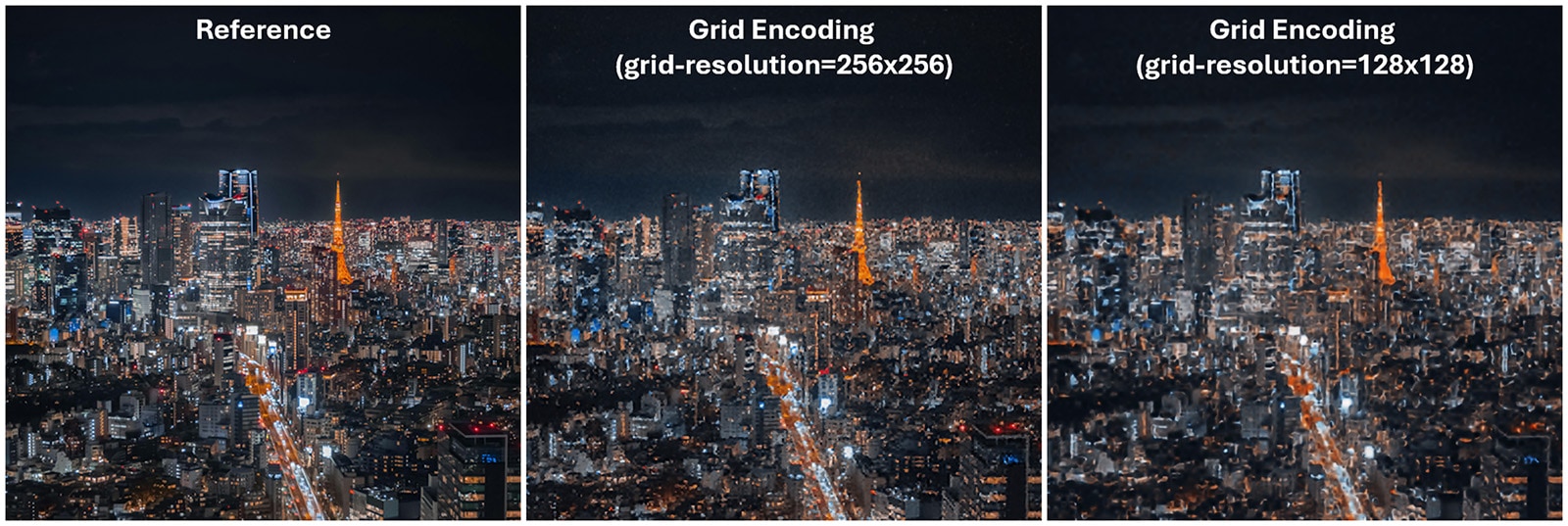 Examples from 03-texture-compression-with-input-encoding. Stock image from Pexels.
Interactive GUI application (v0.4.0):
04_texture_compression_app is a windowed app that incrementally trains each frame, displays the reconstruction live, and exposes training parameters through ImGui.Toolchain:
D3D12 LinAlg Matrix is a DirectX 12 feature that exposes hardware matrix-vector multiply-accumulate operations directly in HLSL compute shaders. It targets the tensor/matrix units found on modern discrete GPUs, the same units used by dedicated ML frameworks, but is accessible from a standard D3D12 compute pipeline.
A single MLP layer, matrix × vector + bias, all in FP16, looks like this:
// A layer's weight matrix, held in thread scope and loaded from a byte bufferusing WeightMatrix = dx::linalg::Matrix<dx::linalg::ComponentType::F16,                                        OUTPUT_DIM, INPUT_DIM,                                        dx::linalg::MatrixUse::A,                                        dx::linalg::MatrixScope::Thread>;using BiasVec = dx::linalg::VectorRef<dx::linalg::ComponentType::F16, OUTPUT_DIM>;
WeightMatrix weight = WeightMatrix::Load<dx::linalg::MatrixLayout::MulOptimal>(weightBuffer, weightOffset, rowStride);BiasVec bias = {biasBuffer, biasOffset};
// Hardware-accelerated: weight * input + biasvector<float16_t, OUTPUT_DIM> output = dx::linalg::MultiplyAdd<float16_t>(weight, input, bias);
Because the driver controls the matrix memory layout (via the MulOptimal layout hint), it can arrange weight data in whatever tiling or swizzle pattern the underlying hardware prefers, without the shader author needing to know the details.
Two steps are required before the standard D3D12 device creation:
D3D12EnableExperimentalFeatures with D3D12ExperimentalShaderModels before creating the device.After device creation, query support with CheckFeatureSupport(D3D12_FEATURE_LINEAR_ALGEBRA_SUPPORT). Tier 1 guarantees FP16 vector-matrix multiply. Supported hardware includes AMD Radeon RX 9000 Series GPUs with the AMD Software: AgilitySDK Developer Preview Edition 26.10.07.02 driver and equivalent NVIDIA GPUs with SM 6.10 drivers.
One requirement that comes with D3D12 LinAlg Matrix is weight format conversion. The application must convert its CPU-side row-major weight matrices into the driver’s preferred layout before dispatching shaders. This is done with two D3D12 commands:
// Query the size the driver needs for the optimal layoutdevice->GetLinearAlgebraMatrixConversionDestinationInfo(&destInfo);
// Record the conversion on a command list (GPU-side)commandList->ConvertLinearAlgebraMatrix(&convInfo, 1);
MiniDXNN wraps this in a packAsD3D12MatrixBuffer() utility that handles alignment, queries, and conversion in one call. Alignment requirements are strict: matrix base addresses need 128-byte alignment, row strides need 16-byte alignment, and bias vectors also need 128-byte alignment.
mlp.hlslThe core of MiniDXNN is a single-header HLSL file that implements both forward inference and backward training using D3D12 LinAlg Matrix. It’s template-heavy to keep everything compile-time resolved:
#include <minidxnn/hlsl/mlp.hlsl>
using LayerData = mininn::InferenceLayerDataRef<    NUM_LAYERS, HIDDEN_DIM,    dx::linalg::DATA_TYPE_FLOAT16,    dx::linalg::MATRIX_LAYOUT_MUL_OPTIMAL,    dx::linalg::DATA_TYPE_FLOAT16,   // bias type    dx::linalg::DATA_TYPE_FLOAT16,   // accumulator type    mininn::LeakyReluActivation,    mininn::SigmoidActivation>;
[numthreads(32, 1, 1)]void main(uint3 tid : SV_DispatchThreadID){    LayerData layerData;    layerData.setWeightData(g_weights, uint2(firstLayerMatSize, hiddenLayerMatSize));    layerData.setBiasData(g_biases);
    vector<half, 2> output;    mininn::forward(output, input, layerData);}
For training, the backward pass requires two additional buffers: a gradient accumulation buffer (for weight and bias gradients, accumulated across the mini-batch with atomic adds) and a logits cache (per-thread storage of pre-activation values needed during backprop). After forward() writes the logits cache, backward() reads it to propagate gradients correctly.
The major addition in MiniDXNN v0.4.0 is 04_texture_compression_app — a windowed application built on the same neural texture compression idea as example 03, but restructured for interactive use.
Instead of running a fixed number of epochs headlessly and writing a PNG at the end, the app runs a configurable number of training epochs per frame, immediately reconstructs the full texture with an inference dispatch, and draws it as a fullscreen quad. You watch the network learn the image in real time.
# Train on a PNG image, 5 epochs per frame with a larger batch04-texture-compression-app --input-image photo.png --epochs-per-frame 5 --batch-size 50000
# Positional encoding with more frequency bands04-texture-compression-app --input-encoding positional --positional-frequencies 8The app is GPU-only — the C++ fallback path is not wired in, since there is nothing to display without a device. And it supports none and positional encoding; grid encoding remains available in the headless example 03, where its larger parameter set and joint grid/MLP training are easier to sweep.
Building it requires ImGui support in the vendored gfx layer: set GFX_ENABLE_GUI ON in third_party/gfx_dep/CMakeLists.txt, then
cmake --build build --target 04-texture-compression-app --config ReleaseBoth texture compression examples train an MLP to map UV coordinates (u, v) ∈ [0,1]² to RGB pixel values, learning the mapping entirely on-GPU — a form of neural texture compression.
The key challenge is that a raw 2D coordinate fed into a small MLP can only represent low-frequency content: sharp edges and fine texture are invisible to it. Input encoding transforms the raw UV into a higher-dimensional feature vector before the MLP sees it.
Positional encoding maps each coordinate to a bank of sin/cos features at exponentially spaced frequencies:
sin(2⁰π·u), cos(2⁰π·u), sin(2¹π·u), cos(2¹π·u), ..., sin(2^(F-1)π·u), cos(2^(F-1)π·u)With F frequency bands the input grows from 2D to 4F dimensions, and the MLP can learn coefficients per frequency — the same idea behind NeRF’s positional encoding. This is the default in the GUI app, and its frequency count is one of the more visually dramatic sliders to move while training runs.
Grid encoding (example 03) stores learnable feature vectors at the vertices of a regular R×R grid. For a given UV, bilinear interpolation of the four surrounding corners produces the MLP input, and the grid features are trained jointly with the MLP weights — gradient is scattered back to each corner weighted by its bilinear contribution:
// Forward: bilinear interpolationresult = w00 * corner[0,0] + w10 * corner[1,0] + w01 * corner[0,1] + w11 * corner[1,1];
// Backward: atomic scatter to grid gradient bufferfor each corner c:    atomicFetchAdd(gridGradBuffer, cornerOffset[c] + f*4, grad[f] * interpWeight[c]);
It is the most expressive option: at 64×64 resolution with 8-dimensional features, the grid holds 32,768 feature vectors the MLP can look up spatial detail from, rather than computing everything from scratch. Higher resolution captures sharper detail; larger feature dimension gives the MLP more to work with per query.
None — raw UV passed directly — remains available in both examples, and works fine for smooth gradients.
For CI, testing, or systems without DirectX 12, mlp.hlsl can be compiled as standard C++ by including hlsl_compat.hpp first. This header provides C++ shims for HLSL intrinsics (vector, ByteAddressBuffer, dx::linalg::*) so the same source file runs on CPU without modification. The input encoding code in input_encoding_common.hlsl uses #ifdef guards to pick between the HLSL path and idiomatic C++ (with if constexpr, proper casts, and STL math functions).
cmake -B build -DMINIDXNN_CPP_FALLBACK_ONLY=ON -DMINIDXNN_BUILD_TESTS=ONcmake --build build -j$(nproc)git clone --recursive https://github.com/amdadvtech/MiniDXNN.gitcd MiniDXNNcmake -B buildcmake --build build --config Release
# Watch an image being learned in real time./build/example/Release/04-texture-compression-app \ --input-image photo.png \ --input-encoding positional --positional-frequencies 8 \ --epochs-per-frame 5 --batch-size 50000 --optimizer adam
# Or the headless equivalent, with grid encoding./build/example/Release/03-texture-compression-with-input-encoding \ --input-image photo.png \ --input-encoding grid --grid-resolution 64 --grid-feature-dim 8 \ --epochs 50 --optimizer adam --output-image result.pngThe four examples now cover the full range: 01 runs inference from a pre-trained binary, 02 trains on-GPU and reconstructs headlessly, 03 adds input encoding for texture compression, and 04 puts the whole loop behind an interactive window.
Links to third party sites are provided for convenience and unless explicitly stated, AMD is not responsible for the contents of such linked sites and no endorsement is implied. GD-97.
DirectX, Microsoft, and Windows are registered trademarks of Microsoft Corporation in the US and/or other countries.