FSR™ Ray Regeneration Sample
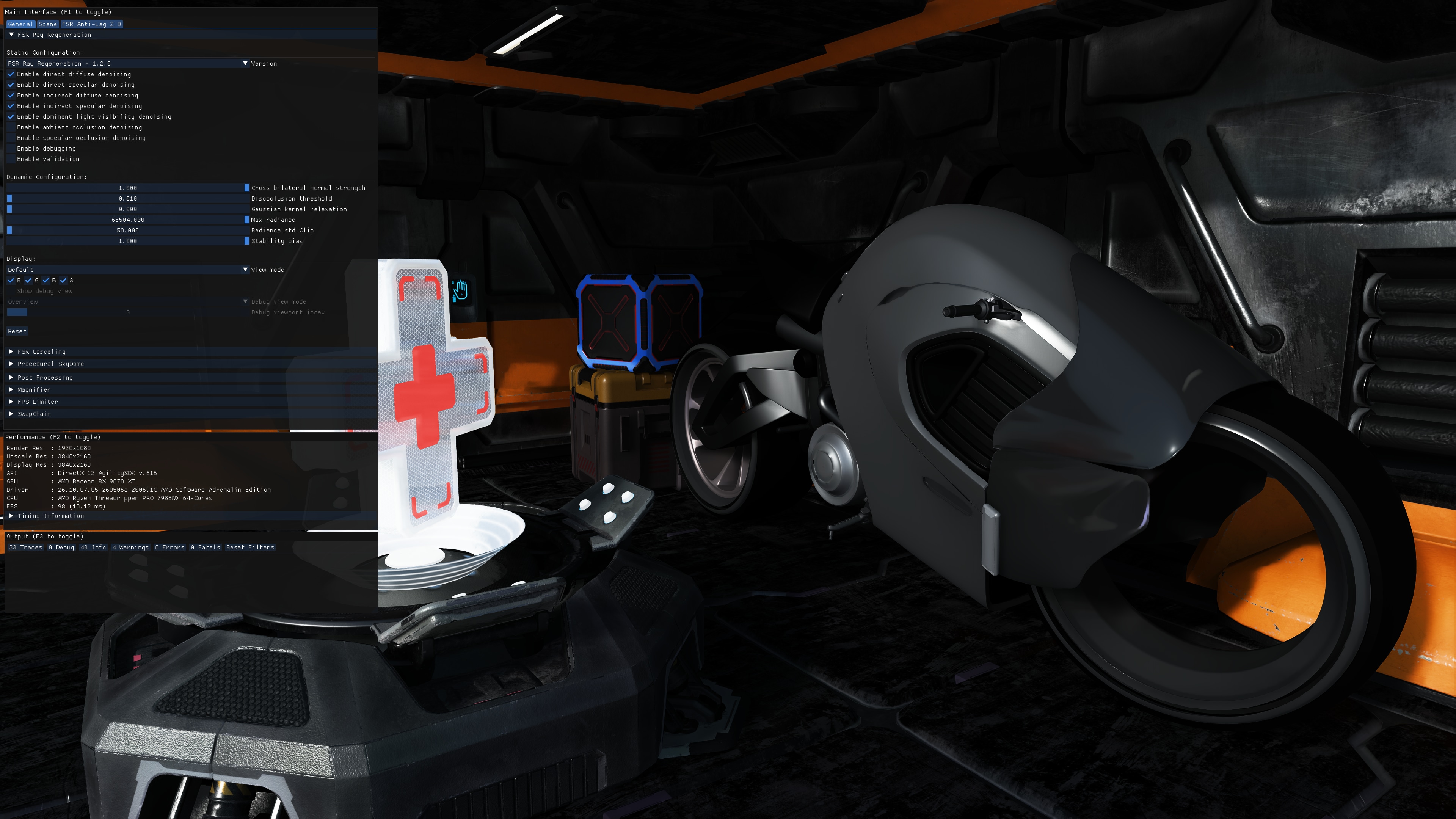
This sample demonstrates how to integrate and experiment with FSR™ Ray Regeneration 1.2.0, a real-time ray-tracing denoising solution designed to improve the stability and visual quality of ray-traced lighting signals.
For details on the underlying algorithm, refer to the FSR™ Ray Regeneration technique documentation.
Table of contents
- 1. Requirements
- 2. UI elements
- 3. Setting up FSR™ Ray Regeneration
- 4. Sample controls and configurations
- 5. See also
1. Requirements
- AMD FSR™ Ray Regeneration requires an AMD Radeon™ RX 9000 Series GPU or later.
- DirectX® 12 + Shader Model 6.6
- Windows® 11
2. UI elements
The sample contains various UI elements to help you explore the techniques it demonstrates. The tables below summarize the UI elements and what they control within the sample.
2.1. Provider
| Element name | Values | Description |
|---|---|---|
| Version | FSR Ray Regeneration - 1.2.0 | Dropdown for specifying the provider. Sets the corresponding versionId member of the ffxOverrideVersion description. |
2.2. Context creation
| Element name | Values | Description |
|---|---|---|
| Enable direct diffuse denoising | Checked, Unchecked | Checkbox for specifying whether the direct diffuse radiance should be denoised. Toggles the FFX_DENOISER_SIGNAL_DIRECT_DIFFUSE flag to the signalFlags member of the ffxCreateContextDescDenoiser context creation description. |
| Enable direct specular denoising | Checked, Unchecked | Checkbox for specifying whether the direct specular radiance should be denoised. Toggles the FFX_DENOISER_SIGNAL_DIRECT_SPECULAR flag to the signalFlags member of the ffxCreateContextDescDenoiser context creation description. |
| Enable indirect diffuse denoising | Checked, Unchecked | Checkbox for specifying whether the indirect diffuse radiance should be denoised. Toggles the FFX_DENOISER_SIGNAL_INDIRECT_DIFFUSE flag to the signalFlags member of the ffxCreateContextDescDenoiser context creation description. |
| Enable indirect specular denoising | Checked, Unchecked | Checkbox for specifying whether the indirect specular radiance should be denoised. Toggles the FFX_DENOISER_SIGNAL_INDIRECT_SPECULAR flag to the signalFlags member of the ffxCreateContextDescDenoiser context creation description. |
| Enable dominant light visibility denoising | Checked, Unchecked | Checkbox for specifying whether the dominant light visibility should be denoised. Toggles the FFX_DENOISER_SIGNAL_DOMINANT_LIGHT_VISIBILITY flag to the signalFlags member of the ffxCreateContextDescDenoiser context creation description. |
| Enable ambient occlusion denoising | Checked, Unchecked | Checkbox for specifying whether the ambient occlusion should be denoised. Toggles the FFX_DENOISER_SIGNAL_AMBIENT_OCCLUSION flag to the signalFlags member of the ffxCreateContextDescDenoiser context creation description. |
| Enable specular occlusion denoising | Checked, Unchecked | Checkbox for specifying whether the specular occlusion should be denoised. Toggles the FFX_DENOISER_SIGNAL_SPECULAR_OCCLUSION flag to the signalFlags member of the ffxCreateContextDescDenoiser context creation description. |
| Enable debugging | Checked, Unchecked | Checkbox for specifying whether debugging should be enabled. Toggles the FFX_DENOISER_ENABLE_DEBUGGING flag to the flags member of the ffxCreateContextDescDenoiser context creation description. |
| Enable validation | Checked, Unchecked | Checkbox for specifying whether exhaustive validation should be enabled. Toggles the FFX_DENOISER_ENABLE_VALIDATION flag to the flags member of the ffxCreateContextDescDenoiser context creation description. |
2.3. Configure
| Element name | Values | Description |
|---|---|---|
| Cross bilateral normal strength | [0.0, 1.0] | Sets the FFX_API_CONFIGURE_DENOISER_KEY_CROSS_BILATERAL_NORMAL_STRENGTH configuration parameter. |
| Disocclusion threshold | [0.01, 0.05] | Sets the FFX_API_CONFIGURE_DENOISER_KEY_DISOCCLUSION_THRESHOLD configuration parameter. |
| Gaussian kernel relaxation | [0.0, 1.0] | Sets the FFX_API_CONFIGURE_DENOISER_KEY_GAUSSIAN_KERNEL_RELAXATION configuration parameter. |
| Max radiance | [0.0, 65504.0] | Sets the FFX_API_CONFIGURE_DENOISER_KEY_MAX_RADIANCE configuration parameter. |
| Radiance std clip | [0.0, 65504.0] | Sets the FFX_API_CONFIGURE_DENOISER_KEY_RADIANCE_CLIP_STD_K configuration parameter. |
| Stability bias | [0.0, 1.0] | Sets the FFX_API_CONFIGURE_DENOISER_KEY_STABILITY_BIAS configuration parameter. |
| Debug view linear depth max bound | [0.001, 1024.0] | Sets the max field of the FFX_API_CONFIGURE_DENOISER_KEY_DEBUG_VIEW_LINEAR_DEPTH_BOUNDS configuration parameter. Only the max bound is exposed in the sample UI; the min bound is set programmatically. |
2.4. Dispatch
| Element name | Values | Description |
|---|---|---|
| Reset | NA | Button for resetting the history accumulation. Toggles the FFX_DENOISER_DISPATCH_RESET flag to the flags member of the ffxDispatchDescDenoiser dispatch description. |
2.5. Display
| Element name | Values | Description |
|---|---|---|
| View mode | Default, Default (Input), Direct, Direct diffuse, Direct specular, Indirect, Indirect diffuse, Indirect specular, Dominant light visibility, Ambient occlusion, Specular occlusion, Direct (Input), Direct diffuse (Input), Direct specular (Input), Indirect (Input), Indirect diffuse (Input), Indirect specular (Input), Dominant light visibility (Input), Ambient occlusion (Input), Specular occlusion (Input), Linear depth, Motion vectors, Normals, Specular albedo, Diffuse albedo, Skip signal | Dropdown for specifying the view mode to display. |
| R G B A | Checked, Unchecked | Checkboxes for specifying which color channels (i.e. red, green, blue, alpha) of the selected view mode should be displayed. |
| Show debug view | Checked, Unchecked | Checkbox for specifying whether the debug view should be dispatched and drawn. The debug view requires debugging to be enabled. |
| Debug view mode | Overview, Fullscreen Target | Dropdown for specifying the debug view mode to display. Sets the corresponding mode member of the ffxDispatchDescDenoiserDebugView dispatch description. |
| Debug viewport index | [0,FFX_API_DENOISER_DEBUG_VIEW_MAX_VIEWPORTS) | Slider for specifying the debug viewport index for the Fullscreen Target, debug view mode. Sets the corresponding viewportIndex member of the ffxDispatchDescDenoiserDebugView dispatch description. |
3. Setting up FSR Ray Regeneration
The sample includes a dedicated Render Module for FSR™ Ray Regeneration which creates the context and manages its lifetime. See the FSR™ Ray Regeneration technique documentation for more details.
4. Sample controls and configurations
For information on sample controls, configuration options, and Cauldron Framework UI elements, see Running the samples.