AMD FSR™ Frame Generation API
Table of contents
Integration
FSR™ Frame Generation should be integrated using the FSR™ API. This document describes the API constructs specific to AMD FSR™ Frame Generation. This API is common across all versions of FSR™ Frame Generation with any differences noted in the version specific pages.
Memory Usage
An application can get amount of GPU local memory required by FSR™ Frame Generation after context creation by calling ffxQuery with the valid context and ffxQueryDescFrameGenerationGetGPUMemoryUsage.
An application can get GPU local memory required by default FSR™ Frame Generation version before context creation by calling ffxQuery with NULL context and filling out ffxQueryDescFrameGenerationGetGPUMemoryUsageV2. To get the memory requirement info for a different FSR™ Frame Generation version, additionally link ffxOverrideVersion.
See code examples how to call Query.
New APIs
As of SDK 2.1 it is necessary to create and fill in a ffxCreateContextDescFrameGenerationVersion, setting the version field to FFX_FRAMEGENERATION_VERSION and link this in the header.pNext field of the above ffxCreateContextDescFrameGeneration structure. This is used to ensure compatibility between different versions of the API.
As of SDK 2.1 both ffxDispatchDescFrameGenerationPrepare and ffxDispatchDescFrameGenerationPrepareCameraInfo are deprecated. Use a ffxDispatchDescFrameGenerationPrepareV2 structure instead.
The reset field of ffxDispatchDescFrameGenerationPrepareV2 is now used by the FSR™ Frame Generation implementations and behaves the same as providing disjoint frameID, unlike the previous unused_reset field which was ignored.
Create frame generation context
In order to use frame generation first call ffxCreateContext with a description for frame generation and a backend description.
The ffxCreateContextDescFrameGeneration structure contains configuration data:
- A set of initialization flags
- The maximum resolution the rendering will be performed at
- The resolution of the resources that will get interpolated
- The format of the resources that will get interpolated
The initialization flags are provided though the FfxApiCreateContextFramegenerationFlags enumeration:
| Flag | Note |
|---|---|
FFX_FRAMEGENERATION_ENABLE_ASYNC_WORKLOAD_SUPPORT | A bit indicating whether the context supports async. dispatch for frame-generation workloads. |
FFX_FRAMEGENERATION_ENABLE_DISPLAY_RESOLUTION_MOTION_VECTORS | A bit indicating if the motion vectors are rendered at display resolution. |
FFX_FRAMEGENERATION_ENABLE_MOTION_VECTORS_JITTER_CANCELLATION | A bit indicating that the motion vectors have the jittering pattern applied to them. |
FFX_FRAMEINTERPOLATION_ENABLE_DEPTH_INVERTED | A bit indicating that the input depth buffer data provided is inverted [1..0].A bit indicating the depth buffer is inverted. |
FFX_FRAMEINTERPOLATION_ENABLE_DEPTH_INFINITE | A bit indicating that the input depth buffer data provided is using an infinite far plane. |
FFX_FRAMEGENERATION_ENABLE_HIGH_DYNAMIC_RANGE | A bit indicating if the input color data provided to all inputs is using a high-dynamic range. |
FFX_FRAMEGENERATION_ENABLE_DEBUG_CHECKING | A bit indicating that the runtime should check some API values and report issues. |
Example using the C++ helpers:
ffx::Context frameGenContext;ffx::CreateBackendDX12Desc backendDesc{};backendDesc.device = GetDevice()->DX12Device();
ffx::CreateContextDescFrameGenerationVersion createFgVersion{};createFgVersion.version = FFX_FRAMEGENERATION_VERSION;
ffx::CreateContextDescFrameGeneration createFg{};createFg.displaySize = {resInfo.DisplayWidth, resInfo.DisplayHeight};createFg.maxRenderSize = {resInfo.DisplayWidth, resInfo.DisplayHeight};createFg.flags = FFX_FRAMEGENERATION_ENABLE_HIGH_DYNAMIC_RANGE;
if (m_EnableAsyncCompute)    createFg.flags |= FFX_FRAMEGENERATION_ENABLE_ASYNC_WORKLOAD_SUPPORT;
createFg.backBufferFormat = SDKWrapper::GetFfxSurfaceFormat(GetFramework()->GetSwapChain()->GetSwapChainFormat());ffx::ReturnCode retCode = ffx::CreateContext(frameGenContext, nullptr, createFg, createFgVersion, backendDesc);
Configure frame generation
Configure frame generation by filling out the ffxConfigureDescFrameGeneration structure with the required arguments and calling ffxConfigure.
This must be called once per frame. The frame ID must increment by exactly 1 each frame. Any other difference between consecutive frames will reset frame generation logic.
ffxConfigureDescFrameGeneration member | Note |
|---|---|
swapChain | The swapchain to use with frame generation. |
presentCallback | A UI composition callback to call when finalizing the frame image. |
presentCallbackUserContext | A pointer to be passed to the UI composition callback. |
frameGenerationCallback | The frame generation callback to use to generate a frame. |
frameGenerationCallbackUserContext | A pointer to be passed to the frame generation callback. |
frameGenerationEnabled | Sets the state of frame generation. Set to false to disable frame generation. |
allowAsyncWorkloads | Sets the state of async workloads. Set to true to enable generation work on async compute. |
HUDLessColor | The hudless back buffer image to use for UI extraction from backbuffer resource. May be empty. |
flags | Zero or combination of flags from FfxApiDispatchFrameGenerationFlags. |
onlyPresentGenerated | Set to true to only present generated frames. |
generationRect | The area of the backbuffer that should be used for generation in case only a part of the screen is used e.g. due to movie bars |
frameID | Identifier used to select internal resources when async support is enabled. Must increment by exactly one (1) for each frame. Any non-exactly-one difference will reset the frame generation logic. |
// Update frame generation configFfxApiResource hudLessResource = SDKWrapper::ffxGetResourceApi(m_pHudLessTexture[m_curUiTextureIndex]->GetResource(), FFX_API_RESOURCE_STATE_COMPUTE_READ);
m_FrameGenerationConfig.frameGenerationEnabled = m_FrameInterpolation;m_FrameGenerationConfig.flags = 0;m_FrameGenerationConfig.flags |= m_DrawFrameGenerationDebugTearLines ? FFX_FRAMEGENERATION_FLAG_DRAW_DEBUG_TEAR_LINES : 0;m_FrameGenerationConfig.flags |= m_DrawFrameGenerationDebugResetIndicators ? FFX_FRAMEGENERATION_FLAG_DRAW_DEBUG_RESET_INDICATORS : 0;m_FrameGenerationConfig.flags |= m_DrawFrameGenerationDebugView ? FFX_FRAMEGENERATION_FLAG_DRAW_DEBUG_VIEW : 0;m_FrameGenerationConfig.HUDLessColor = (s_uiRenderMode == 3) ? hudLessResource : FfxApiResource({});m_FrameGenerationConfig.allowAsyncWorkloads = m_AllowAsyncCompute && m_EnableAsyncCompute;// assume symmetric letterboxm_FrameGenerationConfig.generationRect.left = (resInfo.DisplayWidth - resInfo.UpscaleWidth) / 2;m_FrameGenerationConfig.generationRect.top = (resInfo.DisplayHeight - resInfo.UpscaleHeight) / 2;m_FrameGenerationConfig.generationRect.width = resInfo.UpscaleWidth;m_FrameGenerationConfig.generationRect.height = resInfo.UpscaleHeight;// For sample purposes only. Most applications will use one or the other.if (m_UseCallback){ m_FrameGenerationConfig.frameGenerationCallback = [](../ffxDispatchDescFrameGeneration* params, void* pUserCtx/) -> ffxReturnCode_t { return ffxDispatch(reinterpret_cast<ffxContext*>(pUserCtx), ¶ms->header); }; m_FrameGenerationConfig.frameGenerationCallbackUserContext = &m_FrameGenContext;}else{ m_FrameGenerationConfig.frameGenerationCallback = nullptr; m_FrameGenerationConfig.frameGenerationCallbackUserContext = nullptr;}m_FrameGenerationConfig.onlyPresentGenerated = m_PresentInterpolatedOnly;m_FrameGenerationConfig.frameID = m_FrameID;
m_FrameGenerationConfig.swapChain = GetSwapChain()->GetImpl()->DX12SwapChain();
ffx::ReturnCode retCode = ffx::Configure(m_FrameGenContext, m_FrameGenerationConfig);CauldronAssert(ASSERT_CRITICAL, !!retCode, L"Configuring FSR FG failed: %d", (uint32_t)retCode);If using the frame generation callback, the swapchain will call the callback with appropriate parameters.
Otherwise, the application is responsible for calling the frame generation dispatch and setting parameters itself.
In that case, the frame ID must be equal to the frame ID used in configuration. The command list and output texture can be queried from the frame generation context using ffxQuery. See the sample code for an example.
The user context pointers will only be passed into the respective callback functions. FSR™ code will not attempt to dereference them.
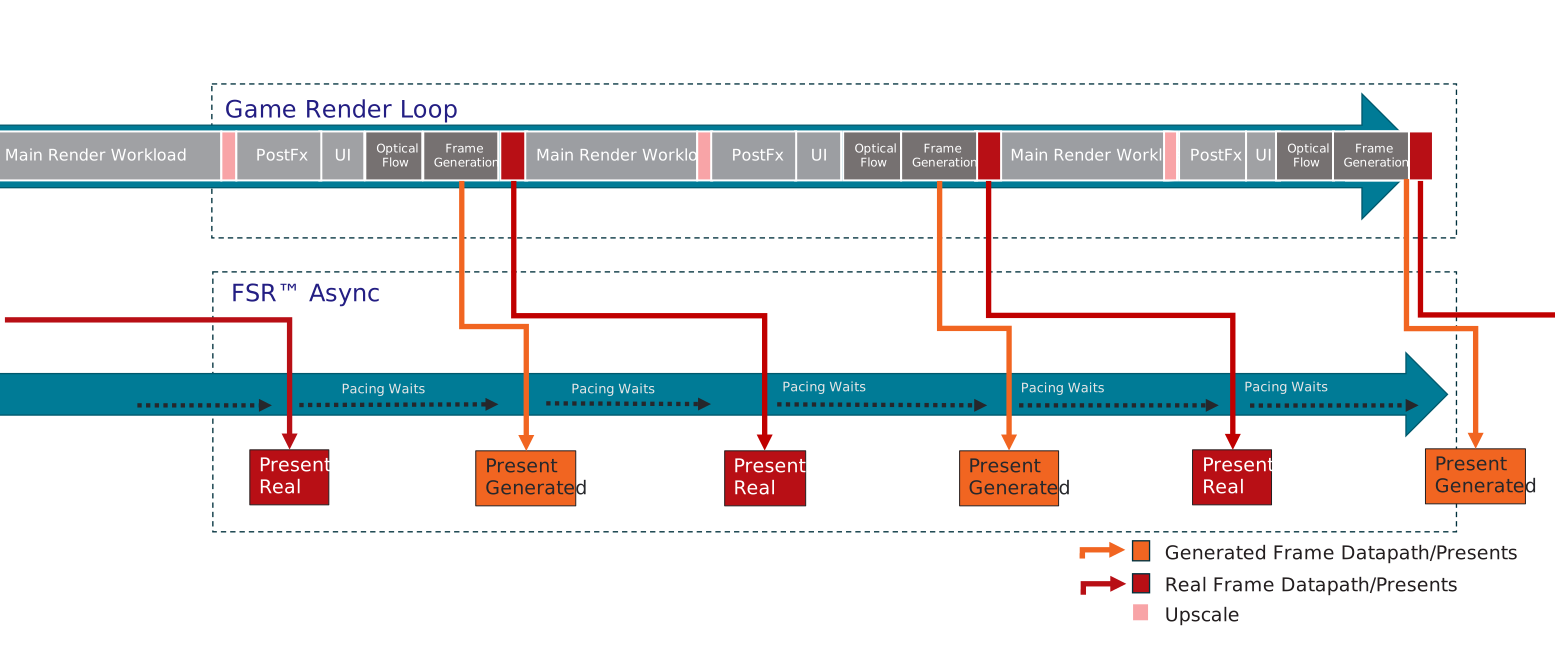
When allowAsyncWorkloads is set to false the main graphics queue will be used to execute the Optical Flow and Frame Generation workloads. It is strongly advised to profile, if significant performance benefits can be gained from asynchronous compute usage. Not using asynchronous compute will result in a lower memory overhead.
Note that UI composition and presents will always get executed on an async queue, so they can be paced and injected into the middle of the workloads generating the next frame.
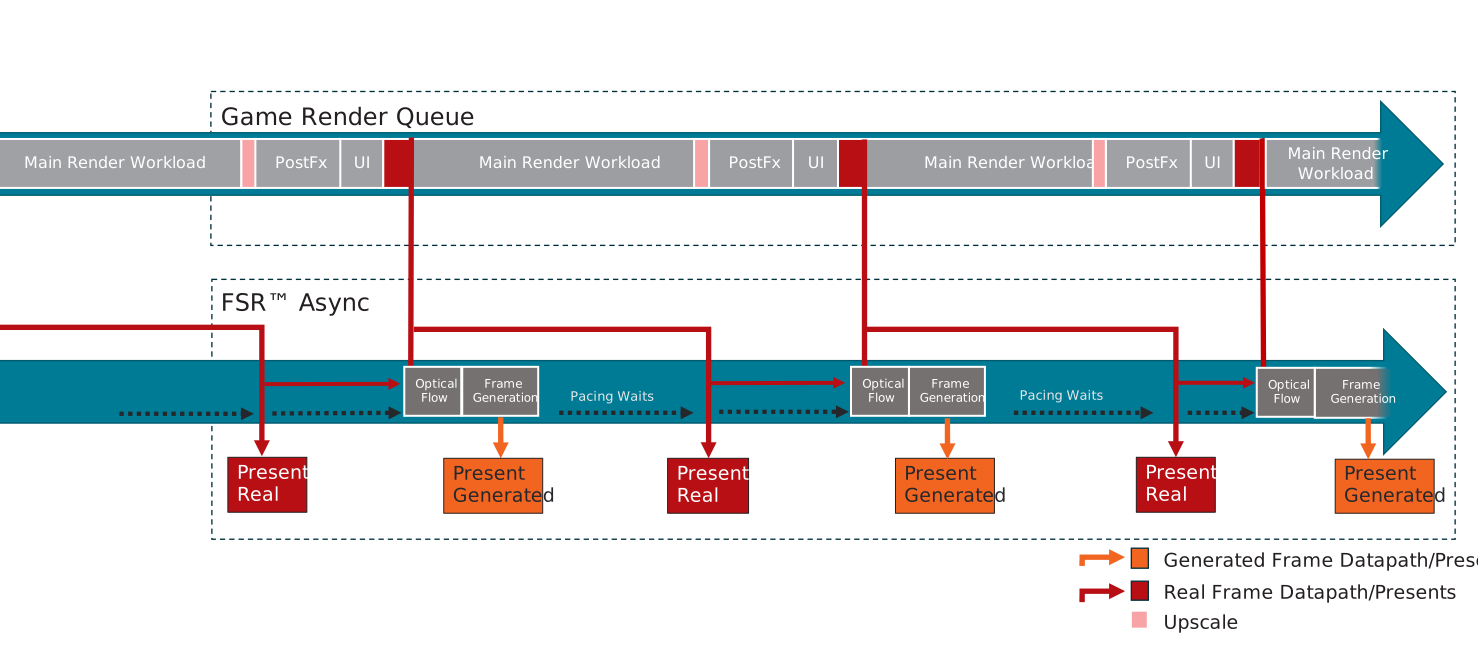
When allowAsyncWorkloads is set to true, the Optical Flow and Frame Generation workloads will run on an asynchronous compute queue and overlap with workloads of the next frame on the main game graphics queue. This can improve performance depending on the GPU and workloads.
Distortion Field
When an application applies post-processing distortion effects to the color buffer, the distorted color data no longer aligns spatially with the corresponding motion vectors and depth data. This would result in “ghosting” artifacts in the interpolated frame.
To address this, the application can configure the frame generation context with distortionField linked after ffxConfigureDescFrameGeneration structure and calling ffxConfigure.
Distortion Field Format:
- 2-component (R,G) texture containing UV offset data
- Each pixel encodes:
[UV after distortion] - [UV before distortion] - Frame Generation shaders use these offsets to correct depth and motion vector lookups
UI Composition
For FSR™ Frame Generation the user interface will require some special treatment, otherwise very noticeable artifacts will be generated which can impact readability of the interface.
To prohibit those artifacts frame-generation supports various options to handle the UI:
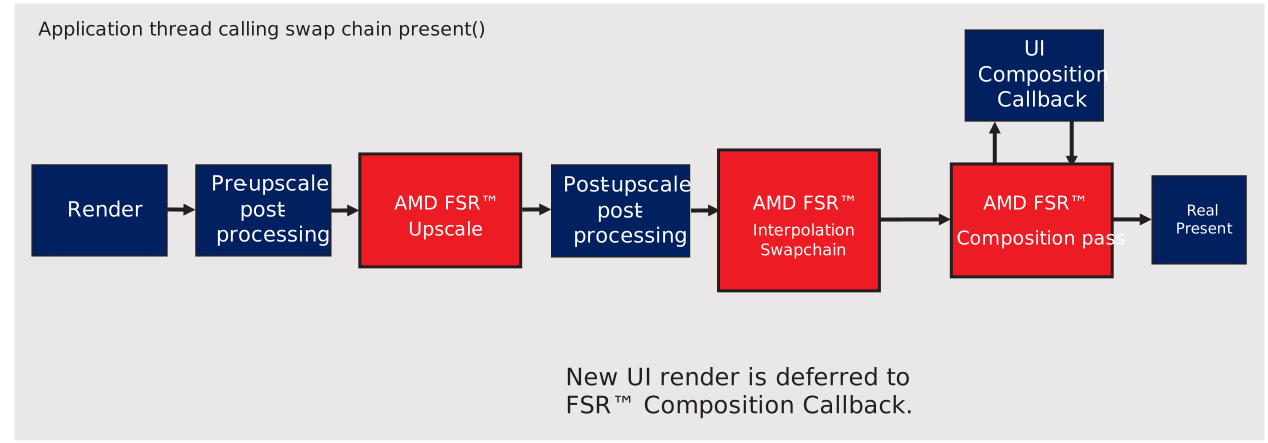
The preferred method is to use the presentCallback. The function provided in this parameter will get called once for every frame presented and allows the application to schedule the GPU workload required to render the UI. By using this function the application can reduce UI input latency and render effects that do not work well with frame generation (e.g. film grain).
The UI composition callback function will be called for every frame (real or generated) to allow rendering the UI separately for each presented frame, so the UI can get rendered at presentation rate to achieve smooth UI animations.
ffxReturnCode_t FSR3RenderModule::UiCompositionCallback(ffxCallbackDescFrameGenerationPresent* params, void* userCtx){    ID3D12GraphicsCommandList2* pDxCmdList  = reinterpret_cast<ID3D12GraphicsCommandList2*>(params->commandList);    ID3D12Resource*             pRtResource = reinterpret_cast<ID3D12Resource*>(params->outputSwapChainBuffer.resource);    ID3D12Resource*             pBbResource = reinterpret_cast<ID3D12Resource*>(params->currentBackBuffer.resource);
    // Use pDxCmdList to copy pBbResource and render UI into the outputSwapChainBuffer.    // The backbuffer is provided as SRV so postprocessing (e.g. adding a blur effect behind the UI) can easily be applied
    return FFX_API_RETURN_OK;}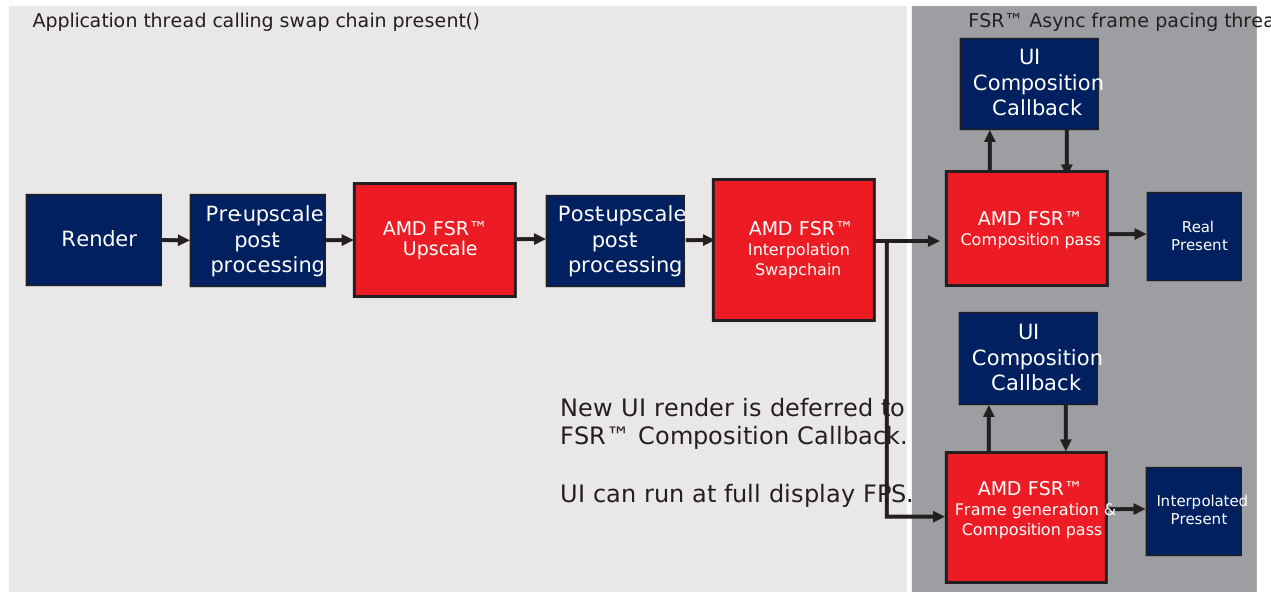
If frame generation is disabled presentCallback will still get called on present.
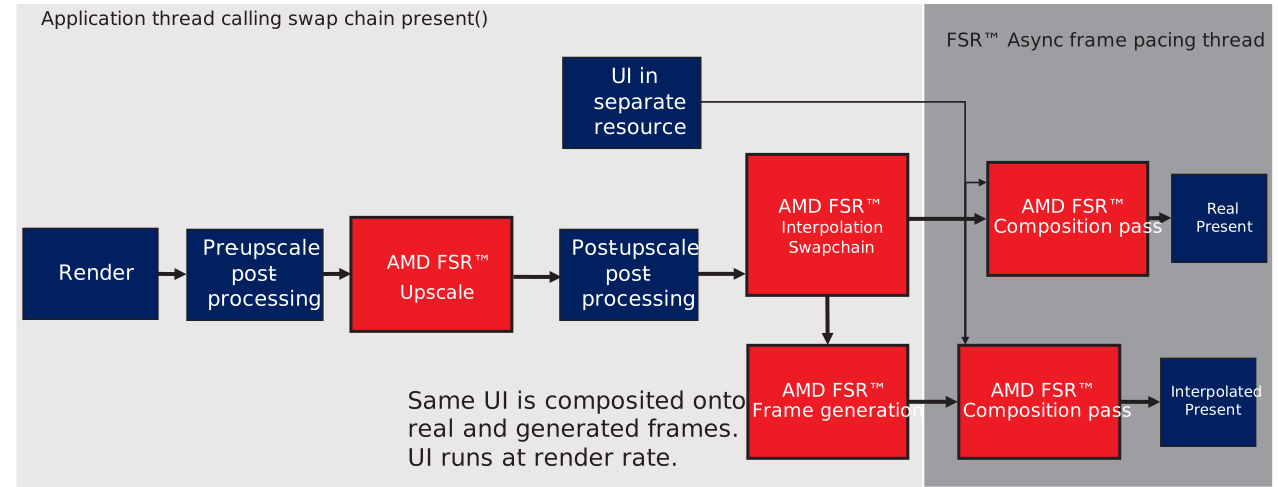
The second option to handle the UI is to render the UI into a dedicated surface that will be blended onto the interpolated and real backbuffer before present. Composition of this surface can be done automatically composed by the proxy swapchain or manually in the presentCallback. This method allows to present a UI unaffected by FSR™ Frame Generation, however the UI will only be rendered at render rate. For applications with a largely static UI this might be a good solution without the additional overhead of rendering the UI at presentation rate.
If frame generation is disabled and the UI Texture is provided, UI composition will still get executed by the FSR™ Frame Generation Swapchain.
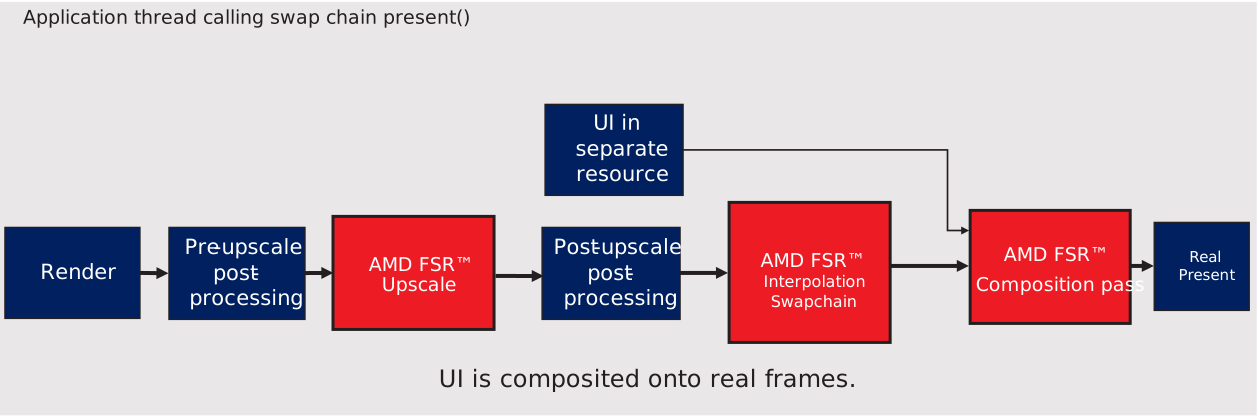
In that case the surface needs to be registered to the swap chain by calling ffxConfigure with a ffxConfigureDescFrameGenerationSwapChainRegisterUiResourceDX12 structure.
Flags can be provided in ffxConfigureDescFrameGenerationSwapChainRegisterUiResourceDX12 to control the following:
FfxApiUiCompositionFlags member | Note |
|---|---|
FFX_FRAMEGENERATION_UI_COMPOSITION_FLAG_USE_PREMUL_ALPHA | A bit indicating that we use premultiplied alpha for UI composition. |
FFX_FRAMEGENERATION_UI_COMPOSITION_FLAG_ENABLE_INTERNAL_UI_DOUBLE_BUFFERING | A bit indicating that the swapchain should doublebuffer the UI resource. |
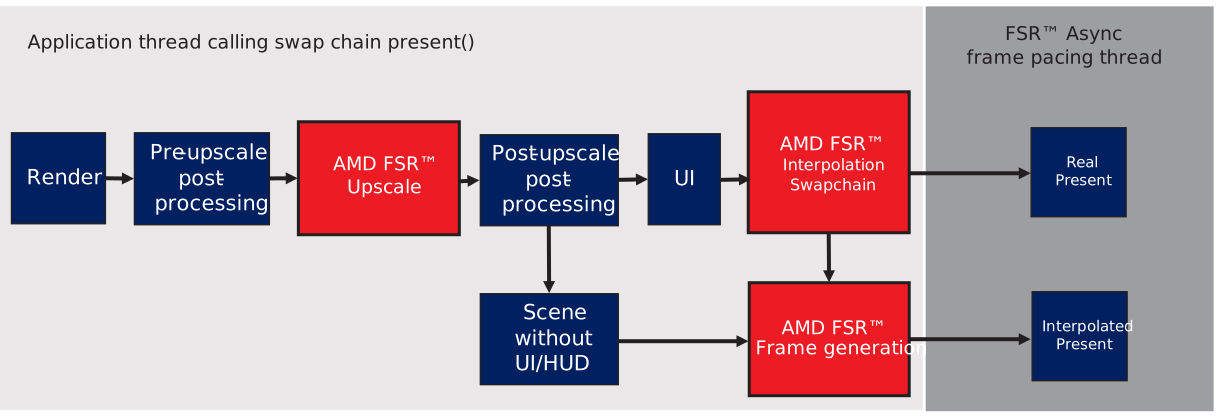
FfxResource uiColor = ffxGetResource(m_pUiTexture[m_curUiTextureIndex]->GetResource(), L"FSR3_UiTexture", FFX_RESOURCE_STATE_PIXEL_COMPUTE_READ);ffx::ConfigureDescFrameGenerationSwapChainRegisterUiResourceDX12 uiConfig{};uiConfig.uiResource = uiColor;uiConfig.flags = m_DoublebufferInSwapchain ? FFX_FRAMEGENERATION_UI_COMPOSITION_FLAG_ENABLE_INTERNAL_UI_DOUBLE_BUFFERING : 0;ffx::Configure(m_SwapChainContext, uiConfig);The final method to handle the UI is to provide a HUDLessColor surface in the FfxFrameGenerationConfig. This surface will get used during FSR™ Frame Generation to detect the UI and avoid distortion on UI elements. This method has been added for compatibility with engines that can not apply either of the other two options for UI rendering.
Different HUDless Formats
An optional structure ffxCreateContextDescFrameGenerationHudless can be linked to the pNext of the ffxCreateContextDescFrameGeneration used at context-creation time to enable the application to use a different hudlessBackBufferformat (IE.RGBA8_UNORM) from backBufferFormat (IE. BGRA8_UNORM).
Dispatch frame generation preparation
Since version 3.1.0, frame generation runs independently of FSR™ Upscaling. To replace the resources previously shared with the upscaler, a new frame generation prepare pass is required.
After the call to ffxConfigure, fill out a ffxDispatchDescFrameGenerationPrepareV2 structure. Then provide the structure and frame generation context in a call to ffxDispatch.
ffxDispatchDescFrameGenerationPrepareV2 member | Note |
|---|---|
frameID | Identifier used to select internal resources when async support is enabled. Must increment by exactly one (1) for each frame. Any non-exactly-one difference will reset the frame generation logic. Set the frameID to the same value as in the ffxConfigureDescFrameGeneration structure. |
flags | Zero or combination of values from FfxApiDispatchFrameGenerationFlags. |
commandList | A command list to record frame generation commands into. |
renderSize | The dimensions used to render game content, dilatedDepth, dilatedMotionVectors are expected to be of ths size. |
jitterOffset | The subpixel jitter offset applied to the camera. |
motionVectorScale | The scale factor to apply to motion vectors. |
frameTimeDelta | Time elapsed in milliseconds since the last frame. |
reset | A boolean value which when set to true, indicates FrameGeneration will be called in reset mode. |
cameraNear | The distance to the near plane of the camera. |
cameraFar | The distance to the far plane of the camera. This is used only used in case of non infinite depth. |
cameraFovAngleVertical | The camera angle field of view in the vertical direction (expressed in radians). |
viewSpaceToMetersFactor | The scale factor to convert view space units to meters. |
depth | The depth buffer data. |
motionVectors | The motion vector data. |
cameraPosition | The camera position in world space. |
cameraUp | The camera up normalized vector in world space. |
cameraRight | The camera right normalized vector in world space. |
cameraForward | The camera forward normalized vector in world space. |
For fields also found in ffxDispatchDescUpscale, the same input requirements and recommendations apply here.
Set the frameID to the same value as in the configure description.
It is required to specify cameraPosition, cameraUp, cameraRight and cameraForward which must contain valid information about the camera position and orientation within the scene.
Dispatch frame generation
In order to optimally invoke ffxDispatch for frame-generation it is strongly recommended that the caller supply a callback to frameGenerationCallback along with any necessary context pointer in frameGenerationCallbackUserContext. This callback should execute ffxDispatch using the provided ffxDispatchDescFrameGeneration structure pointer. This will then be written into the proper command-list during the swap-chain presentation and when allowAsyncWorkloads are enabled overlapped with other work.
It is possible, but highly discouraged to dispatch frame-generation manually. This infrastructure exists to support specific game-engine integrations such as the Unreal Engine plugin where dispatching during swap-chain presentation is unsafe. In this case the caller must acquire an interpolation command-buffer using the ffxQueryDescFrameGenerationSwapChainInterpolationCommandListDX12 structure on the swap-chain context and supply this as the commandList in a ffxDispatchDescFrameGeneration which can then be used to dispatch via ffxDispatch. In this case the caller is responsible for understanding whether it is safe to enable allowAsyncWorkloads.
ffxDispatchDescFrameGeneration member | Note |
|---|---|
commandList | The command list on which to register render commands. |
presentColor | The current presentation color, this will be used as source data. |
outputs | Destination targets (1 for each frame in numGeneratedFrames). |
numGeneratedFrames | The number of frames to generate from the passed in color target. |
reset | A boolean value which when set to true, indicates the camera has moved discontinuously. |
backbufferTransferFunction | The transfer function use to convert frame generation source color data to linear RGB. One of the values from FfxApiBackbufferTransferFunction. |
minMaxLuminance | Min and max luminance values, used when converting HDR colors to linear RGB. |
generationRect | The area of the backbuffer that should be used for generation in case only a part of the screen is used e.g. due to movie bars. |
frameID | Identifier used to select internal resources when async support is enabled. Must increment by exactly one (1) for each frame. Any non-exactly-one difference will reset the frame generation logic. |
Input color requirements
Input color dimension to FSR™ Frame Generation needs to be displaySize. Recall that input color comes from swapchain back buffer if using frameGenerationCallback or presentColor if manually dispatch frame generation.
If the upscaled (or rendered, if no upscaling) image is not same dimension as displaySize, it must be composited before passing as input color to FSR™ Frame Generation.
The upscaled image composited in the back buffer must have the same aspect ratio as renderSize.
Letterboxing or pillarboxing
Recall that the interpolated pixel color comes from lookup where the interpolated pixel would be in the previous and current back buffers using motion vector. When an application presents an image with cinematic bars (i.e. letterboxing or pillarboxing), the lookup pixel position in the back buffer can be inside the black bars region resulting in image artifacts in the interpolated image. IE. color region spill into the black bar region, or black lines appear inside the color region. To fix this, the application needs to fill out generationRect, to tell FSR™ Frame Generation, the area of back buffer containing rendered content without black bars. At each frame, the left and top values can vary. But, current API does not support width and height values different than the upscaler output size. FSR™ Frame Generation assumes the top-left pixel of generationRect maps to the top-left texel in depth and motionVectors. The current API does not describe how to offset into the depth and motion vector textures when generationRect size is smaller than upscaler output size.
Example supported usage
Suppose upscaler output is 3840x2160 (16:9) without black bars and is displayed on 3840x2160 (16:9) sized back buffer. Then, it is expected to setgenerationRectto cover the 3840x2160 region.
Example supported usage
Suppose upscaler output is 3840x1080 (32:9) without black bars. Upscaler output is composed to a 3840x2160 (16:9) sized back buffer and centered vertically, leaving black bars at the top and bottom. Then it is correct to setgenerationRectto only cover the 3840x1080 region. FSR™ Frame Generation has correct mapping where top-left pixel ofgenerationRectwith UV coordinate (0, 0.25) in backbuffer maps to UV coordinate (0, 0) in thedepthandmotionVectors.
Example unsupported usage
Suppose upscaler output is 3840x2160 (16:9) without black bar. Black bar is drawn over the upscaler output color such that the 3840x2160 (16:9) sized back buffer has now a 32:9 image (3840x1080) centered vertically, with black bars at the top and bottom. If setgenerationRectto be 3840x1080 colored region, then the assumed mapping ofgenerationRectto depth and motion vector is wrong for every pixel, resulting in “ghosting” artifacts in the non-black region. If setgenerationRectto be 3840x2160, then the interpolated frame will have image artifacts due to lookup inside the black region.
Shutdown
Before destroying the Frame Generation context:
- Disable frame generation and UI composition on the proxy swap chain via
ffx::Configure. - This configure call waits for the proxy swap chain to complete GPU work (interpolation and UI composition) that references Frame Generation resources.
- Then destroy the Frame Generation context with
ffxDestroyContextto release all resources it created.
if (m_FrameGenContext != nullptr){    // Disable frame generation before destroying context.    // Internally calls waitForPresents(), which flushes interpolation and UI composition GPU work, to avoid    // D3D12 debug layer error #921: OBJECT_DELETED_WHILE_STILL_IN_USE    ffx::ConfigureDescFrameGeneration m_FrameGenerationConfig;    m_FrameGenerationConfig.frameGenerationEnabled = false;    m_FrameGenerationConfig.swapChain              = GetSwapChain()->GetImpl()->DX12SwapChain();    m_FrameGenerationConfig.presentCallback        = nullptr;    m_FrameGenerationConfig.HUDLessColor           = FfxApiResource({});    ffx::Configure(m_FrameGenContext, m_FrameGenerationConfig);
    ffx::DestroyContext(m_FrameGenContext);    m_FrameGenContext = nullptr;}
Failure to flush the interpolation GPU work from submitted frames can result in D3D12 debug layer error EXECUTION ERROR #921: OBJECT_DELETED_WHILE_STILL_IN_USE on frame generation created resources during callstack of ffxDestroyContext on the frame generation context.
Thread safety
The underlying context is not guaranteed to be thread safe. Several public APIs that operate on FrameGenContext and SwapChainContext are not thread-safe and must be externally synchronized. Race condition symptoms can include access violation crashes, interpolation visual artifacts, and infinite waits in Dx12CommandPool destructor when releasing the swapchain.
When FSR™ Frame Generation Swapchain ::present is configured with frame generation callback, it accesses both SwapChainContext and FrameGenContext. A race can occur if application threads call ::present concurrently with either Dispatch(m_FrameGenContext, DispatchDescFrameGenerationPrepareV2) or DestroyContext(SwapChainContext).
APIs that require a mutex guard
ffxCreateContextfor the Frame Generation contextffxDestroyContextfor the Frame Generation contextffxDispatchffxDispatchDescFrameGenerationPrepareV2structureffxDispatchffxDispatchDescFrameGenerationstructure ifFSR™ Frame Generation Swapchain::presentis not configured withframeGenerationCallback.FSR™ Frame Generation Swapchain::presentif app supplied a validframeGenerationCallbackwithinffxConfigureDescFrameGenerationstructure.FSR™ Frame Generation Swapchainswapchain destructor. SeeShutdown.
std::mutex g_FGContextMutex;
struct FGContextScopeLock{    explicit FGContextScopeLock(bool doLock) : m_locked(doLock)    {        if (m_locked) g_FGContextMutex.lock();    }    ~FGContextScopeLock()    {        if (m_locked) g_FGContextMutex.unlock();    }private:    bool m_locked;};
ffx::Context m_FrameGenContext  = nullptr;ffx::Context m_SwapChainContext = nullptr;ffx::ConfigureDescFrameGeneration m_FrameGenerationConfig{};
{    // Acquire lock before creating FG context    cauldron::FGContextScopeLock lock(true);    ffx::CreateContextDescFrameGeneration createFg{};    ffx::CreateBackendDX12Desc backendDesc{};    ffx::CreateContextDescFrameGenerationVersion headerVersion{};    headerVersion.version = FFX_FRAMEGENERATION_VERSION;    ffx::CreateContext(m_FrameGenContext, nullptr, createFg, backendDesc, headerVersion);}{    // Acquire lock before dispatch FG Prepare    cauldron::FGContextScopeLock lock(true);    ffx::DispatchDescFrameGenerationPrepareV2 dispatchFgPrep{};    ffx::Dispatch(m_FrameGenContext, dispatchFgPrep);}{    // Acquire lock if app dispatch frame generation directly    cauldron::FGContextScopeLock lock(true);    ffx::DispatchDescFrameGeneration dispatchFg{};    ffx::Dispatch(m_FrameGenContext, dispatchFg);}{    // Acquire lock only if the proxy swapchain present operation uses the FG callback to dispatch frame generation.    const bool bPresentWillDispatchFG = cauldron::GetFramework()->IsFrameGenerationSwapchain() && cauldron::GetFramework()->FrameInterpolationEnabled() && cauldron::GetFramework()->IsSwapchainUsingFrameGenerationCallback();    cauldron::FGContextScopeLock fgLock(bPresentWillDispatchFG);    pSwapChain->GetImpl()->m_pSwapChain->Present(1, 0);}{    // Acquire lock before destroying FG context    cauldron::FGContextScopeLock lock(true);    m_FrameGenerationConfig.frameGenerationEnabled = false;    ffx::Configure(m_FrameGenContext, m_FrameGenerationConfig);    ffx::DestroyContext(m_FrameGenContext);}{    // Acquire lock before destroying proxy swapchain    cauldron::FGContextScopeLock lock(true);    IDXGISwapChain4*     pSwapChain4 = pSwapchain->GetImpl()->DX12SwapChain();    // Release final reference triggers proxy swap chain destructor when refCount reaches 0.    ULONG refCount = pSwapChain4->Release();}
Resource Lifetime
When UiTexture composition mode is used
If FFX_FRAMEGENERATION_UI_COMPOSITION_FLAG_ENABLE_INTERNAL_UI_DOUBLE_BUFFERING is set:
The currentUI gets copied to an internal resource on the game queue
The currentUI may be reused on the GFX queue immediately in the next frame
If FFX_FRAMEGENERATION_UI_COMPOSITION_FLAG_ENABLE_INTERNAL_UI_DOUBLE_BUFFERING is not set:
The application is responsible to ensure currentUI persists until composition of the real frame is finished
This is typically in the middle of the next frame, so the currentUI should not be used during the next frame. The application must ensure double buffering of the UITexture
When HUDLess composition mode is used:
The HUDLess texture will be used during FrameInterpolation
The application is responsible to ensure it persists until FrameInterpolation is complete
If allowAsyncWorkloads is true:
Frameinterpolation happens on an async compute queue so the HUDLess texture needs to be double buffered by the application
If allowAsyncWorkloads is false:
Frameinterpolation happens on the game GFX queue, so app can safely modify HUDLess texture in the next frame
When distortionField texture is registered to FrameInterpolation:
The application is responsible to ensure distortionField texture persists until FrameInterpolation is complete
If allowAsyncWorkloads is true:
Frameinterpolation happens on an async compute queue so the distortionField texture needs to be double buffered by the application
If allowAsyncWorkloads is false:
Frameinterpolation happens on the game GFX queue, so app can safely modify distortionField texture in the next frame
Debug Checker
Enable debug checker to validate application supplied inputs at dispatch upscale. It is recommended this is enabled only in development builds of game.
Passing
FFX_FRAMEGENERATION_ENABLE_DEBUG_CHECKING flag within FfxApiCreateContextFramegenerationFlags will output textual warnings from frame generation to debugger TTY by default. Calling ffxConfigure with fpMessage within a ffxConfigureDescGlobalDebug1 structure to a suitable function allows the application to receive the debug messages issued.
An example of the kind of output that can occur when debug checker observes possible issues is below:
FSR_API_DEBUG_WARNING: ffxDispatchDescFrameGenerationPrepareCameraInfo needs to be passed as linked struct. This is a required input to FSR3.1.4 and onwards for best quality.
Debug output
The FSR™ Frame Generation API supports several debug visualisation options:
When FFX_FRAMEGENERATION_FLAG_DRAW_DEBUG_TEAR_LINES is set in the flags attribute of ffxDispatchDescFrameGenerationPrepareV2, the inpainting pass will add bars of changing color on the left and right border of the interpolated image. This will assist visualizing if interpolated frames are getting presented and if the frames are presented with tearing enabled.
When FFX_FRAMEGENERATION_FLAG_DRAW_DEBUG_RESET_INDICATORS is set in the flags attribute of ffxDispatchDescFrameGenerationPreparV2, the debug reset indicators will be drawn to the generated output.
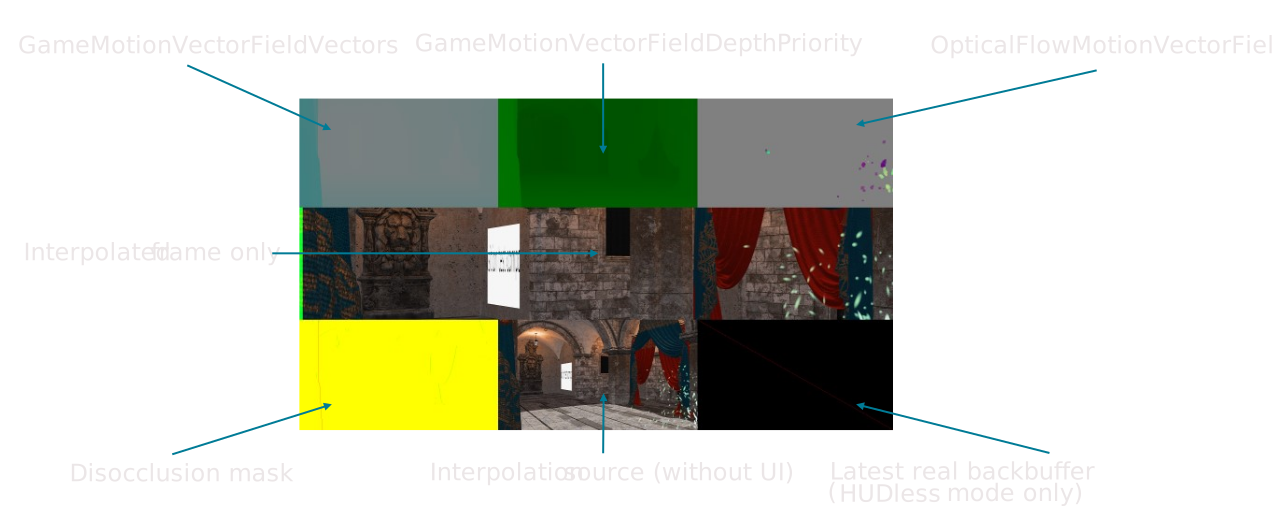
When FFX_FRAMEGENERATION_FLAG_DRAW_DEBUG_VIEW is set in the flags attribute of ffxDispatchDescFrameGenerationPreparV2, the FrameInterpolationSwapChain will only present interpolated frames and execute an additional pass to render debug data from internal surfaces onto the interpolated frame, to allow you to debug.
When FFX_FRAMEGENERATION_FLAG_DRAW_DEBUG_PACING_LINES is set in the flags attribute of ffxDispatchDescFrameGenerationPreparV2, the debug pacing lines will be drawn to the generated output.