FSR™ Ray Regeneration Sample
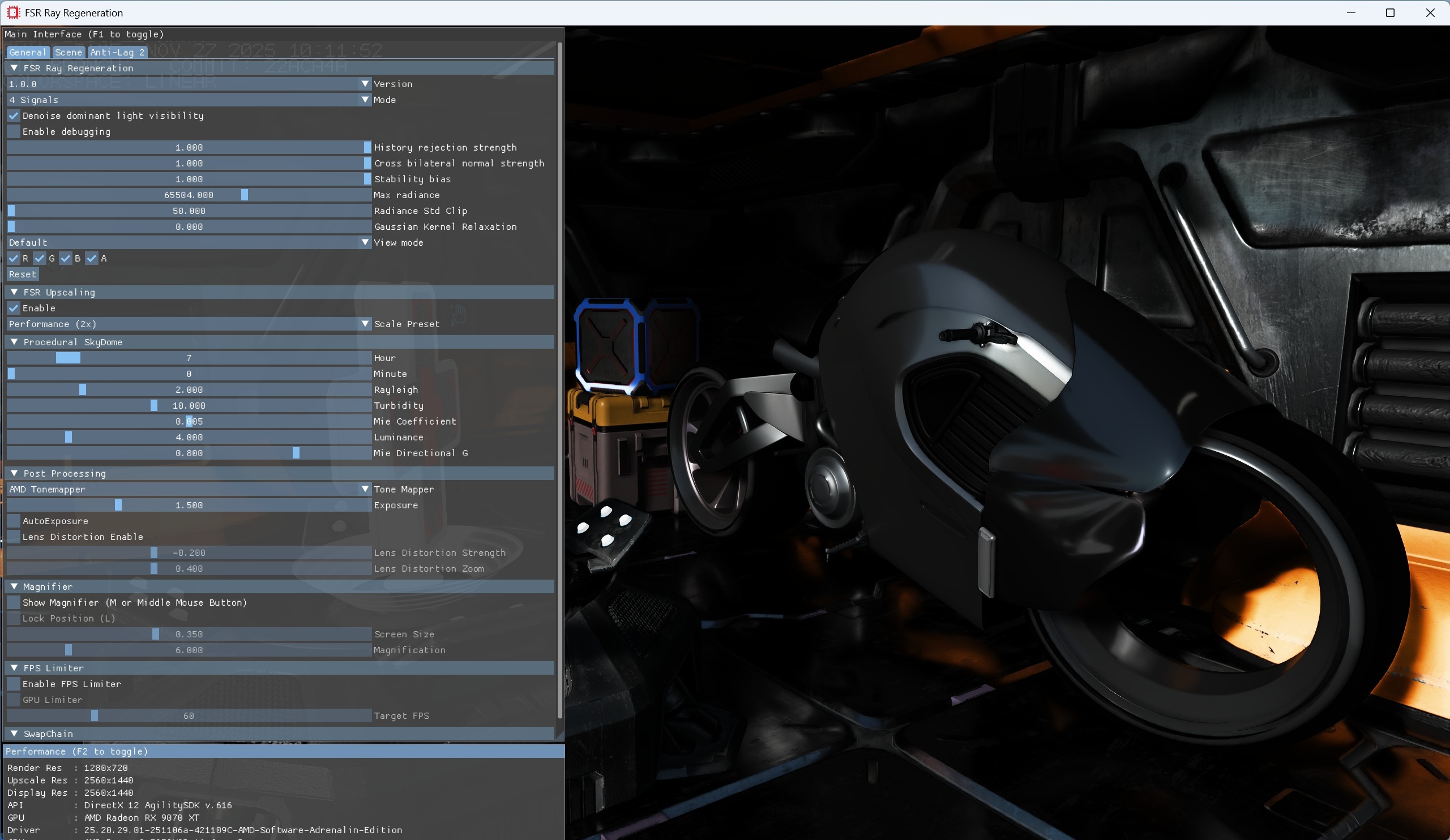
This sample demonstrates how to integrate and experiment with FSR™ Ray Regeneration 1.0.0, a real-time ray-tracing denoising solution designed to improve the stability and visual quality of ray-traced lighting signals.
For details on the underlying algorithm, refer to the FSR™ Ray Regeneration technique documentation.
Table of contents
- Requirements
- UI elements
- Setting up FSR™ Ray Regeneration
- Sample controls and configurations
- See also
Requirements
- AMD Radeon™ RX 9000 Series GPU or later
- DirectX®12
- Windows
[!NOTE] FSR™ Ray Regeneration is only supported on AMD Radeon™ RX 9000 Series GPUs or newer. On unsupported GPUs, the sample will still run, but denoising features will be disabled.
UI elements
The sample contains various UI elements to help you explore the techniques it demonstrates. The tables below summarize the UI elements and what they control within the sample.
Context creation
| Element name | Values | Description |
|---|---|---|
| Version | 1.0.0 | Dropdown for specifying the denoiser context version number. The newest context appears first in the list. Sets the version member of the ffxCreateContextDescDenoiser context creation description. |
| Mode | 4 Signals, 2 Signals, 1 Signal | Dropdown for specifying the number of signals to denoise. Sets the mode member of the ffxCreateContextDescDenoiser context creation description. |
| Denoise dominant light visibility | Checked, Unchecked | Checkbox for specifying whether the dominant light visibility should be denoised (as an additional separate signal). Sets the FFX_DENOISER_ENABLE_DOMINANT_LIGHT flag to the flags member of the ffxCreateContextDescDenoiser context creation description. |
| Enable debugging | Checked, Unchecked | Checkbox for specifying whether debugging should be enabled. Sets the FFX_DENOISER_ENABLE_DEBUGGING flag to the flags member of the ffxCreateContextDescDenoiser context creation description. |
Configure
| Element name | Values | Description |
|---|---|---|
| History rejection strength | [0.0, 1.0] | Sets the historyRejectionStrength member of the FfxApiDenoiserSettings configuration description. |
| Cross bilateral normal strength | [0.0, 1.0] | Sets the crossBilateralNormalStrength member of the FfxApiDenoiserSettings configuration description. |
| Stability bias | [0.0, 1.0] | Sets the stabilityBias member of the FfxApiDenoiserSettings configuration description. |
| Max radiance | [0.0, 100000.0] | Sets the maxRadiance member of the FfxApiDenoiserSettings configuration description. |
| Radiance std clip | [0.0, 100000.0] | Sets the radianceClipStdK member of the FfxApiDenoiserSettings configuration description. |
| Gaussian kernel relaxation | [0.0, 1.0] | Sets the gaussianKernelRelaxation member of the FfxApiDenoiserSettings configuration description. |
Dispatch
| Element name | Values | Description |
|---|---|---|
| Reset | NA | Button for resetting the history accumulation. Sets the FFX_DENOISER_DISPATCH_RESET flag on the flags member of the ffxDispatchDescDenoiser dispatch description. |
Display
| Element name | Values | Description |
|---|---|---|
| View mode | Default, Default (Input), Direct, Direct diffuse, Direct specular, Indirect, Indirect diffuse, Indirect specular, Direct (Input), Direct diffuse (Input), Direct specular (Input), Indirect (Input), Indirect diffuse (Input), Indirect specular (Input), Linear depth, Motion vectors, Normals, Specular albedo, Diffuse albedo, Fused albedo, Skip signal | Dropdown for specifying the view mode to display. |
| Checked, Unchecked | Checkboxes for specifying which color channels (i.e. , , , ) of the selected view mode should be displayed. |
Setting up FSR™ Ray Regeneration
The sample includes a dedicated Render Module for FSR™ Ray Regeneration which creates the context and manages its lifetime. See the FSR™ Ray Regeneration technique documentation for more details.
Sample controls and configurations
For information on sample controls, configuration options, and Cauldron Framework UI elements, see Running the samples.