GPU Reshape
GPU Reshape is a powerful tool that leverages on-the-fly instrumentation of GPU operations with instruction level validation of potentially undefined behavior.

This article explains how to use the AMD Radeon™ GPU Analyzer (RGA) to correlate the AMD GPU ISA disassembly of a pre-compiled Code Object back to the source code line that produced it. Basic RGA usage knowledge is assumed.
Source to ISA correlation is not new to AMD RGA. OpenCL™ mode has supported it for a while. In OpenCL mode, RGA compiles the .cl kernel itself, so it knows which source line produced each of the AMD GPU ISA instructions.
If you loaded a pre-compiled Code Object built via a custom compilation path into RGA, you got the AMD GPU ISA disassembly and the resource usage statistics, but the correlation back to the source code was missing.
Starting with the AMD RGA 2.15 release, Binary Analysis mode brings the same AMD GPU ISA to source code correlation for pre-compiled Code Objects. Drop in any AMD GPU Code Object that carries debug information and RGA extracts the mapping for you. Correlation is enabled by default in Binary Analysis mode, and RGA detects the debug information section when it loads the binary.
This is designed to work regardless of which toolchain produced the Code Object; it works from whatever debug information is embedded in the binary. The examples below use HIP, but Code Objects built from OpenCL C kernels correlate in exactly the same way.
-g.A prerequisite for using this feature is ensuring that the AMD GPU code object is compiled with debug information enabled.
Let’s build an AMD HIP Code Object for AMD CDNA™ 5 architecture (gfx1250 - AMD Instinct™ MI400 Series) GPUs with debug information using the AMD ROCm™ 10.0 toolchain:
amdclang++ -x hip --offload-arch=gfx1250 --offload-device-only --no-gpu-bundle-output \ -std=c++17 -O3 -g gemm.hip -o gemm.coHere, the --offload-device-only option drops the host compilation, and the --no-gpu-bundle-output option writes the linked Code Object that can be loaded with RGA. -g records the DWARF debug information the correlation relies on.
The source file paths embedded in the debug information are point to paths on the same system that was used to build the Code Object. A binary produced on a build server or handed over by a colleague will likely refer to directories that do not exist on your machine.
If AMD RGA cannot find those files, it will prompt you for additional directories to search when the binary is loaded.
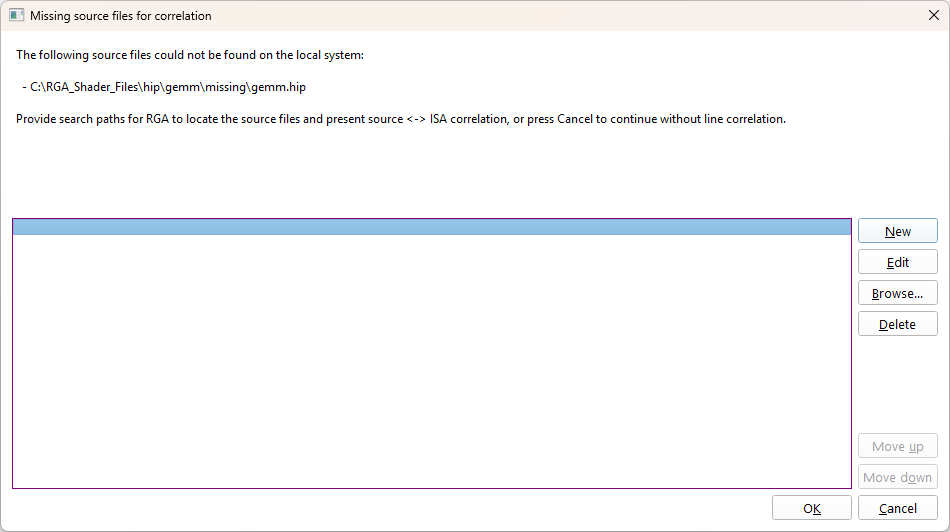
These directories can also be set in advance using the Additional source search paths setting in the Binary Analysis build settings.
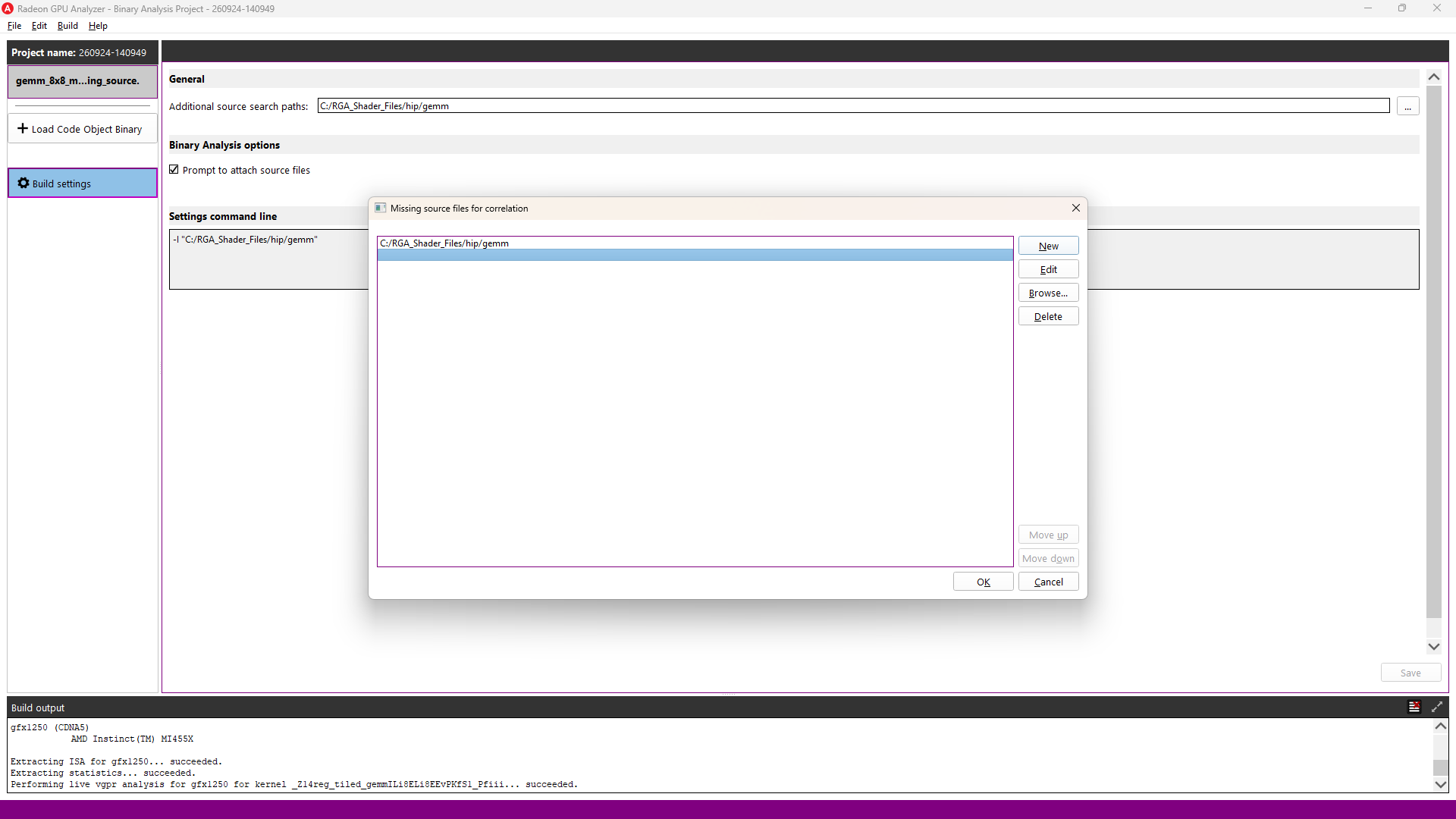
If the Code Object does not contain debug information, no error is reported. The disassembly is produced as usual and no Source Code View is shown.
Load gemm.co into Binary Analysis mode in the AMD RGA GUI application. RGA identifies the target as gfx1250 (CDNA™ 5) and lists the kernel. Selecting it shows the AMD GPU ISA disassembly, with the Source Code View displayed alongside it, correlated in both directions.
Selecting a line in the Source Code View highlights every ISA instruction generated from it. Selecting an instruction in the Disassembly View highlights the source line that produced it.
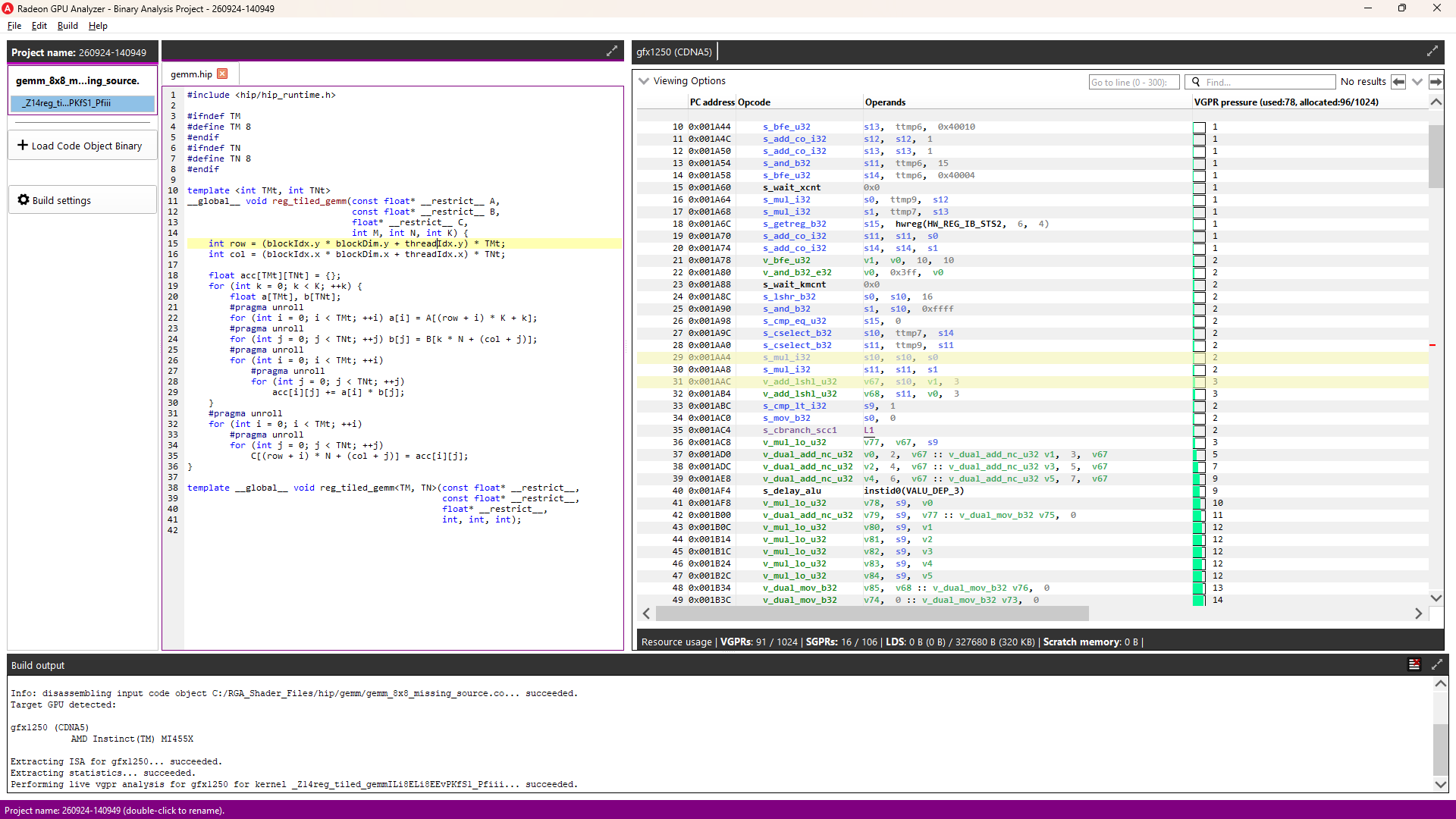
As a worked example, we will use a register-tiled SGEMM microkernel. Each thread computes a TMt × TNt tile of the output matrix and holds the accumulators in registers across the K-loop. Here is gemm.hip in full, built with TM = TN = 8:
1 #include <hip/hip_runtime.h> 2 3 #ifndef TM 4 #define TM 8 5 #endif 6 #ifndef TN 7 #define TN 8 8 #endif 910 template <int TMt, int TNt>11 __global__ void reg_tiled_gemm(const float* __restrict__ A,12 const float* __restrict__ B,13 float* __restrict__ C,14 int M, int N, int K) {15 int row = (blockIdx.y * blockDim.y + threadIdx.y) * TMt;16 int col = (blockIdx.x * blockDim.x + threadIdx.x) * TNt;1718 float acc[TMt][TNt] = {};19 for (int k = 0; k < K; ++k) {20 float a[TMt], b[TNt];21 #pragma unroll22 for (int i = 0; i < TMt; ++i) a[i] = A[(row + i) * K + k];23 #pragma unroll24 for (int j = 0; j < TNt; ++j) b[j] = B[k * N + (col + j)];25 #pragma unroll26 for (int i = 0; i < TMt; ++i)27 #pragma unroll28 for (int j = 0; j < TNt; ++j)29 acc[i][j] += a[i] * b[j];30 }31 #pragma unroll32 for (int i = 0; i < TMt; ++i)33 #pragma unroll34 for (int j = 0; j < TNt; ++j)35 C[(row + i) * N + (col + j)] = acc[i][j];36 }3738 template __global__ void reg_tiled_gemm<TM, TN>(const float* __restrict__,39 const float* __restrict__,40 float* __restrict__,41 int, int, int);Selecting each line in turn gives the number of instructions generated from it:
| Line | Source | Instructions |
|---|---|---|
| 19 | for (int k …) loop header | 87 |
| 22 | a[i] = A[…] | 14 |
| 24 | b[j] = B[…] | 13 |
| 29 | acc[i][j] += a[i] * b[j] | 40 |
| 35 | C[…] = acc[i][j] | 97 |
Line 29 contains 64 logical fused multiply-adds but maps to 40 instructions. The opcodes highlighted for it are 16 v_pk_fma_f32, 16 v_dual_fmac_f32, and 8 s_wait_loadcnt. The packed and dual-issue forms each perform two FMAs, so the 64 operations are carried by 32 instructions.
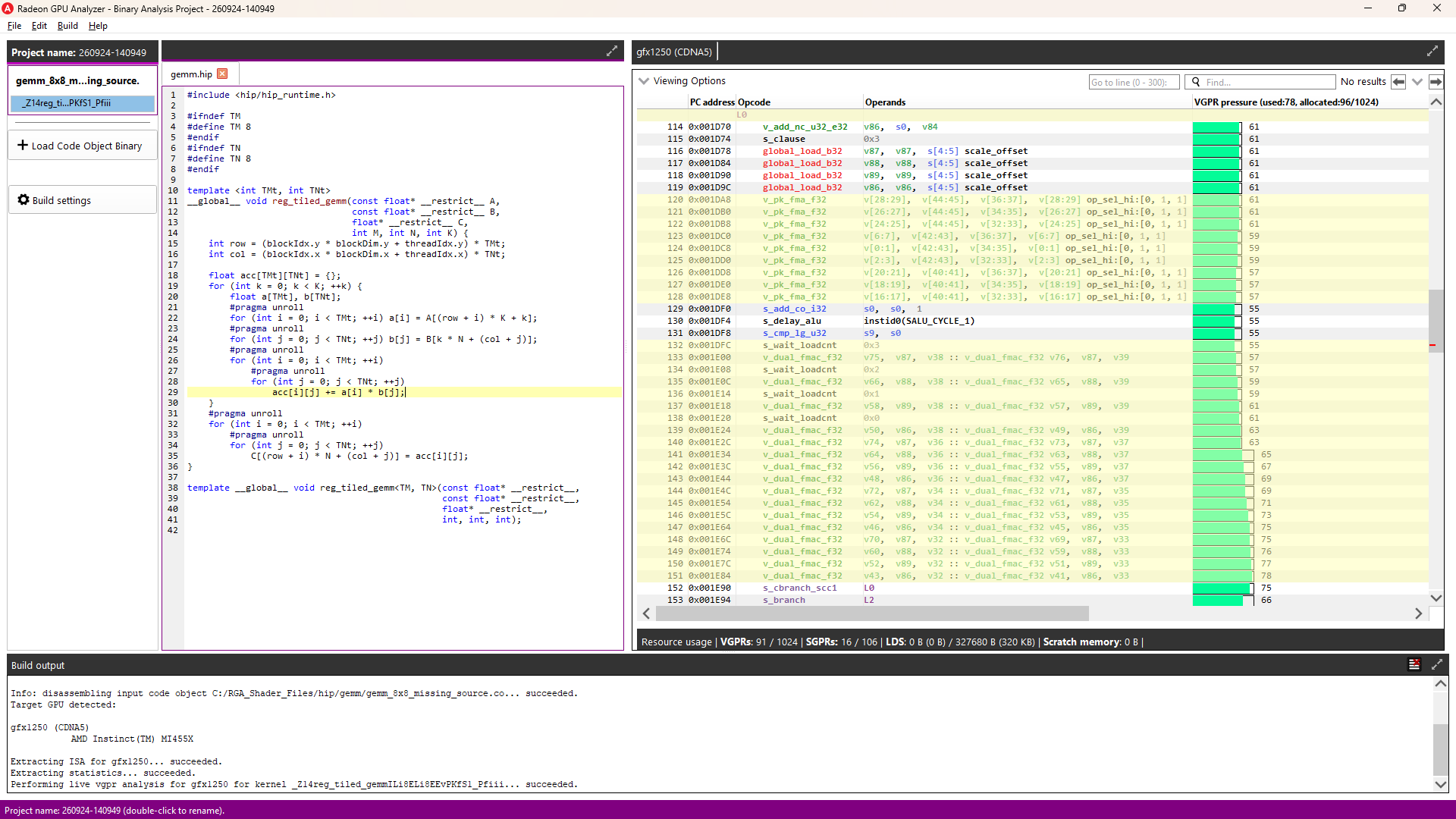
Line 35 is a single subscripted assignment that maps to 97 instructions. It consists of 32 global_store_b32, 8 global_store_b64, and address arithmetic.
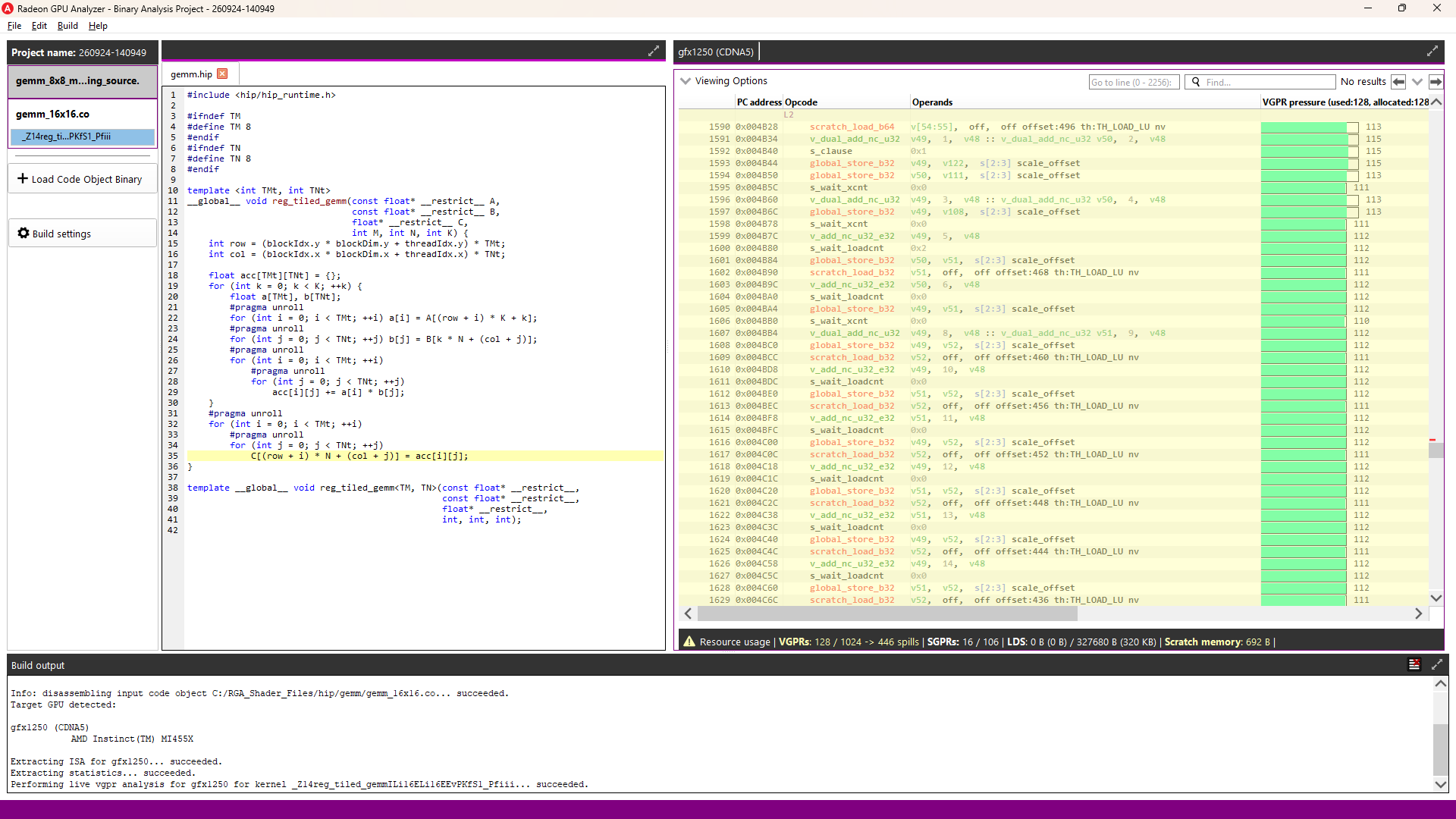
The tile size controls how many values the kernel holds live across the K-loop. Rebuilding with a 16 × 16 tile instead of 8 × 8 grows the ISA from 2,072 bytes to 13,968 bytes and introduces 671 scratch_* instructions, where the 8 × 8 build had none. Those are spill instructions: the tile no longer fits in the register file, so intermediate values are written out and reloaded.
Correlating those 671 instructions back to source gives:
| Line | Source | Scratch instructions |
|---|---|---|
| 19 | K-loop header | 270 |
| 29 | acc[i][j] += a[i] * b[j] | 252 |
| 35 | C[…] = acc[i][j] | 114 |
| 22 | a[i] = A[…] | 17 |
| 24 | b[j] = B[…] | 17 |
Binary Analysis mode in AMD Radeon GPU Analyzer (RGA) 2.15 brings the same source-to-ISA correlation capabilities already available in OpenCL mode to any precompiled AMD GPU Code Object that contains debug information, regardless of the graphics or compute API from which it originated.
OpenCL and the OpenCL logo are trademarks of Apple Inc. used by permission by Khronos.